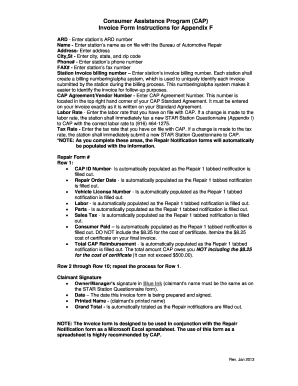
Get Appendix F - Invoice Form Instructions - Bureau Of Automotive Repair - Bar Ca
How it works
-

Open form follow the instructions
-

Easily sign the form with your finger
-

Send filled & signed form or save
How to fill out the Appendix F - Invoice Form Instructions - Bureau Of Automotive Repair - Bar Ca online
Filling out the Appendix F - Invoice Form is essential for proper billing within the Bureau of Automotive Repair's Consumer Assistance Program. This guide provides detailed instructions to help users complete the form accurately and efficiently online.
Follow the steps to complete the Appendix F - Invoice Form online.
- Click ‘Get Form’ button to access the form and open it in your preferred editor.
- Enter the station’s ARD number in the designated field. This number should be clearly identifiable and associated with your station.
- Input the station’s name as it appears on file with the Bureau of Automotive Repair. Accuracy here ensures proper identification.
- Fill in the address of the station. Ensure that this is the correct address associated with your station.
- Enter the city, state, and zip code in the appropriate fields. This information is critical for correspondence and verification.
- Provide the station’s phone number. This should be a contact number where your station can be reached easily.
- Include the station’s fax number for any necessary communications linked to the submission process.
- Input the station invoice billing number. Each station should use a unique numbering/alpha system for easy identification during the billing process.
- Enter the CAP Agreement Number located in the top right corner of your CAP Standard Agreement. It must match exactly.
- Fill in the labor rate as registered with CAP. If this changes, promptly submit a new STAR Station Questionnaire.
- Specify the tax rate you have on file with CAP. A change requires the submission of a new STAR Station Questionnaire.
- As you complete the information in this section, related areas in the Repair Notification forms will auto-populate with your entries.
- In the Repair Form section, the first row will automatically populate various fields (e.g., CAP ID Number, Repair Order Date, etc.) as you fill out the Repair 1 tabbed notification.
- Fill out rows 2 through 10 by repeating the process used for row 1, ensuring accurate information is submitted in each.
- Obtain the required claimant’s signature in blue ink, ensuring it matches the name on the STAR Station Questionnaire.
- Add the date this invoice form is prepared and signed, and print the claimant’s name in the designated area.
- The grand total will auto-calculate based on the Repair notifications filled out, ensuring accuracy in reporting your expenses.
- Once all sections are completed, save your changes, download a copy, print for your records, or share the form as needed.
Start completing your documents online today for a smoother invoicing process.
A repair estimate should include a detailed breakdown of parts and labor costs, estimated completion time, and any applicable warranties. It should also specify any fees associated with the service. Following the guidelines set in the Appendix F - Invoice Form Instructions - Bureau Of Automotive Repair - Bar Ca will help ensure that customers receive comprehensive and transparent estimates, leading to better service experiences.
Industry-leading security and compliance
-
In businnes since 199725+ years providing professional legal documents.
-
Accredited businessGuarantees that a business meets BBB accreditation standards in the US and Canada.
-
Secured by BraintreeValidated Level 1 PCI DSS compliant payment gateway that accepts most major credit and debit card brands from across the globe.