Loading
Get Transfer School Forms
How it works
-

Open form follow the instructions
-

Easily sign the form with your finger
-

Send filled & signed form or save
How to fill out the Transfer School Forms online
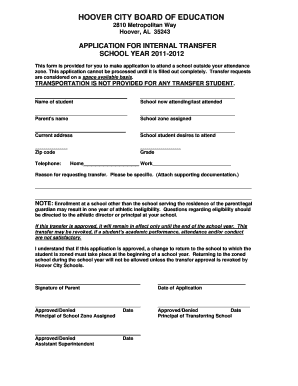
This guide provides clear and supportive instructions for users on how to complete the Transfer School Forms online. Ensure that you have all necessary information at hand before you begin the application process.
Follow the steps to complete the Transfer School Forms online.
- Click ‘Get Form’ button to access the Transfer School Form and open it in the editor.
- In the ‘Name of student’ field, enter the full name of the student applying for the transfer.
- For ‘School now attending/last attended,’ input the name of the school that the student is currently attending or last attended.
- In the ‘Parent's name’ section, provide the full name of the parent or guardian submitting the application.
- Enter the ‘School zone assigned’ to the student, indicating their designated attendance area.
- Fill in the ‘Current address’ field with the complete residential address of the student's family.
- In the ‘School student desires to attend’ section, specify the name of the school the student wishes to transfer to.
- Input the ‘Zip code’ corresponding to the new school the student wishes to attend.
- Indicate the student’s current ‘Grade’ to provide context on their educational level.
- Provide a telephone number in the ‘Home’ and ‘Work’ fields for contact purposes.
- Clearly state the reason for requesting the transfer in the designated area, being as specific as possible. Attach any supporting documentation as required.
- Review all entries for accuracy and completeness to ensure the application can be processed.
- Once all information is confirmed, save changes, download, print, or share the completed form as needed.
Complete your Transfer School Forms online to ensure a smooth application process.
When transferring schools, you need several essential items to ensure a smooth transition. This includes updated transcripts, proof of residency, and completed transfer school forms. You may also need to submit a letter explaining your reasons for the transfer. To make this process easier, consider using US Legal Forms, which provides access to all necessary documentation and guides you through the requirements.
Industry-leading security and compliance
US Legal Forms protects your data by complying with industry-specific security standards.
-
In businnes since 199725+ years providing professional legal documents.
-
Accredited businessGuarantees that a business meets BBB accreditation standards in the US and Canada.
-
Secured by BraintreeValidated Level 1 PCI DSS compliant payment gateway that accepts most major credit and debit card brands from across the globe.