Loading
Get Xxxiocm Form
How it works
-

Open form follow the instructions
-

Easily sign the form with your finger
-

Send filled & signed form or save
How to fill out the Xxxiocm Form online
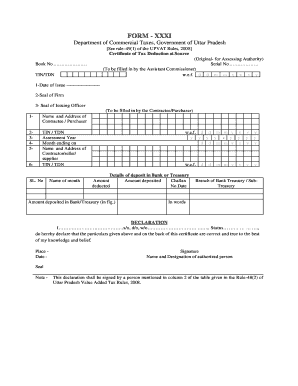
Filling out the Xxxiocm Form online is an essential process for documenting tax deductions in compliance with the Uttar Pradesh Value Added Tax Rules. This guide provides clear, step-by-step instructions to ensure you complete the form accurately.
Follow the steps to fill out the Xxxiocm Form online.
- Click the ‘Get Form’ button to obtain the Xxxiocm Form and open it in your preferred editor.
- Start by filling in the 'Serial No' and 'Book No' in the designated fields. These details are typically provided by the Assistant Commissioner.
- Provide the details of the Contractee or Purchaser, including their Name, Address, TIN, and the Assessment Year. Be sure to enter the month that this information pertains to.
- Specify the Name and Address of the Contractor or Supplier, along with their TIN. This should align with the information related to the tax deduction.
- Fill in the details of the deposit in the Bank or Treasury. Include the amount deducted, along with the date of deposit and the name of the Bank or Treasury.
- Complete the declaration section by stating your name, relationship to the Contractee, and confirming that the information provided is accurate. Ensure you sign and date this declaration.
- For the details of payments, complete each row with relevant information such as the place and date, name of the person from whom VAT is deducted, the nature of the contract, and the amounts paid and deducted.
- Review all the information for accuracy before proceeding.
- Once completed, you can save your changes, download the form, print it, or share it as needed.
Get started with filling out your Xxxiocm Form online today!
FULL LIFETIME WARRANTY If the product fails to perform for any reason, we will replace it. Note: Same warranty for all new CRAFTSMAN® models (Model # starting with “CMHT”) and older models (Model # starting with “9”). No proof of purchase required.