Loading
Form preview
  • US Legal Forms
  • Other Templates
  • More Forms
  • More Uncategorized Forms
  • Centralised Employment Notice

Get Centralised Employment Notice

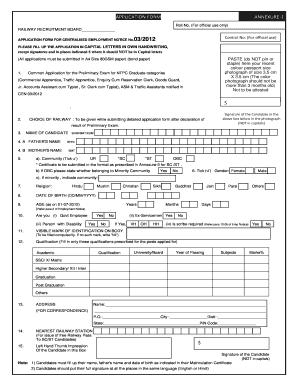
Official use only) RAILWAY RECRUITMENT BOARD APPLICATION FORM FOR CENTRALISED EMPLOYMENT NOTICE No. Control No: (For official use) 03/2012 PLEASE FILL UP THE APPLICATION IN CAPITAL LETTERS IN OWN HANDWRITING, except signatures and in places indicated $ where it should NOT be in Capital letters PASTE (do NOT pin or staple) here your recent colour passport size photograph of size 3.5 cm X 3.5 cm (The color photograph should not be more than 3 months old) Not to be attested.

How it works

  1. Open form

    Open form follow the instructions

  2. Easily sign form

    Easily sign the form with your finger

  3. Share form

    Send filled & signed form or save

How to fill out the Centralised Employment Notice online

This guide provides comprehensive and user-friendly instructions on how to complete the Centralised Employment Notice. The steps outlined here will assist users in accurately filling out the necessary information and ensuring a successful application process.

Follow the steps to complete the Centralised Employment Notice online.

  1. Click the ‘Get Form’ button to access the application form and open it for editing.
  2. Carefully read the instructions and ensure to fill the application using capital letters in your own handwriting, except in specified areas such as signature.
  3. Attach a recent color passport-sized photograph (3.5 cm x 3.5 cm) by pasting it in the designated area. Avoid pinning or stapling the photo.
  4. Provide your name, father’s name, and mother’s name as indicated on your matriculation certificate, and ensure they match your identification documents.
  5. Indicate your community, ticking the appropriate box for UR, SC, ST, or OBC. If you select OBC, state whether you belong to a minority community.
  6. Fill in your gender, religion, date of birth, and age as of July 1, 2012.
  7. Answer the questions regarding your employment status, disability, and need for a scribe, ensuring to address any applicable sections.
  8. Specify any visible marks of identification on your body; if none, write 'Nil'.
  9. List your educational qualifications, including the academic institution, year of passing, subjects, and percentage of marks.
  10. Complete your correspondence address, ensuring to include your pin code and nearest railway station.
  11. Provide your left-hand thumb impression in the specified box.
  12. Review all filled information for accuracy before submitting your form electronically.
  13. Finally, save changes to the application, download a copy for your records, and follow any further instructions provided for submission.

Complete your documents online to ensure a smooth application process.

Get form

Experience a faster way to fill out and sign forms on the web. Access the most extensive library of templates available.
Get form

Related content

Reporting New Hires and Rehired Employees ...
Federal and State law require employers to report newly hired and rehired employees to a...
Learn more
Rrb Junior Engineer
The Railways Recruitment Board conducts the RRB Junior ... CEN-03/2018 - Detailed...
Learn more
Comcast - Wikipedia
Comcast Corporation is an American telecommunications conglomerate headquartered in ... A...
Learn more

Related links form

Exxon Credit Card Application Po Box 5007 Buena Park Ca 2020 Unilever Supplier Registration Program Statement For Group Home

Questions & Answers

Get answers to your most pressing questions about US Legal Forms API.

Contact support

Yes, you can apply online for RRB NTPC through the official website of the respective railway recruitment board. The Centralised Employment Notice will guide you on how to proceed with your application. Make sure to complete the online form correctly and submit it before the deadline. This online application process simplifies your journey towards joining the railway workforce.

To register for RRB Group D, you need to visit the official railway recruitment board's website. Start by locating the Centralised Employment Notice, which contains all relevant information. After reviewing eligibility criteria, fill out the online application form and submit it along with the required documents. This process allows you to take a significant step towards securing a position in the railway sector.

The RRB recruitment process involves several stages, starting with the release of the Centralised Employment Notice. Candidates must first apply online, followed by a written examination. Successful candidates will then undergo document verification and medical examinations. This systematic approach ensures that the most qualified individuals are selected for various railway positions.

The term 'CEN' refers to the Centralised Employment Notice in the railway sector. This notice is published to inform candidates about various job openings in Indian Railways. It provides details such as eligibility criteria, application procedures, and important dates. By staying updated with the Centralised Employment Notice, you can ensure you don’t miss any significant opportunities.

Filling out your employment details requires careful attention to accuracy. Start by gathering all relevant information about your past job positions and educational qualifications. When you access the application form associated with the Centralised Employment Notice, ensure every section is completed thoroughly. If you need assistance with this process, platforms like uslegalforms can provide valuable guidance and templates to help you navigate through your application efficiently.

The CEN number refers to the unique identifier assigned to each Centralised Employment Notice. This number helps candidates track their specific job notifications and related announcements. When you apply for a position, it's important to keep this number handy for reference. Utilizing the CEN number can streamline your application process and improve your chances of success.

CEN stands for Centralised Employment Notice. This notice is crucial for candidates looking to apply for various positions within the Indian Railways. It consolidates job notifications and provides essential information about upcoming recruitments. Understanding CEN is vital for ensuring you don’t miss out on any employment opportunities.

To download your Railway Recruitment Board (RRB) admit card, first visit the official RRB website. Navigate to the section for Centralised Employment Notice, where you will find the relevant link for downloading the admit card. Enter your registration details, and you will be able to download your admit card easily. Remember to print it out for your examination day.

In Tennessee, employers must provide a separation notice promptly after your termination. Typically, they should issue this Centralised Employment Notice within a few days. This timely delivery ensures that you can file for unemployment benefits without unnecessary delays. If you do not receive it, follow up with your employer to obtain the necessary documentation.

The DE 2320 form, commonly known as the separation notice, may be required depending on your state regulations. In the context of a Centralised Employment Notice, this form provides necessary details about your employment termination. It helps streamline the unemployment claim process. Therefore, it's advisable to check local guidelines to see if this form is needed.

Get This Form Now!

Use professional pre-built templates to fill in and sign documents online faster. Get access to thousands of forms.
Get form
If you believe that this page should be taken down, please follow our DMCA take down processhere.
Get Centralised Employment Notice
Get form
  • Adoption
  • Bankruptcy
  • Contractors
  • Divorce
  • Home Sales
  • Employment
  • Identity Theft
  • Incorporation
  • Landlord Tenant
  • Living Trust
  • Name Change
  • Personal Planning
  • Small Business
  • Wills & Estates
  • Packages A-Z
  • Affidavits
  • Bankruptcy
  • Bill of Sale
  • Corporate - LLC
  • Divorce
  • Employment
  • Identity Theft
  • Internet Technology
  • Landlord Tenant
  • Living Wills
  • Name Change
  • Power of Attorney
  • Real Estate
  • Small Estates
  • Wills
  • All Forms
  • Forms A-Z
  • Other Templates
  • Legal Hub
  • About Us
  • Help Portal
  • Legal Resources
  • Blog
  • Affiliates
  • Contact Us
  • Delete My Account
  • Site Map
  • Industries
  • Forms in Spanish
  • Localized Forms
  • State-specific Forms
  • Forms Kit
  • Real Estate Handbook
  • All Guides
  • Notarize
  • Incorporation services
  • For Consumers
  • For Small Business
  • For Attorneys
  • USLegal
  • FormsPass
  • pdfFiller
  • signNow
  • altaFlow
  • DocHub
  • Instapage
Form Packages
  • Adoption
  • Bankruptcy
  • Contractors
  • Divorce
  • Home Sales
  • Employment
  • Identity Theft
  • Incorporation
  • Landlord Tenant
  • Living Trust
  • Name Change
  • Personal Planning
  • Small Business
  • Wills & Estates
  • Packages A-Z
Form Categories
  • Affidavits
  • Bankruptcy
  • Bill of Sale
  • Corporate - LLC
  • Divorce
  • Employment
  • Identity Theft
  • Internet Technology
  • Landlord Tenant
  • Living Wills
  • Name Change
  • Power of Attorney
  • Real Estate
  • Small Estates
  • Wills
  • All Forms
  • Forms A-Z
  • Other Templates
Customer Service
  • Legal Hub
  • About Us
  • Help Portal
  • Legal Resources
  • Blog
  • Affiliates
  • Contact Us
  • Delete My Account
  • Site Map
  • Industries
  • Forms in Spanish
  • Localized Forms
  • State-specific Forms
  • Forms Kit
Legal Guides
  • Real Estate Handbook
  • All Guides
Prepared for you
  • Notarize
  • Incorporation services
Our Customers
  • For Consumers
  • For Small Business
  • For Attorneys
Our Sites
  • USLegal
  • FormsPass
  • pdfFiller
  • signNow
  • altaFlow
  • DocHub
  • Instapage
Social Media
Call us now toll free:
+1 833 426 79 33
As seen in:
© Copyright 1999-2026 airSlate Legal Forms, Inc. 17 Station Street, Suite 303, Brookline, MA 02445
  • Your Privacy Choices
  • Terms of Service
  • Privacy Notice
  • Content Takedown Policy
  • Bug Bounty Program