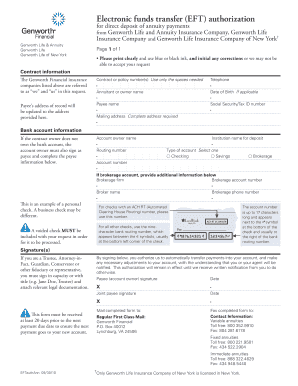
Get Electronic Funds Transfer (eft) Authorization - Genworth
How it works
-

Open form follow the instructions
-

Easily sign the form with your finger
-

Send filled & signed form or save
How to fill out the Electronic Funds Transfer (EFT) Authorization - Genworth online
Filling out the Electronic Funds Transfer (EFT) Authorization form for Genworth is an important step in ensuring your annuity payments are deposited directly into your bank account. This guide will provide you with clear, step-by-step instructions to complete the form accurately and efficiently.
Follow the steps to complete your EFT Authorization form.
- Click ‘Get Form’ button to obtain the form and open it in your chosen editor.
- In the 'Contract information' section, enter your contract or policy number(s) in the designated spaces. Ensure this information is accurate to avoid processing delays.
- Provide your payee's address of record in the relevant section. This address will be updated to the one you enter here.
- Enter your telephone number for contact purposes.
- Fill in the annuitant or owner’s name along with their date of birth, if applicable.
- Complete the 'Payee name' field and provide the Social Security or tax ID number.
- In the 'Mailing address' field, give your complete address where your documents should be sent.
- For bank account information, if the contract owner does not own the bank account, ensure they sign as the payee and complete their details.
- Fill in the account owner name and the institution name for the deposit.
- Input the bank's routing number as indicated on your checks. This is necessary for the electronic funds transfer.
- Select the type of account by ticking the appropriate box: Checking, Savings, or Brokerage.
- Provide the account number, which can be up to 17 characters long.
- If applicable, complete the additional information for a brokerage account, including the brokerage firm, account number, broker name, and brokerage contact number.
- Attach a voided check to your form, as this is required for processing. Make sure it clearly shows the bank routing and account numbers.
- In the 'Signature(s)' section, ensure that all required parties sign and date the form. If you are signing in a representative capacity, include your title and any relevant legal documentation.
- Once completed, save the changes to the form, and choose to download, print, or share as necessary.
Complete your EFT Authorization form online to ensure your payments are deposited directly into your account.
Yes, there have been discussions regarding a class action lawsuit against Genworth related to its long-term care policies. This legal action stems from concerns over premium increases and coverage challenges. If you are impacted and seek assistance, exploring the Electronic Funds Transfer (EFT) Authorization - Genworth through uslegalforms can provide clarity and help you manage your options effectively.