We use cookies to improve security, personalize the user experience, enhance our marketing activities (including cooperating with our marketing partners) and for other business use.
Click "here" to read our Cookie Policy. By clicking "Accept" you agree to the use of cookies. Read less
Read more
Accept
Loading
Form preview
  • US Legal Forms
  • Form Library
  • More Forms
  • More Uncategorized Forms
  • Mcem Application Form - Med Nus Edu

Get Mcem Application Form - Med Nus Edu

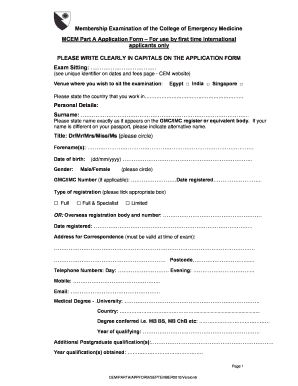
Membership Examination of the College of Emergency Medicine MCEM Part A Application Form For use by first time International applicants only PLEASE WRITE CLEARLY IN CAPITALS ON THE APPLICATION FORM.

How it works

  1. Open form

    Open form follow the instructions

  2. Easily sign form

    Easily sign the form with your finger

  3. Share form

    Send filled & signed form or save

How to fill out the MCEM Application Form - Med Nus Edu online

This guide provides a comprehensive walkthrough for filling out the MCEM Application Form for first-time international applicants. By following these instructions step-by-step, you will ensure a clear and accurate completion of your application.

Follow the steps to fill out the MCEM Application Form online.

  1. Click the ‘Get Form’ button to access the MCEM Application Form and open it in your preferred document editor.
  2. Begin by indicating the exam sitting and venue where you wish to take the examination. Select from Egypt, India, or Singapore.
  3. In the personal details section, write your surname clearly in capital letters as it appears on your GMC/IMC register. If necessary, include an alternative name if your passport shows a different name.
  4. Select your title (Dr/Mr/Mrs/Miss/Ms) and fill in your forename(s). Provide your date of birth in the format dd/mm/yyyy and specify your gender.
  5. If applicable, provide your GMC/IMC number and the date you registered. Indicate the type of registration that applies to you (Full, Full & Specialist, or Limited), or state your overseas registration body along with your registration number and date.
  6. Input your correspondence address, ensuring it is valid at the time of the exam. Include your telephone numbers for both day and evening contact, as well as your mobile number and email address.
  7. Detail your medical degree by including the university name, country, type of degree conferred (such as MB BS or MB ChB), and the year of qualifying.
  8. List any additional postgraduate qualifications you hold along with the year they were obtained.
  9. In the employment history section, document your current position, the date you commenced, the number of months in post, the name of the hospital, specialty, grade, and the name of your consultant/tutor. Make sure to include a confirmation signature from your consultant/tutor.
  10. Chronologically list all previous posts in the employment history. Provide details such as specialty, grade, type of post, hospital name, whether it was full-time or part-time, and the total duration in months for each entry.
  11. Read and sign the declaration statement at the end of the form, ensuring you acknowledge the accuracy of the information provided and your understanding of the regulations.
  12. If applicable, indicate any requests for special arrangements with appropriate supporting evidence attached.
  13. Proceed to payment by enclosing the appropriate fee and ensuring that it is made payable in pounds sterling to the College of Emergency Medicine.
  14. Lastly, review the completed form for any missing sections. Save your changes, and you can then download, print, or share the form as needed.

Complete your MCEM Application Form online today to ensure your application is submitted accurately!

Get form

Experience a faster way to fill out and sign forms on the web. Access the most extensive library of templates available.
Get form

Related content

Bracing for impact: operational upshots from the...
Published online 2020 Jun 19. doi: 10.1002/emp2.12134 ... Charmaine Malenab Manauis, MD...
Learn more
2009 Self-Study Report - Montana State University
Aug 18, 2003 — Fiscal Operations Report and Application to Participate. 7. FPDC...
Learn more
MYW CA 1979 11 30 - UserManual.wiki
Nov 30, 1979 — r, s 3 'S I BOISE - The newly !y form ed Gem ' S tate conference recel'...
Learn more

Related links form

Fca2 Form Fta Inspection Sheet 2020 Unoccupied Property Enquiry Form Lukhanji Municipality Tenders

Questions & Answers

Get answers to your most pressing questions about US Legal Forms API.

Contact support

When applying to NUS, you typically need to submit several key documents. These include your academic transcripts, a copy of your identification, and any relevant certificates. For those filling out the MCEM Application Form - Med Nus Edu, ensure you have all supporting documents prepared to enhance your application. Having everything organized will make the process smoother.

To email the NUS Student Service Centre, you can visit their official website to find the appropriate contact information. Look for the 'Contact Us' section, where you will find the email address designated for student queries. Ensure you provide all relevant details in your email to facilitate a prompt response. If you have questions regarding the MCEM Application Form - Med Nus Edu, mention it for specific assistance.

To apply for Nus medical school, you need to complete the MCEM Application Form - Med Nus Edu. Start by researching the specific prerequisites and gathering necessary documents, such as your transcripts and personal statements. After filling out the application form, submit it through the online portal. This methodical approach will guide you through the application process and help you present your best self to the admissions team.

Getting into Nus Med can be competitive, as the program attracts many qualified candidates. However, with a strong academic record and a compelling MCEM Application Form - Med Nus Edu, you can improve your chances. Focus on highlighting your unique experiences and motivations for pursuing medicine. Remember, preparation and clarity in your application can make a significant difference.

To submit a testimonial for your Nus application, start by gathering relevant information from your recommenders. Ensure that they understand the importance of showcasing your strengths and experiences. Once you have the testimonials ready, you can upload them through the MCEM Application Form - Med Nus Edu portal. This process is straightforward and designed to support your application.

Filling out the NUS application form requires careful attention to detail. Start by gathering all necessary information, including your academic records and personal details. Make sure to complete the MCEM Application Form - Med Nus Edu accurately and review it for any errors before submission. If needed, seek guidance from mentors or use platforms like uslegalforms to ensure you have everything in order.

The NUS application typically consists of several sections, including personal information, academic history, and a space for your personal statement. You will also need to complete the MCEM Application Form - Med Nus Edu as a key component. The layout is user-friendly, making it easy to navigate and submit the required information effectively.

To boost your chances of admission into NUS, focus on building a strong academic profile, engaging in relevant extracurricular activities, and preparing a compelling personal statement. Additionally, ensure that your MCEM Application Form - Med Nus Edu is filled out thoroughly and accurately. Connecting with current students or alumni can also provide valuable insights and tips for your application process.

To view your NUS application status, log into the university's application portal using your credentials. You will find updates regarding your application progress there. If you need further assistance, consider reaching out to their support team for help. Keeping track of your application status is vital, especially if you have submitted your MCEM Application Form - Med Nus Edu.

Gaining admission to NUS Medicine can be competitive, as the program attracts many talented applicants. It requires meeting academic standards and demonstrating a genuine interest in the medical field. By focusing on your application, including the MCEM Application Form - Med Nus Edu, and preparing well for interviews, you can enhance your chances of acceptance. Remember, preparation and persistence are key.

Get This Form Now!

Use professional pre-built templates to fill in and sign documents online faster. Get access to thousands of forms.
Get form
If you believe that this page should be taken down, please follow our DMCA take down processhere.

Industry-leading security and compliance

US Legal Forms protects your data by complying with industry-specific security standards.
  • In businnes since 1997
    25+ years providing professional legal documents.
  • Accredited business
    Guarantees that a business meets BBB accreditation standards in the US and Canada.
  • Secured by Braintree
    Validated Level 1 PCI DSS compliant payment gateway that accepts most major credit and debit card brands from across the globe.
Get MCEM Application Form - Med Nus Edu
Get form
Form Packages
Adoption
Bankruptcy
Contractors
Divorce
Home Sales
Employment
Identity Theft
Incorporation
Landlord Tenant
Living Trust
Name Change
Personal Planning
Small Business
Wills & Estates
Packages A-Z
Form Categories
Affidavits
Bankruptcy
Bill of Sale
Corporate - LLC
Divorce
Employment
Identity Theft
Internet Technology
Landlord Tenant
Living Wills
Name Change
Power of Attorney
Real Estate
Small Estates
Wills
All Forms
Forms A-Z
Form Library
Customer Service
Terms of Service
Privacy Notice
Legal Hub
Content Takedown Policy
Bug Bounty Program
About Us
Help Portal
Legal Resources
Blog
Affiliates
Contact Us
Delete My Account
Site Map
Industries
Forms in Spanish
Localized Forms
State-specific Forms
Forms Kit
Legal Guides
Real Estate Handbook
All Guides
Prepared for You
Notarize
Incorporation services
Our Customers
For Consumers
For Small Business
For Attorneys
Our Sites
US Legal Forms
USLegal
FormsPass
pdfFiller
signNow
airSlate WorkFlow
DocHub
Instapage
Social Media
Call us now toll free:
+1 833 426 79 33
As seen in:
  • USA Today logo picture
  • CBC News logo picture
  • LA Times logo picture
  • The Washington Post logo picture
  • AP logo picture
  • Forbes logo picture
© Copyright 1997-2025
airSlate Legal Forms, Inc.
3720 Flowood Dr, Flowood, Mississippi 39232
Form Packages
Adoption
Bankruptcy
Contractors
Divorce
Home Sales
Employment
Identity Theft
Incorporation
Landlord Tenant
Living Trust
Name Change
Personal Planning
Small Business
Wills & Estates
Packages A-Z
Form Categories
Affidavits
Bankruptcy
Bill of Sale
Corporate - LLC
Divorce
Employment
Identity Theft
Internet Technology
Landlord Tenant
Living Wills
Name Change
Power of Attorney
Real Estate
Small Estates
Wills
All Forms
Forms A-Z
Form Library
Customer Service
Terms of Service
Privacy Notice
Legal Hub
Content Takedown Policy
Bug Bounty Program
About Us
Help Portal
Legal Resources
Blog
Affiliates
Contact Us
Delete My Account
Site Map
Industries
Forms in Spanish
Localized Forms
State-specific Forms
Forms Kit
Legal Guides
Real Estate Handbook
All Guides
Prepared for You
Notarize
Incorporation services
Our Customers
For Consumers
For Small Business
For Attorneys
Our Sites
US Legal Forms
USLegal
FormsPass
pdfFiller
signNow
airSlate WorkFlow
DocHub
Instapage
Social Media
Call us now toll free:
+1 833 426 79 33
As seen in:
  • USA Today logo picture
  • CBC News logo picture
  • LA Times logo picture
  • The Washington Post logo picture
  • AP logo picture
  • Forbes logo picture
© Copyright 1997-2025
airSlate Legal Forms, Inc.
3720 Flowood Dr, Flowood, Mississippi 39232