We use cookies to improve security, personalize the user experience, enhance our marketing activities (including cooperating with our marketing partners) and for other business use.
Click "here" to read our Cookie Policy. By clicking "Accept" you agree to the use of cookies. Read less
Read more
Accept
Loading
Form preview
  • US Legal Forms
  • Form Library
  • More Forms
  • More Uncategorized Forms
  • Part Ii Form No. I. Em Number - Database Of Indian ...

Get Part Ii Form No. I. Em Number - Database Of Indian ...

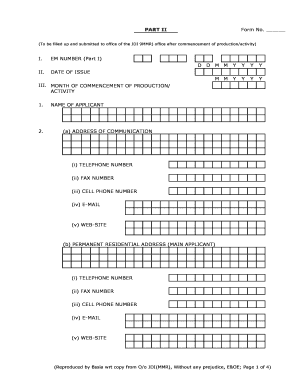
PART II Form No. (To be filled up and submitted to office of the JDI 9MMR) office after commencement of production/activity) I. EM NUMBER (Part I) D D M M Y Y Y M M II. Y Y Y Y Y DATE OF ISSUE III.

How it works

  1. Open form

    Open form follow the instructions

  2. Easily sign form

    Easily sign the form with your finger

  3. Share form

    Send filled & signed form or save

How to fill out the PART II Form No. I. EM NUMBER - Database Of Indian ... online

Filling out the PART II Form No. I. EM NUMBER is an essential step for individuals and entities seeking to document their production or activity commencement. This guide provides clear instructions on how to complete the form online with ease and accuracy.

Follow the steps to fill out the PART II Form No. I. EM NUMBER online.

  1. Click the ‘Get Form’ button to obtain the form and open it in your designated online editor.
  2. Fill in the EM Number from Part I of the form, ensuring accuracy.
  3. Enter the date of issue in the specified format (DD/MM/YYYY).
  4. Indicate the month of commencement of your production or activity by typing in the relevant month.
  5. Provide your name as the applicant clearly in the designated field.
  6. Fill in your address of communication, including telephone, fax, cell phone numbers, and email.
  7. Complete your permanent residential address, ensuring to include phone and email details.
  8. Input the name of the enterprise in the corresponding section.
  9. Specify the location of the enterprise, including village/town code, tehsil/taluka/mandal code, district, state, and pin code.
  10. Select the area type by marking '1' for rural and '2' for urban.
  11. Choose the category of your enterprise, corresponding to micro, small, or medium.
  12. Tick the appropriate box for your nature of activity, specifying whether it is manufacturing or service.
  13. Indicate the nature of operation by selecting perennial, seasonal, or casual.
  14. Confirm if the unit is ancillary by marking yes or no.
  15. Enter the month of installation of plant and machinery.
  16. Specify if the unit is registered under the Factory Act by selecting the appropriate option.
  17. Choose your type of organization from the given list.
  18. In the main manufacturing/service activity section, provide the name and code.
  19. List the products or services to be manufactured or provided, including their respective codes.
  20. Complete the investment in fixed assets section, detailing values for land, building, plant & machinery, and equipment.
  21. Indicate the installed capacity per annum.
  22. Provide details of power load required.
  23. Specify any other sources of energy or power if applicable.
  24. Detail employment figures for male and female across categories.
  25. Input total annual turnover, or state expected turnover if the operation is less than a year.
  26. Report any export figures if applicable.
  27. Provide the entrepreneurs' profile for all partners or directors using separate sheets if needed.
  28. Enter the date of commencement of production/activity in the format (DD/MM/YYYY).
  29. Ensure to sign and print your name as the applicant or authorized person at the end of the form.
  30. Save your changes, and then proceed to download, print, or share your completed form.

Complete your documents online for a smoother submission process.

Get form

Experience a faster way to fill out and sign forms on the web. Access the most extensive library of templates available.
Get form

Related content

GRADS360° - Home > Overview > Home
Grantee Records and Assistance Database System. ... The Office of Indian Education (OIE)...
Learn more
Relations of Production and Modes of Surplus...
Extraction in India: Part II – 'Informal' Industry. Amit Basole ... classes. This is...
Learn more
India - Wikipedia
India (Hindi: Bhārat), officially the Republic of India (Hindi: Bhārat Gaṇarājya), is...
Learn more

Related links form

Kaimosi Ttc Application Form Pdf Ignou Subject Change Online Application Imm5782 2020 India CitiBank Deposit Slip Foreign Currency (FCY) Cheque 2015

Questions & Answers

Get answers to your most pressing questions about US Legal Forms API.

Contact support

EM Part 2 refers to the registration process for Micro, Small, and Medium Enterprises (MSMEs) in India. This form is essential for businesses looking to obtain recognition under the MSME Act. It includes details about the enterprise, such as its type, address, and investment details. You can find more information and support for this process in the PART II Form No. I. EM NUMBER - Database Of Indian, which offers a streamlined approach to accessing necessary forms and guidance.

No, you cannot retrieve the IMEI number from a SIM card. The SIM card is designed to store subscriber information, while the IMEI number is tied to the device itself. If you need your IMEI number, you can use methods like dialing #06# or checking your device's packaging. This clarification is important for managing your records in the PART II Form No. I. EM NUMBER - Database Of Indian.

It is not possible to directly obtain an IMEI number from a SIM number, as both serve different functions. The IMEI number uniquely identifies your device, while the SIM number identifies your subscription to a mobile network. However, your mobile service provider can assist you with both numbers if needed. This helps maintain accurate records in the PART II Form No. I. EM NUMBER - Database Of Indian.

You can get your IMEI number by dialing #06# on your mobile phone. This will display the IMEI number on your screen. Additionally, the IMEI number is often found in your phone's settings under 'About Phone'. Understanding your IMEI is crucial, especially in relation to the PART II Form No. I. EM NUMBER - Database Of Indian.

To check an Indian birth certificate online, visit the official state government website where the birth was registered. You will likely need details such as the name of the person, date of birth, and place of birth. By following the site’s instructions, you can access the relevant records. This online verification aligns with the PART II Form No. I. EM NUMBER - Database Of Indian, ensuring accurate documentation.

Yes, Airtel can help you obtain your IMEI number. You can contact their customer service for assistance or check their official app if you have it installed. Providing your device details may be necessary to retrieve this information. This process connects back to the PART II Form No. I. EM NUMBER - Database Of Indian, which helps track devices.

The Cherokees tested had high levels of DNA test markers associated with the Berbers, native Egyptians, Turks, Lebanese, Hebrews and Mesopotamians. Genetically, they are more Jewish than the typical American Jew of European ancestry.

The Bureau of Indian Affairs uses a blood quantum definition—generally one-fourth Native American blood—and/or tribal membership to recognize an individual as Native American. However, each tribe has its own set of requirements—generally including a blood quantum—for membership (enrollment) of individuals.

There are seven clans: A-ni-gi-lo-hi (Long Hair), A-ni-sa-ho-ni (Blue), A-ni-wa-ya (Wolf), A-ni-go-te-ge-wi (Wild Potato), A-ni-a-wi (Deer), A-ni-tsi-s-qua (Bird), A-ni-wo-di (Paint). The knowledge of a person's clan is important.

The first step to confirming or denying these claims is to take an autosomal DNA test, which will tell you definitively whether you have any Native American ancestry. These tests are available through companies such as 23andMe, Family Tree DNA and Ancestry.com.

Get This Form Now!

Use professional pre-built templates to fill in and sign documents online faster. Get access to thousands of forms.
Get form
If you believe that this page should be taken down, please follow our DMCA take down processhere.

Industry-leading security and compliance

US Legal Forms protects your data by complying with industry-specific security standards.
  • In businnes since 1997
    25+ years providing professional legal documents.
  • Accredited business
    Guarantees that a business meets BBB accreditation standards in the US and Canada.
  • Secured by Braintree
    Validated Level 1 PCI DSS compliant payment gateway that accepts most major credit and debit card brands from across the globe.
Get PART II Form No. I. EM NUMBER - Database Of Indian ...
Get form
Form Packages
Adoption
Bankruptcy
Contractors
Divorce
Home Sales
Employment
Identity Theft
Incorporation
Landlord Tenant
Living Trust
Name Change
Personal Planning
Small Business
Wills & Estates
Packages A-Z
Form Categories
Affidavits
Bankruptcy
Bill of Sale
Corporate - LLC
Divorce
Employment
Identity Theft
Internet Technology
Landlord Tenant
Living Wills
Name Change
Power of Attorney
Real Estate
Small Estates
Wills
All Forms
Forms A-Z
Form Library
Customer Service
Terms of Service
Privacy Notice
Legal Hub
Content Takedown Policy
Bug Bounty Program
About Us
Help Portal
Legal Resources
Blog
Affiliates
Contact Us
Delete My Account
Site Map
Industries
Forms in Spanish
Localized Forms
State-specific Forms
Forms Kit
Legal Guides
Real Estate Handbook
All Guides
Prepared for You
Notarize
Incorporation services
Our Customers
For Consumers
For Small Business
For Attorneys
Our Sites
US Legal Forms
USLegal
FormsPass
pdfFiller
signNow
altaFlow
DocHub
Instapage
Social Media
Call us now toll free:
+1 833 426 79 33
As seen in:
  • USA Today logo picture
  • CBC News logo picture
  • LA Times logo picture
  • The Washington Post logo picture
  • AP logo picture
  • Forbes logo picture
© Copyright 1997-2025
airSlate Legal Forms, Inc.
3720 Flowood Dr, Flowood, Mississippi 39232
Form Packages
Adoption
Bankruptcy
Contractors
Divorce
Home Sales
Employment
Identity Theft
Incorporation
Landlord Tenant
Living Trust
Name Change
Personal Planning
Small Business
Wills & Estates
Packages A-Z
Form Categories
Affidavits
Bankruptcy
Bill of Sale
Corporate - LLC
Divorce
Employment
Identity Theft
Internet Technology
Landlord Tenant
Living Wills
Name Change
Power of Attorney
Real Estate
Small Estates
Wills
All Forms
Forms A-Z
Form Library
Customer Service
Terms of Service
Privacy Notice
Legal Hub
Content Takedown Policy
Bug Bounty Program
About Us
Help Portal
Legal Resources
Blog
Affiliates
Contact Us
Delete My Account
Site Map
Industries
Forms in Spanish
Localized Forms
State-specific Forms
Forms Kit
Legal Guides
Real Estate Handbook
All Guides
Prepared for You
Notarize
Incorporation services
Our Customers
For Consumers
For Small Business
For Attorneys
Our Sites
US Legal Forms
USLegal
FormsPass
pdfFiller
signNow
altaFlow
DocHub
Instapage
Social Media
Call us now toll free:
+1 833 426 79 33
As seen in:
  • USA Today logo picture
  • CBC News logo picture
  • LA Times logo picture
  • The Washington Post logo picture
  • AP logo picture
  • Forbes logo picture
© Copyright 1997-2025
airSlate Legal Forms, Inc.
3720 Flowood Dr, Flowood, Mississippi 39232