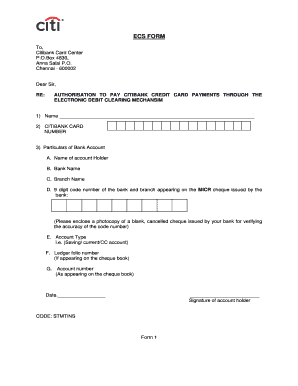
ECS FORM To Citibank Card Center P. O. Box 4830 Anna Salai P. O. Chennai - 600002 Dear Sir RE AUTHORISATION TO PAY CITIBANK CREDIT CARD PAYMENTS THROUGH THE ELECTRONIC DEBIT CLEARING MECHANSIM 1 Name 2 CITIBANK CARD NUMBER 3 Particulars of Bank Account A. These debits would be raised by Citibank every month. Please treat this as an authorization to debit my account each month. Please also inform Citibank in case this account is closed or its stat.
Open form follow the instructions
Easily sign the form with your finger
Send filled & signed form or save
How to fill out the Signing Blank Ecs Form online
Filling out the Signing Blank Ecs Form online can simplify the process of authorizing your credit card payments through the Electronic Debit Clearing Mechanism. This guide will provide clear, step-by-step instructions to assist you in completing the form accurately.
Follow the steps to fill out the form successfully:
- Click ‘Get Form’ button to obtain the form and open it in your preferred document editor.
- Enter your name in the designated field as it appears on your credit card.
- Input your Citibank card number in the specified section.
- For the particulars of your bank account, provide the following details: A. Name of account holder B. Bank name C. Branch name D. 9-digit code number of the bank and branch (micr code) E. Account type (Saving/current/CC account) F. Ledger folio number (if applicable) G. Account number (as it appears on the cheque book). Ensure to attach a photocopy of a blank, cancelled cheque for verification.
- Indicate the date and sign where required to authenticate your submission.
- Express your consent by selecting one of the payment options: Total amount due, Minimum amount due, or Fixed amount each month. If choosing a fixed amount, state the desired amount in both figures and words.
- Review all provided information for accuracy, as any inaccuracies may lead to transaction delays. Once confirmed, save your changes, and proceed to download, print, or share the form as needed.
Complete your documents online and ensure a hassle-free payment process today.
Experience a faster way to fill out and sign forms on the web. Access the most extensive library of templates available.
Related content
ECS generates the EN-20 (Acceptance of Payment Form) and the EE-20 (award ... the EFT...
To those individuals located in a federally declared disaster area, We know there are...
Jan 21, 2016 — 72) ACM certificates signed by ACM Private CA for use anywhere in your...
Get answers to your most pressing questions about US Legal Forms API.
How do I fill out a mandate form?
To fill out a mandate form, start by entering your personal details, such as name and address. Next, provide the necessary banking information while ensuring accuracy, especially when Signing Blank Ecs Form. Be sure to specify the payment details, including the amount and frequency. Finally, sign the form, and double-check all entries to confirm everything is correct.
How to complete an e-mandate?
Completing an e-mandate involves a few simple steps. Begin by accessing your bank's online portal and selecting the option for creating an e-mandate. When Signing Blank Ecs Form digitally, you will need to enter your details, including the amounts and dates for payments. After filling in all necessary information, review it carefully and submit the mandate for approval.
How do I fill out an ECS mandate form?
Filling out an ECS mandate form is straightforward. First, you need to provide your bank details, including the account number and IFSC code. Next, when Signing Blank Ecs Form, include the amount and frequency of transactions. Finally, ensure that your signature aligns with your bank's records to avoid any processing issues.
Is ECS mandate rejected due to signature mismatch?
Yes, a mismatch in signatures can lead to the rejection of your ECS mandate. When you are Signing Blank Ecs Form, it is crucial to ensure that your signature matches the one on your bank records. This verification process helps to prevent fraud and secure your transactions. If your ECS mandate is rejected, you may need to resubmit the form with the correct signature.
How to fill ECS mandate form?
Filling an ECS mandate form is easy....How to Fill ECS Form? Date: Enter the date in DD/MM/YYYY format. Checkbox: Tick mark the checkbox to create/ edit mandate. Account Type: Tick the bank account type from the list. Account Number: Write your bank account number. IFSC / MICR Code: Fill in the applicable code.
What does ECS mean in banking?
Ans: It is a mode of electronic funds transfer from one bank account to another bank account using the services of a Clearing House. This is normally for bulk transfers from one account to many accounts or vice-versa.
What is ECS and ACH?
ECS, or Electronic Clearing System, is the Indian equivalent of ACH. Although ACH's full form may be different from ECS, both of these refer to the clearing of electronic funds transfer. Payments made through ACH transfers may be known as ACH direct payments.
What is ECS mandatory form?
ELECTRONIC CLEARING SERVICE (CREDIT CLEARING) MODEL MANDATE FORM. INVESTOR/CUSTOMER'S OPTION TO RECEIVE PAYMENTS THROUGH CREDIT CLEARING. MECHANISM. SCHEME NAME AND THE PERIODICITY OF PAYMENT.
What is signed ECS?
When you take a loan, you are required to sign an ECS payment mandate. This mandate gives the authority to the clearinghouse to debit the monthly EMI from your bank account and credit the same into your loan account, or lenders account on a fixed date.
What is the ECS form?
ELECTRONIC CLEARING SERVICE (CREDIT CLEARING) MODEL MANDATE FORM. INVESTOR/CUSTOMER'S OPTION TO RECEIVE PAYMENTS THROUGH CREDIT CLEARING. MECHANISM. SCHEME NAME AND THE PERIODICITY OF PAYMENT.
Use professional pre-built templates to fill in and sign documents online faster. Get access to thousands of forms.
If you believe that this page should be taken down, please follow our DMCA take down process here.