Open form follow the instructions
Easily sign the form with your finger
Send filled & signed form or save
How to fill out the Sbi Life Fund Switch online
Managing your investments is crucial, and filling out the Sbi Life Fund Switch form online is a streamlined way to make necessary changes. This guide provides you with clear, step-by-step instructions to help you complete the form accurately and efficiently.
Follow the steps to fill out the form correctly.
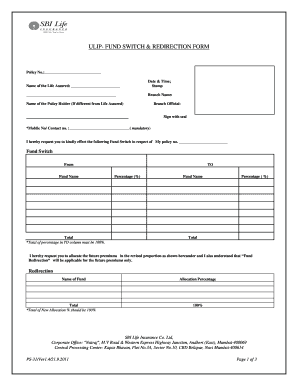
- Press the ‘Get Form’ button to access the Sbi Life Fund Switch form and open it in your preferred editor.
- Begin by filling in your policy number in the designated field at the top of the form. Ensure that this number matches the one on your policy documents.
- Next, enter the name of the life assured as it appears in the policy. This identifies the individual who is covered by the policy.
- Include the date and time stamp as required. This may be necessary for processing your request. Make sure this is accurate to avoid any processing delays.
- Fill in the branch name from where you are submitting the form. This helps in identifying the processing center for your request.
- If the policyholder is different from the life assured, include their name in the respective field.
- Provide your mobile number or contact number in the mandatory field. This information is important for any follow-up correspondence.
- In the fund switch section, specify the fund names you are switching from and to, along with the corresponding percentage allocations. Ensure that the total percentage equals 100% as indicated.
- For the redirection section, list the new fund name and the associated allocation percentage. Ensure this total also equals 100%.
- Review the declaration and authorization section, where you acknowledge and agree to the terms. Sign accordingly.
- Finally, save the changes you have made to the document. You can now download, print, or share the completed form as needed to submit it for processing.
Complete your documents online today for seamless fund management.
Experience a faster way to fill out and sign forms on the web. Access the most extensive library of templates available.
Related content
switching over to energy efficient lighting systems installation of energy ... deliver...
The major parameters covered in ULIP The key points of ULIPs are: switching model ... Ltd...
... 49 49 52 54 Switch Initiation of switch request Approval of switch request Final...
Get answers to your most pressing questions about US Legal Forms API.
Can I switch from one fund to another?
Yes, you can switch from one fund to another in SBI Life. This flexibility is crucial for adapting your investment strategy as market conditions change. The Sbi Life Fund Switch allows you to make these changes seamlessly, ensuring you remain on track with your financial objectives.
How to switch funds in ULIP?
To switch funds in a Unit Linked Insurance Plan (ULIP) with SBI Life, access your account online or through the mobile app. Identify the fund you currently hold and select a new fund to switch to. The Sbi Life Fund Switch option in ULIPs provides flexibility, allowing you to adapt your investment based on market conditions and personal needs.
How to switch mutual funds in SBI?
Switching mutual funds in SBI can be done through your online account or by submitting a request form at a branch. First, review the funds available and decide which mutual fund you want to switch to. The Sbi Life Fund Switch feature helps you manage your mutual fund investments effectively, aligning them with your financial objectives.
What is the process of fund switching?
The process of fund switching involves transferring your investment from one fund to another within the SBI Life portfolio. You can initiate this process through your online account or by contacting customer service. The Sbi Life Fund Switch process is efficient, allowing you to adjust your investment strategy based on your financial goals.
How to switch fund in SBI Life online?
Switching funds in SBI Life online is simple. First, visit the SBI Life website and log into your account. Locate the 'Fund Switch' section, select the fund you want to switch, and pick the new fund to invest in. The online process for Sbi Life Fund Switch allows you to make changes quickly and easily from the comfort of your home.
How to switch fund in SBI Life?
To switch funds in SBI Life, start by logging into your SBI Life account. Navigate to the 'Fund Switch' option and select the current fund you wish to switch from. Then, choose the new fund you want to invest in and confirm your request. The Sbi Life Fund Switch process is designed to be straightforward, ensuring you can manage your investments effectively.
What is fund switch in insurance?
A fund switch in insurance, particularly in the context of SBI Life, allows policyholders to transfer their investment from one fund to another within their insurance plan. This feature provides flexibility to adapt to changing market conditions or personal financial goals. Utilizing the Sbi Life Fund Switch helps ensure that your investments remain aligned with your objectives.
What is switch fund in SBI mutual fund?
A switch fund in SBI mutual fund refers to the transfer of funds between different mutual fund schemes under the SBI umbrella. This option enables you to adapt your investment portfolio according to market trends or personal preferences. By utilizing the Sbi Life Fund Switch, you can maintain an optimal investment strategy.
How to switch mutual funds online?
You can switch mutual funds online by accessing your investment platform, such as SBI's online portal. Select the fund you want to switch from and choose your new fund. The process is seamless, allowing you to execute your Sbi Life Fund Switch efficiently and stay on track with your investment goals.
What is a switch fund in SBI?
A switch fund in SBI refers to the ability to transfer your investment from one mutual fund to another within the SBI portfolio. This feature allows you to adjust your investment strategy based on performance or changing financial needs. The Sbi Life Fund Switch feature is a valuable tool for managing your investment strategy.
Use professional pre-built templates to fill in and sign documents online faster. Get access to thousands of forms.
If you believe that this page should be taken down, please follow our DMCA take down process here.