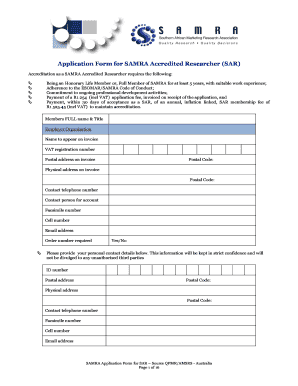
Get Samrasonline Form
How it works
-

Open form follow the instructions
-

Easily sign the form with your finger
-

Send filled & signed form or save
How to fill out the Samrasonline Form online
This guide provides clear and detailed instructions on how to effectively complete the Samrasonline Form for accreditation as a SAMRA Accredited Researcher. Whether you are familiar with online forms or filling one out for the first time, this guide will assist you in navigating the process smoothly.
Follow the steps to complete the Samrasonline Form online effectively
- Click the ‘Get Form’ button to access the application form and open it in the designated editor.
- Begin by entering your full name and title, as well as your employer organization. Make sure to provide the name that should appear on the invoice and include your VAT registration number.
- Fill out the postal and physical address sections, ensuring that the postal codes are correct.
- Provide your contact information, including your telephone number, the name of the contact person for your account, a facsimile number, a cell number, and your email address.
- Indicate whether an order number is required by selecting yes or no.
- In the personal contact details section, enter your ID number, both postal and physical addresses, as well as your contact information again.
- List the names and contact details of two referees, ensuring at least one is from a different company and one is a full SAMRA member.
- Attach a detailed CV that includes your educational and employment history, job titles, the duration of your employment at each organization, and a contact person if available.
- Certify the accuracy of the information provided by signing and dating the form.
- Finally, submit your completed application form along with your CV and verified copies of qualifications to SAMRA’s offices via the indicated addresses.
Complete your form online today to take the next step in your professional journey.
To register for a SAM account, you need to start by visiting the official SAM website. Once there, you will find the option to create a new account. Fill out the required information, including your business details and contact information, and ensure that you have all necessary documents ready. After completing the registration, you can use your account to access various resources, including the Samrasonline Form, which simplifies your compliance needs.
Industry-leading security and compliance
-
In businnes since 199725+ years providing professional legal documents.
-
Accredited businessGuarantees that a business meets BBB accreditation standards in the US and Canada.
-
Secured by BraintreeValidated Level 1 PCI DSS compliant payment gateway that accepts most major credit and debit card brands from across the globe.