We use cookies to improve security, personalize the user experience, enhance our marketing activities (including cooperating with our marketing partners) and for other business use.
Click "here" to read our Cookie Policy. By clicking "Accept" you agree to the use of cookies. Read less
Read more
Accept
Loading
Form preview
  • US Legal Forms
  • Form Library
  • More Forms
  • More Uncategorized Forms
  • P.e.c. Application Form - Kystverket

Get P.e.c. Application Form - Kystverket

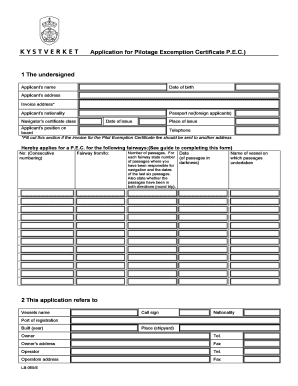
Guide to Completing the Application form for a Pilotage Exemption Certificate 1. The application should be sent to Kystverket Vest, 5947 FEDJE or farledsbevis kystverket.no 2. Copy of a valid navigator.

How it works

  1. Open form

    Open form follow the instructions

  2. Easily sign form

    Easily sign the form with your finger

  3. Share form

    Send filled & signed form or save

How to fill out the P.E.C. Application Form - Kystverket online

Completing the P.E.C. Application Form for a Pilotage Exemption Certificate through Kystverket can be a straightforward process if you follow the right steps. This guide will walk you through each section of the form, providing clear instructions tailored to your needs.

Follow the steps to complete your application form effortlessly.

  1. Press the ‘Get Form’ button to access the P.E.C. Application Form and open it for editing.
  2. Fill in your personal details in the first section. This includes your full name, date of birth, address, nationality, and contact information. If the invoice for the Pilot Exemption Certificate fee is to be sent to a different address, provide that information in the designated area.
  3. In the section labeled 'Hereby applies for a P.E.C. for the following fairways,' begin numbering each passage route you have navigated. Specify the fairway from and to, along with the number of passages for each fairway, including the dates of the last six passages.
  4. For each passage, indicate if your navigation was conducted in both directions (round trip). Record the name of the vessel you navigated during these passages.
  5. In the second part of the application, provide detailed information about the vessel, including its name, nationality, port of registration, and year built. Specify the owner's and operator's contact details, along with the vessel's size and capabilities.
  6. Complete the navigation equipment section, including details of your steering compass, radar systems, and positioning systems.
  7. If you hold any other Pilotage Exemption Certificates for different fairways, indicate 'Yes' and list them; otherwise, select 'No.'
  8. Finally, confirm the correctness of all information provided by signing and dating the application. Make sure to indicate your total number of passages over the past 12 months.
  9. Once completed, you can save the changes, download, or print the form for submission. The application should be sent either to Kystverket Vest at the specified address or by email.

Complete your P.E.C. Application Form online today for a seamless application process.

Get form

Experience a faster way to fill out and sign forms on the web. Access the most extensive library of templates available.
Get form

Related content

Meld. St. 21 (2011–2012) - OSTI.gov
ling vil gi resultater i form av reduserte utslipp. ... Tallene for Malawi mangier...
Learn more

Related links form

Farmer Registration Form 2020 Mesa County Court Forms 2020 Form De 2525xx 2020 Eenctm Correct Word 2020

Questions & Answers

Get answers to your most pressing questions about US Legal Forms API.

Contact support

A PEC application is the process of requesting a Permit for Entry into Controlled areas using the P.E.C. Application Form - Kystverket. This application collects essential details about the applicant and the intended use of the vessel. By submitting a complete PEC application, you enhance your chances of receiving timely approval and can engage in your maritime activities with confidence.

To obtain a PEC, you need to fill out the P.E.C. Application Form - Kystverket accurately and submit it to the relevant authorities. Ensure you have all supporting documents ready to expedite the process. For a more streamlined experience, consider using platforms like uslegalforms that offer templates and guidance to help you complete your application correctly.

A PEC job typically involves employment opportunities related to maritime operations that require a P.E.C. application. These jobs can range from vessel management to safety compliance roles. Individuals looking for PEC jobs should ensure they have the appropriate P.E.C. Application Form - Kystverket completed to demonstrate their qualifications.

A PEC request refers to the formal submission made to initiate the process of obtaining a P.E.C. application. This request outlines the intent to use the P.E.C. Application Form - Kystverket for a specific purpose, such as commercial or recreational activities. By making a PEC request, users can streamline their application process and ensure they meet all necessary requirements.

A P.E.C. form is a document required for specific applications in maritime operations, particularly in Norway. This form is essential for individuals or businesses seeking permission to operate vessels in designated areas. By completing the P.E.C. Application Form - Kystverket, applicants provide necessary information to comply with regulations and ensure safe maritime practices.

For example, the Name, Id, Bill Every, Currency, and Price fields are mandatory(by default) while creating a Plan.

Mandatory fields will also always have the Required property enabled, and it cannot be overridden on the Details. Required fields are configured in SSA by the admin and can be set on Available Fields by clicking the Required? property.

What are required form fields? To put it simply, a required form field must contain an answer before the respondent can submit the form. These are fields that absolutely must be answered in order for the form to be useful. It's possible for a form to be useful without having any required fields.

How to indicate a required field. Provide the required text in the label. Provide a graphic * image in the label with appropriate alt text. Providing a star (asterisk) symbol.

The phrase "mandatory requirement" is redundant. A mandatory action is something that is required, obligatory, or compulsory. Like letting your Great Aunt Edna pinch your cheeks or passing gym to get your diploma. Mandatory is often used in opposition to optional.

Get This Form Now!

Use professional pre-built templates to fill in and sign documents online faster. Get access to thousands of forms.
Get form
If you believe that this page should be taken down, please follow our DMCA take down processhere.

Industry-leading security and compliance

US Legal Forms protects your data by complying with industry-specific security standards.
  • In businnes since 1997
    25+ years providing professional legal documents.
  • Accredited business
    Guarantees that a business meets BBB accreditation standards in the US and Canada.
  • Secured by Braintree
    Validated Level 1 PCI DSS compliant payment gateway that accepts most major credit and debit card brands from across the globe.
Get P.E.C. Application Form - Kystverket
Get form
Form Packages
Adoption
Bankruptcy
Contractors
Divorce
Home Sales
Employment
Identity Theft
Incorporation
Landlord Tenant
Living Trust
Name Change
Personal Planning
Small Business
Wills & Estates
Packages A-Z
Form Categories
Affidavits
Bankruptcy
Bill of Sale
Corporate - LLC
Divorce
Employment
Identity Theft
Internet Technology
Landlord Tenant
Living Wills
Name Change
Power of Attorney
Real Estate
Small Estates
Wills
All Forms
Forms A-Z
Form Library
Customer Service
Terms of Service
Privacy Notice
Legal Hub
Content Takedown Policy
Bug Bounty Program
About Us
Help Portal
Legal Resources
Blog
Affiliates
Contact Us
Delete My Account
Site Map
Industries
Forms in Spanish
Localized Forms
State-specific Forms
Forms Kit
Legal Guides
Real Estate Handbook
All Guides
Prepared for You
Notarize
Incorporation services
Our Customers
For Consumers
For Small Business
For Attorneys
Our Sites
US Legal Forms
USLegal
FormsPass
pdfFiller
signNow
airSlate WorkFlow
DocHub
Instapage
Social Media
Call us now toll free:
+1 833 426 79 33
As seen in:
  • USA Today logo picture
  • CBC News logo picture
  • LA Times logo picture
  • The Washington Post logo picture
  • AP logo picture
  • Forbes logo picture
© Copyright 1997-2025
airSlate Legal Forms, Inc.
3720 Flowood Dr, Flowood, Mississippi 39232
Form Packages
Adoption
Bankruptcy
Contractors
Divorce
Home Sales
Employment
Identity Theft
Incorporation
Landlord Tenant
Living Trust
Name Change
Personal Planning
Small Business
Wills & Estates
Packages A-Z
Form Categories
Affidavits
Bankruptcy
Bill of Sale
Corporate - LLC
Divorce
Employment
Identity Theft
Internet Technology
Landlord Tenant
Living Wills
Name Change
Power of Attorney
Real Estate
Small Estates
Wills
All Forms
Forms A-Z
Form Library
Customer Service
Terms of Service
Privacy Notice
Legal Hub
Content Takedown Policy
Bug Bounty Program
About Us
Help Portal
Legal Resources
Blog
Affiliates
Contact Us
Delete My Account
Site Map
Industries
Forms in Spanish
Localized Forms
State-specific Forms
Forms Kit
Legal Guides
Real Estate Handbook
All Guides
Prepared for You
Notarize
Incorporation services
Our Customers
For Consumers
For Small Business
For Attorneys
Our Sites
US Legal Forms
USLegal
FormsPass
pdfFiller
signNow
airSlate WorkFlow
DocHub
Instapage
Social Media
Call us now toll free:
+1 833 426 79 33
As seen in:
  • USA Today logo picture
  • CBC News logo picture
  • LA Times logo picture
  • The Washington Post logo picture
  • AP logo picture
  • Forbes logo picture
© Copyright 1997-2025
airSlate Legal Forms, Inc.
3720 Flowood Dr, Flowood, Mississippi 39232