Loading
Form preview
  • US Legal Forms
  • Other Templates
  • More Forms
  • More Uncategorized Forms
  • Rta6

Get Rta6

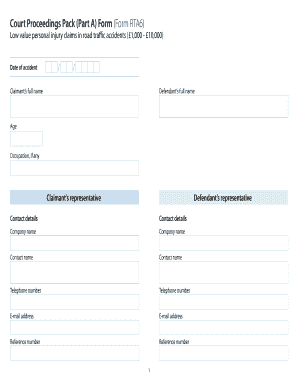
Traffic accidents ( 1,000 - 10,000) Date of accident / / Claimant s full name Defendant s full name Claimant s representative Defendant s representative Contact details Contact details Company name Company name Contact name Contact name Telephone number Telephone number E-mail address E-mail address Reference number Reference number Claimant final offer Fixed costs Stage 1 fixed costs paid Judge s award Stage 2 fixed costs paid 4 Defendant final offer.

How it works

  1. Open form

    Open form follow the instructions

  2. Easily sign form

    Easily sign the form with your finger

  3. Share form

    Send filled & signed form or save

How to fill out the Rta6 online

Filling out the Rta6 form is an essential step for users involved in low value personal injury claims related to road traffic accidents. This guide will provide you with clear, step-by-step instructions to ensure that you complete the form accurately and efficiently.

Follow the steps to successfully complete your Rta6 form online.

  1. Click the ‘Get Form’ button to access the Rta6 form and open it in your document editor.
  2. Begin by entering the date of the accident in the specified format. This typically includes the day, month, and year.
  3. Fill in the claimant’s full name. Ensure that the name matches the identification you are providing.
  4. Next, enter the defendant’s full name. Double-check the spelling for accuracy.
  5. Provide the age of the claimant, followed by their occupation, if applicable.
  6. Input the details of any representatives for both the claimant and the defendant, including contact details such as email and telephone numbers.
  7. In the 'Claimant Losses' section, itemize each loss you are claiming, specifying the gross value and any contributory negligence percentages.
  8. Indicate whether evidence is attached to support your claims and note any necessary comments regarding each item.
  9. Confirm if all disbursements are agreed and paid. If not, provide the details including the amount paid and the reason for any disputes.
  10. Complete the statement of truth. This may require a signature from the claimant or their solicitor, along with the date and any relevant position or office held.
  11. Finally, review the entire form for accuracy and completeness. Once you are satisfied, save your changes, download, print, or share the form as required.

Begin the process by filling out your Rta6 form online today.

Get form

Experience a faster way to fill out and sign forms on the web. Access the most extensive library of templates available.
Get form

Related content

Building - City of Leesburg
OWASP_CSRFTOKEN=9XEW-RTA6-FZQ4-QWZU-SO9B-VP4J-43SD-XPZ8">Your Link Name. Share this page...
Learn more
C:/Program Files/Texas...
C:/Program Files/Texas Instruments/ccsv4/eclipse/..\dvt\RTA6\solutions\cce_rta6 C:/Program...
Learn more
Anchor Bolt Matrix with Generic Template Link
Use With RTA 6" Poles. ABTEMPLATE PJ50033. 9" - 10". 3.5". 10". AB30-0. 3/4"X30"X3". 4...
Learn more

Related links form

Tsnpdcl Name Change Application Nbk Loan Manila Teachers Loan Form 2020 Raksha Tpa Pre Auth Form

Questions & Answers

Get answers to your most pressing questions about US Legal Forms API.

Contact support

To file the Florida RT-6 form, start by collecting all required information about your employees' wages and hours worked. You can file online through the Florida Department of Revenue's website or use a service like US Legal Forms for a streamlined experience. Ensure that you complete the form accurately and submit it by the deadline to avoid penalties. Regularly filing the RT-6 will help you stay compliant with state regulations.

To apply for a reemployment tax ID in Florida, you need to register your business with the Florida Department of Revenue. This process can be completed online through their official website. Once registered, you will receive your tax ID, which is necessary for filing the RT-6 form. For additional support, consider using US Legal Forms to guide you through the application process.

Any employer who pays wages to employees in Florida is required to file the Florida RT-6 form. This includes businesses of all sizes and types, whether they are for-profit or non-profit. It is essential to file the RT-6 to remain compliant with state regulations. If you need assistance, US Legal Forms offers guidance and resources to help you with the filing process.

The easiest way to file for unemployment in Florida is through the Florida Department of Economic Opportunity's online portal. You will need to create an account and provide your personal information and employment history. Make sure to have your social security number and other relevant documents handy. Additionally, consider using resources from US Legal Forms to navigate the process smoothly.

To fill out your income tax form, start by gathering all necessary documents such as W-2s, 1099s, and any other income statements. Next, you can use an online platform like US Legal Forms, which provides easy-to-follow templates. Fill in your personal information, income details, and deductions accurately to ensure compliance with IRS regulations. Finally, review your form carefully before submission to avoid any errors.

RT-6 in Florida is a report that employers must submit to detail their employees' wages and employment status. This filing is essential for maintaining compliance with state unemployment laws. By understanding the RT-6 and utilizing platforms like uslegalforms, employers can ensure they stay informed and compliant.

The RT6 report is used to track employee wages and ensure that employers are paying the correct unemployment taxes. This report helps maintain the integrity of the unemployment insurance system in Florida. By accurately filing the RT6, employers contribute to a fund that supports workers during periods of unemployment.

An RT6 in Florida refers to a specific report that employers must file with the state. This report provides information about employees and their wages, primarily for unemployment tax purposes. Understanding the RT6 is crucial for employers to remain compliant with Florida's unemployment insurance regulations.

RT6 in Florida refers to the specific form that businesses must file to report their sales and use tax obligations. This form plays a critical role in ensuring that businesses adhere to state tax regulations. By understanding RT6, business owners can manage their tax responsibilities effectively and avoid costly mistakes.

To obtain an RT number in Florida, you need to register your business with the Florida Department of Revenue. This process typically involves submitting an application that includes your business details and any necessary documentation. Once registered, you will receive your RT number, which is essential for filing the RT6 form.

Get This Form Now!

Use professional pre-built templates to fill in and sign documents online faster. Get access to thousands of forms.
Get form
If you believe that this page should be taken down, please follow our DMCA take down processhere.
Get Rta6
Get form
  • Adoption
  • Bankruptcy
  • Contractors
  • Divorce
  • Home Sales
  • Employment
  • Identity Theft
  • Incorporation
  • Landlord Tenant
  • Living Trust
  • Name Change
  • Personal Planning
  • Small Business
  • Wills & Estates
  • Packages A-Z
  • Affidavits
  • Bankruptcy
  • Bill of Sale
  • Corporate - LLC
  • Divorce
  • Employment
  • Identity Theft
  • Internet Technology
  • Landlord Tenant
  • Living Wills
  • Name Change
  • Power of Attorney
  • Real Estate
  • Small Estates
  • Wills
  • All Forms
  • Forms A-Z
  • Other Templates
  • Legal Hub
  • About Us
  • Help Portal
  • Legal Resources
  • Blog
  • Affiliates
  • Contact Us
  • Delete My Account
  • Site Map
  • Industries
  • Forms in Spanish
  • Localized Forms
  • State-specific Forms
  • Forms Kit
  • Real Estate Handbook
  • All Guides
  • Notarize
  • Incorporation services
  • For Consumers
  • For Small Business
  • For Attorneys
  • USLegal
  • FormsPass
  • pdfFiller
  • signNow
  • altaFlow
  • DocHub
  • Instapage
Form Packages
  • Adoption
  • Bankruptcy
  • Contractors
  • Divorce
  • Home Sales
  • Employment
  • Identity Theft
  • Incorporation
  • Landlord Tenant
  • Living Trust
  • Name Change
  • Personal Planning
  • Small Business
  • Wills & Estates
  • Packages A-Z
Form Categories
  • Affidavits
  • Bankruptcy
  • Bill of Sale
  • Corporate - LLC
  • Divorce
  • Employment
  • Identity Theft
  • Internet Technology
  • Landlord Tenant
  • Living Wills
  • Name Change
  • Power of Attorney
  • Real Estate
  • Small Estates
  • Wills
  • All Forms
  • Forms A-Z
  • Other Templates
Customer Service
  • Legal Hub
  • About Us
  • Help Portal
  • Legal Resources
  • Blog
  • Affiliates
  • Contact Us
  • Delete My Account
  • Site Map
  • Industries
  • Forms in Spanish
  • Localized Forms
  • State-specific Forms
  • Forms Kit
Legal Guides
  • Real Estate Handbook
  • All Guides
Prepared for you
  • Notarize
  • Incorporation services
Our Customers
  • For Consumers
  • For Small Business
  • For Attorneys
Our Sites
  • USLegal
  • FormsPass
  • pdfFiller
  • signNow
  • altaFlow
  • DocHub
  • Instapage
Social Media
Call us now toll free:
+1 833 426 79 33
As seen in:
© Copyright 1999-2026 airSlate Legal Forms, Inc. 17 Station Street, Suite 303, Brookline, MA 02445
  • Your Privacy Choices
  • Terms of Service
  • Privacy Notice
  • Content Takedown Policy
  • Bug Bounty Program