Loading
Get Citrec
How it works
-

Open form follow the instructions
-

Easily sign the form with your finger
-

Send filled & signed form or save
How to fill out the Citrec online
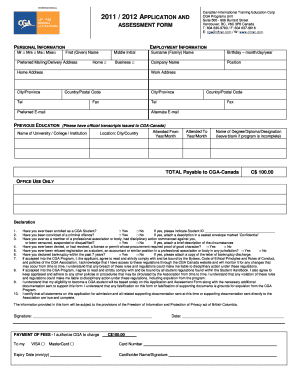
Filling out the Citrec form is an essential step towards your application to the CGA program. This guide will provide you with a clear, step-by-step approach to ensure that all sections are completed accurately and efficiently.
Follow the steps to successfully complete the Citrec form online.
- Click the ‘Get Form’ button to access the Citrec application form and open it in your preferred editor.
- Begin by entering your personal information. This includes your first name, middle initial, surname, date of birth, and preferred mailing or delivery address. Ensure all information is accurate to avoid delays.
- Provide your employment information, including your company name, position, work address, and contact details. Specify whether the address corresponds to your home or business.
- In the previous education section, list the name of the university, college, or institution you attended, along with its location and the dates you attended. If you completed a degree or diploma, include its name.
- Indicate your total payment amount, which is C$100.00 payable to CGA-Canada.
- Complete the declaration section by answering all provided questions truthfully. Attach additional descriptions if necessary, ensuring any sensitive information is marked confidential.
- Review the compliance agreement and confirm your understanding of the rules, regulations, and the implications of any violations.
- Sign and date the application form to certify that all information provided is true and complete.
- Provide your payment information, including the credit card type, number, expiry date, and cardholder's name. Ensure that this information is correct for the transaction to process smoothly.
- Once you have completed all sections of the form, save your changes, and follow the instructions to download, print, or share the form as needed.
Take the next step towards your CGA program application by filling out the Citrec form online today.
2:39 4:58 Multiple Table of Contents in Word/ TOC for Each Section - YouTube YouTube Start of suggested clip End of suggested clip Click on OK and you can see that it's put in a table of contents. For these three headings. Let'sMoreClick on OK and you can see that it's put in a table of contents. For these three headings. Let's just do the same thing down here.
Industry-leading security and compliance
US Legal Forms protects your data by complying with industry-specific security standards.
-
In businnes since 199725+ years providing professional legal documents.
-
Accredited businessGuarantees that a business meets BBB accreditation standards in the US and Canada.
-
Secured by BraintreeValidated Level 1 PCI DSS compliant payment gateway that accepts most major credit and debit card brands from across the globe.