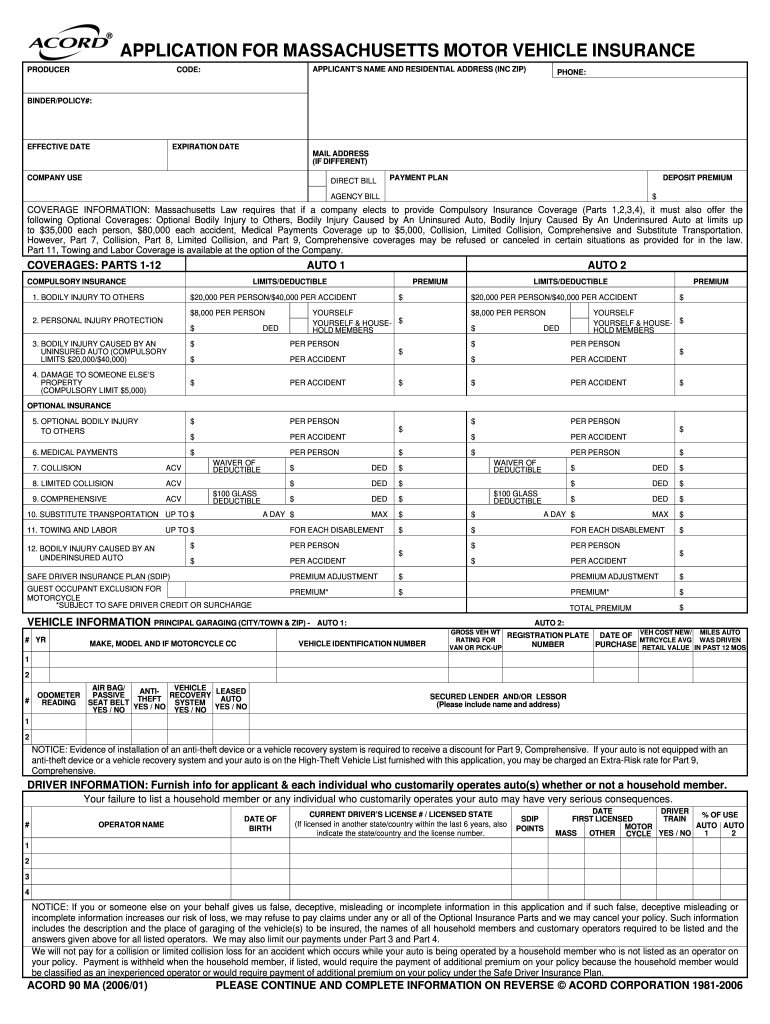
IFFERENT) COMPANY USE DIRECT BILL PAYMENT PLAN DEPOSIT PREMIUM AGENCY BILL $ COVERAGE INFORMATION: Massachusetts Law requires that if a company elects to provide Compulsory Insurance Coverage (Parts 1,2,3,4), it must also offer the following Optional Coverages: Optional Bodily Injury to Others, Bodily Injury Caused by An Uninsured Auto, Bodily Injury Caused By An Underinsured Auto at limits up to $35,000 each person, $80,000 each accident, Medical Payments Coverage up to $5,000, Collision.
Loading

Open form follow the instructions

Easily sign the form with your finger

Send filled & signed form or save
How to fill out the Application For Massachusetts Motor Vehicle Insurance Form online
Filling out the Application For Massachusetts Motor Vehicle Insurance Form online can be a straightforward process with the right guidance. This guide will provide you with step-by-step instructions to ensure you complete the form correctly and efficiently.
Follow the steps to successfully complete your application online.
- Click ‘Get Form’ button to acquire the form and open it in the designated editor.
- Enter the applicant's name and residential address, including the zip code. Providing a valid phone number is essential for communication.
- Fill in the binder or policy number, effective date, and expiration date of your insurance policy. If your mailing address differs from your residential address, include that as well.
- Select the applicable options for company use, including direct bill, payment plan, and deposit premium, if necessary. Indicate the coverage options you wish to select.
- Provide detailed coverage information, filling out the required parts related to compulsory and optional insurance coverages. Be prepared to indicate limits and deductibles.
- Enter vehicle information for each auto you are insuring, including the year, make, model, vehicle identification number, and principal garaging address.
- Provide detailed driver information for all individuals who will operate the vehicle, including their names, dates of birth, and any relevant driver's license information.
- Carefully review the questions regarding previous incidents or violations that may affect your insurance eligibility and provide clear, accurate responses.
- Complete any additional information requested, including attaching necessary documents such as driver training certificates or anti-theft device evidence.
- Once you have filled out all sections of the application, review your entries for accuracy. You can then save your changes, download, print, or share the completed form as needed.
Complete your Massachusetts Motor Vehicle Insurance application online today!
Experience a faster way to fill out and sign forms on the web. Access the most extensive library of templates available.
Related content
Massachusetts Registry of Motor Vehicles ... are as established by the commissioner of...
Registry of Motor Vehicles. P.O. Box 55889 • Boston, MA • 02205-5889 ... provisions of...
... call DMV at. (503) 945-5090, or write to DMV Driver Programs at the address above....
Get answers to your most pressing questions about US Legal Forms API.
How do I submit proof of insurance to MA RMV?
To submit proof of insurance to the Massachusetts RMV, you typically need to provide the RMV 3 form along with the Application For Massachusetts Motor Vehicle Insurance Form. You can submit these documents online, by mail, or in person at your local RMV branch. It’s essential to ensure your insurance coverage meets state requirements to avoid legal complications. Using uslegalforms can help you navigate the submission process seamlessly.
What is the RMV 1 form in Massachusetts?
The RMV 1 form is an application used for registering your vehicle in Massachusetts. It’s essential for anyone looking to apply for vehicle registration and is included in the overall Application For Massachusetts Motor Vehicle Insurance Form process. Accurate completion of this form is critical to avoid any registration issues. You can find this form online or at your local RMV office.
What's the cheapest car insurance in Massachusetts?
Finding the cheapest car insurance in Massachusetts requires comparing quotes from various providers. Rates can vary significantly based on your driving history and the type of coverage you need. The Application For Massachusetts Motor Vehicle Insurance Form can guide you through the process, but using platforms like uslegalforms can help simplify your search for affordable options. Always look for discounts that may apply to you.
What is an RMV 3 form?
The RMV 3 form is a Certificate of Insurance that proves you have the required insurance coverage for a motor vehicle in Massachusetts. This form is vital for the Application For Massachusetts Motor Vehicle Insurance Form, as it must be submitted to the RMV to complete your vehicle registration. Ensure you obtain this form from your insurance provider to meet the legal requirements for driving in the state.
What is an RMV 1 form in MA?
The RMV 1 form in Massachusetts is an application for registration and title of a motor vehicle. This form is crucial when you are registering a new vehicle or transferring ownership. It serves as an essential part of the Application For Massachusetts Motor Vehicle Insurance Form process, as you will need it to provide proof of insurance. Make sure to complete it accurately to avoid any delays in your vehicle registration.
How to fill out a car insurance application?
To fill out a car insurance application, you need to gather essential information such as your driver's license number, vehicle details, and your personal information. Begin by carefully filling out each section of the Application For Massachusetts Motor Vehicle Insurance Form. Double-check for accuracy to ensure you provide correct information, which will help in obtaining the best possible rates. If you need assistance, consider using uslegalforms, which offers clear guidance and templates.
How to register an out of state vehicle in Massachusetts?
To register an out of state vehicle in Massachusetts, you must complete the Application For Massachusetts Motor Vehicle Insurance Form to show that you have valid insurance. Visit the RMV with your completed application, the vehicle's title, and other identification documents. The RMV will guide you through the registration process, ensuring you meet all necessary requirements. This approach simplifies the transition and helps you navigate the registration of your vehicle smoothly.
What are the requirements for car insurance in Massachusetts?
In Massachusetts, drivers must carry a minimum level of liability insurance, including bodily injury and property damage coverage. Additionally, you will need the Application For Massachusetts Motor Vehicle Insurance Form to confirm your insurance policy. Massachusetts requires drivers to have coverage for personal injury protection (PIP) as well. Understanding these requirements helps ensure that you are compliant and protected on the road.
How do I register my car in Massachusetts from out of state?
To register your car in Massachusetts from out of state, you first need to obtain the Application For Massachusetts Motor Vehicle Insurance Form. This form is essential for proving that you have the required insurance coverage. After securing the insurance, visit your local Registry of Motor Vehicles (RMV) office with the completed application, proof of ownership, and any necessary identification. This process ensures that your vehicle is legally registered and insured in Massachusetts.
What is a RMV3 form?
The RMV3 form is a vital document used in Massachusetts to confirm your insurance coverage. It serves as proof of insurance when you register a vehicle or renew your registration. If you are unsure about obtaining this form, you can utilize the Application For Massachusetts Motor Vehicle Insurance Form to facilitate the process. Always ensure that your information is up to date to avoid any issues with the RMV.
Use professional pre-built templates to fill in and sign documents online faster. Get access to thousands of forms.
If you believe that this page should be taken down, please follow our DMCA take down process here.