Get Change Of Address Form - Shareview
How it works
-

Open form follow the instructions
-

Easily sign the form with your finger
-

Send filled & signed form or save
How to fill out the Change Of Address Form - Shareview online
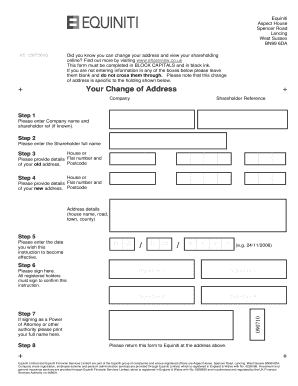
Changing your address for your shareholding is a straightforward process that can be completed online. This guide will provide you with clear, step-by-step instructions for filling out the Change Of Address Form - Shareview.
Follow the steps to successfully complete the Change Of Address Form.
- Click the ‘Get Form’ button to access the Change of Address Form and open it in the online editor.
- In the first section, enter the company name and your shareholder reference, if known.
- Provide your full name and the details of your old address, including the house or flat number and postcode.
- Next, enter the details of your new address, including the house or flat number and postcode.
- Fill in the effective date for this change of address by entering the day, month, and year in the specified format (DD/MM/YYYY).
- All registered holders must sign the form to confirm this instruction. Provide the required number of signatures.
- If you are signing under a Power of Attorney or any other authority, print your full name in the specified box.
- Review all the information provided for accuracy, then save your changes. You may choose to download, print, or share the form as needed.
Complete your Change Of Address Form online to ensure your shareholding information is up to date.
When filling out address line 1 and 2 on the Change Of Address Form - Shareview, use line 1 for your street address, including the house number and street name. Use line 2 for additional information such as apartment numbers, suite numbers, or other details that clarify your location. This clear separation helps prevent confusion and ensures that your mail arrives correctly. Always double-check your entries to ensure they are accurate.
Industry-leading security and compliance
-
In businnes since 199725+ years providing professional legal documents.
-
Accredited businessGuarantees that a business meets BBB accreditation standards in the US and Canada.
-
Secured by BraintreeValidated Level 1 PCI DSS compliant payment gateway that accepts most major credit and debit card brands from across the globe.