Loading
Get Woqod Login
How it works
-

Open form follow the instructions
-

Easily sign the form with your finger
-

Send filled & signed form or save
How to fill out the Woqod Login online
This guide provides step-by-step instructions on how to effectively fill out the Woqod Login form online. By following these detailed directions, users can ensure that all necessary information is correctly provided.
Follow the steps to complete the Woqod Login form online.
- Click ‘Get Form’ button to obtain the form and open it in the editor.
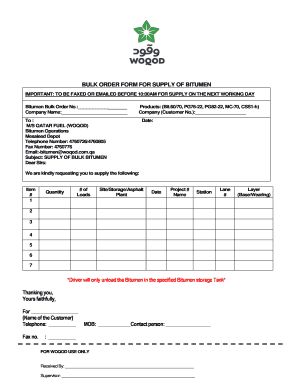
- Begin by filling in the Bitumen Bulk Order No. in the designated field. This number is crucial for tracking your order.
- Enter your company name in the corresponding section. This identifies the entity placing the order.
- Select the product type from the list provided. Options include Bit.60/70, PG76-22, PG82-22, MC-70, and CSS1-h.
- Input your company customer number in the specified field. This is necessary for record-keeping.
- In the ‘To’ section, confirm the recipient as M/S Qatar Fuel (Woqod), ensuring that the address and department details are correct.
- Fill in the date of your order, as it is essential for processing and delivery scheduling.
- Complete the items section by listing the item number, number of loads, quantity needed, and the location for delivery, whether it is a site, storage, or asphalt plant.
- Include the project number and name, as well as any station or lane assignments relevant to your order.
- Specify that the driver should only unload the bitumen in the designated storage tank.
- Sign the form by entering the name of your company representative, along with their telephone, mobile, and fax numbers.
- Ensure all fields are accurately filled out before proceeding to save changes, download, print, or share the completed form.
Complete your documents online today for efficient processing.
WOQOD accepts various payment methods for your convenience, including credit and debit cards, as well as the WOQOD tag for seamless transactions. Additionally, you can use mobile payment options through the WOQOD mobile app. This flexibility in payment methods enhances your experience at petrol stations. Make sure to log in using your Woqod Login to manage your payment preferences effectively.
Industry-leading security and compliance
US Legal Forms protects your data by complying with industry-specific security standards.
-
In businnes since 199725+ years providing professional legal documents.
-
Accredited businessGuarantees that a business meets BBB accreditation standards in the US and Canada.
-
Secured by BraintreeValidated Level 1 PCI DSS compliant payment gateway that accepts most major credit and debit card brands from across the globe.