Loading
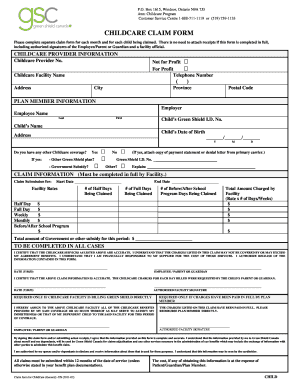
Get Childcare Claim Form - Green Shield Canada - Greenshield
How it works
-

Open form follow the instructions
-

Easily sign the form with your finger
-

Send filled & signed form or save
How to fill out the CHILDCARE CLAIM FORM - Green Shield Canada - Greenshield online
Completing the CHILDCARE CLAIM FORM accurately is essential for a smooth claim process. This guide will provide you with step-by-step instructions to fill out the form correctly and ensure that all necessary information is provided.
Follow the steps to complete your claim form efficiently.
- Click ‘Get Form’ button to obtain the form and open it in your preferred editing tool.
- Start with the Childcare Provider Information section. Indicate whether the provider is Not for Profit or For Profit, then fill in the facility's telephone number, provider number, name of the facility, address, city, province, and postal code.
- Proceed to the Plan Member Information section. Enter the employer's name, the first and last names of the employee, the child’s Green Shield ID number, the child's name, and the child's date of birth. Also, fill in your address.
- In the section asking about other childcare coverage, select 'Yes' or 'No'. If you select 'Yes', provide details regarding any other Green Shield plan or government subsidy coverage and attach necessary documents if applicable.
- Fill out the Claim Information section completely. Include the claim submission start and end dates, number of half days, full days, and before/after school program days being claimed. Provide the respective rates for each type of service.
- Calculate the total amount charged by the facility based on your entries. Clearly state the total amount of government or other subsidies received for the period.
- Both the employee/parent or guardian and the authorized facility representative must sign and date the form to certify that the information provided is accurate. Ensure that you check for missing information before the signatures.
- Finally, save your changes to the form. You can choose to download, print, or share the completed form as needed.
Complete and submit your CHILDCARE CLAIM FORM online today for a hassle-free claims experience.
Get form
Experience a faster way to fill out and sign forms on the web. Access the most extensive library of templates available.
To email GreenShield Canada, simply visit their official website and locate the contact section. You will find the appropriate email address for customer inquiries. When reaching out, be sure to include relevant details about your CHILDCARE CLAIM FORM - Green Shield Canada - Greenshield to expedite your request. This ensures a quicker response and helps address your questions effectively.
Get This Form Now!
Use professional pre-built templates to fill in and sign documents online faster. Get access to thousands of forms.