Loading
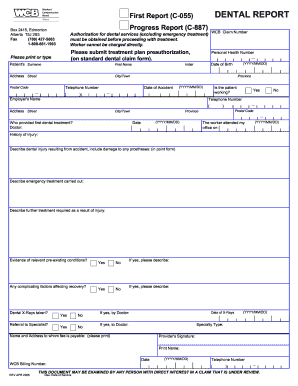
Get Dental Report. Wcb Dental Report/first Report/progress Report
How it works
-

Open form follow the instructions
-

Easily sign the form with your finger
-

Send filled & signed form or save
How to fill out the Dental Report. WCB Dental Report/First Report/Progress Report online
Completing the Dental Report for WCB is essential for documenting and processing dental injuries sustained in an accident. This guide will walk you through each section of the report to ensure accurate and thorough submission.
Follow the steps to successfully complete the Dental Report online.
- Click ‘Get Form’ button to access the Dental Report and open it in your preferred editor.
- Begin filling out the WCB claim number in the designated field to identify the claim associated with this report.
- Enter the personal health number of the patient, followed by the patient's surname and first name in the appropriate fields.
- Provide the patient’s address, including street, city or town, postal code, and province, ensuring all information is accurate.
- Input the telephone number of the patient, and record the date of birth in the prescribed format (YYYY/MM/DD).
- Indicate whether the patient is currently working by selecting 'Yes' or 'No.' If employed, enter the employer's name and their contact number.
- Document the name and address of the individual or establishment that provided the initial dental treatment, completing the relevant fields.
- Fill in the date when the patient first attended the dental office using the required date format.
- Detail the history of the injury by describing the dental injury resulting from the accident, including any damages to prostheses in point form.
- Describe any emergency treatment that was carried out immediately after the injury.
- Outline any further treatment required as a result of the injury, ensuring to specify any ongoing dental needs.
- Note if there is any evidence of relevant pre-existing conditions; provide details if applicable.
- Discuss any complicating factors that may affect the recovery process of the patient.
- Indicate whether dental X-rays were taken and enter the date of the X-rays if applicable.
- If referred to a specialist, provide details about the specialist, including name and address.
- Complete the section indicating the name and address of the person to whom fees are payable.
- Sign the report, print your name, and date the form. Include the WCB billing number where required.
- Review the completed Dental Report for accuracy, and save changes. You can then download, print, or share the form as necessary.
Start completing your WCB Dental Report online today to ensure timely processing of your claim.
To file a WCB report, begin by compiling all relevant information, including a detailed dental report if the injury involved dental care. Complete the WCB claim form, ensuring you provide accurate details about the incident and treatment. Submit the form along with the dental report to your local Workers' Compensation Board office. This step is crucial for ensuring you receive appropriate benefits.