Loading
Form preview
  • US Legal Forms
  • Form Library
  • More Forms
  • More Uncategorized Forms
  • Pnb Postal Link

Get Pnb Postal Link

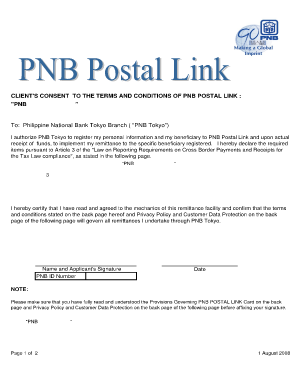
Ostal Link Card will be sent by Registered Mail to the client approximately after 4 weeks upon receipt of client's valid application form. 8. Each card containing unique number respectively will correspond one specific remitter to one specific beneficiary. This unique number is composed as PNBT (4digit) + PNB ID no (6 digit) + Initial of the beneficiary (2 digit) + beneficiary number (1 digit). Usage of this card at transferring remittance proceeds will constitute the remittance instruction. It.

How it works

  1. Open form

    Open form follow the instructions

  2. Easily sign form

    Easily sign the form with your finger

  3. Share form

    Send filled & signed form or save

How to fill out the Pnb Postal Link online

Filling out the Pnb Postal Link form is a crucial step for users wanting to facilitate remittances through PNB Tokyo. This guide provides a clear and supportive approach to completing the form accurately and efficiently.

Follow the steps to fill out the Pnb Postal Link form online.

  1. Click ‘Get Form’ button to obtain the Pnb Postal Link application form and open it in your preferred editor.
  2. Begin by filling out your personal information, including last name, first name, and middle name as applicable. Ensure that this information matches your identification documents.
  3. Provide your address in Japan. This should be the residence address that is valid and reflected on your identification.
  4. Enter your PNB ID number and date of birth in the MM/DD/YY format. This is essential for identification purposes.
  5. Include your contact details, such as home landline, mobile, and email address, to ensure that PNB can reach you for any necessary communications.
  6. Next, fill out the beneficiary's information. This includes their last name, first name, middle name, address in Indonesia, date of birth, and contact details.
  7. Indicate the purpose of the remittance by checking the appropriate box from the list of options. Ensure that this aligns with the specified conditions.
  8. Review your form carefully to verify all entries are accurate and complete. Pay special attention to the details that can impact remittance processing.
  9. Affix your signature to certify that you have read and agreed to the terms and conditions stated on the form.
  10. Save the completed form to your device. You can then download, print, or share it as needed for submission.

Complete your Pnb Postal Link form online now to ensure your remittance process is seamless.

Get form

Experience a faster way to fill out and sign forms on the web. Access the most extensive library of templates available.
Get form

Related content

A scam story: Secret shopping and fake checks |...
May 16, 2018 — I was sent the link via LinkedIn via a professional colleague....
Learn more
The Remittance Market in India - Open Knowledge...
these banks are providing any special remittance-linked loan products. Remittances...
Learn more
Philippine Airlines - Wikipedia
Philippine Airlines a trade name of PAL Holdings, Inc. (PSE: PAL), also known historically...
Learn more

Related links form

AU Macquarie Grammar School 377-FM-MGS Complaint Form 2012 AU Macquarie University Professional Authority Form AU MCV Form 68A AU Medicare MS001 2016

Questions & Answers

Get answers to your most pressing questions about US Legal Forms API.

Contact support

Linking your PAN card with your PNB account online is straightforward with the PNB Postal Link. Start by logging into your internet banking account, and locate the PAN linking option. Enter your PAN details as prompted, and confirm the information. If you encounter any issues, our platform offers support to guide you through this essential process.

To receive your PNB statement via mail, you can easily set this up through the PNB Postal Link. Log into your online banking account, go to the statements section, and opt for email delivery. This feature ensures you stay updated on your account transactions without the hassle of manual requests. If you need more assistance, our resources can help you navigate this process.

Yes, you can link your Aadhaar to your PNB account online through the PNB Postal Link. Simply log into your internet banking account, navigate to the Aadhaar linking section, and follow the prompts. This process is secure and convenient, allowing you to complete the linkage without visiting a branch. For more detailed steps, our platform offers comprehensive guides to assist you.

When you use the PNB Postal Link for foreign remittance, you can typically expect the transfer to be completed within 1 to 3 business days. This timeframe may vary based on the recipient's bank and country regulations. To ensure a smooth process, double-check the details before initiating the transfer. If you have further questions, our platform can provide guidance on managing your remittances effectively.

The 12 digit reference number in PNB is a unique identifier that is generated for various transactions and services. This number helps track your requests and transactions efficiently. If you are using the Pnb Postal Link service, you will often receive this reference number to confirm your transaction status or request updates, ensuring you stay informed throughout the process.

Linking your PAN card to your PNB account is a straightforward process. You can do this by visiting your nearest PNB branch or using the Pnb Postal Link service available online. Simply provide your PAN card details along with your account information, and the bank will ensure your records are updated, enhancing your account's compliance with regulatory requirements.

To link your mobile number with your PNB bank account, visit the nearest PNB branch or use the Pnb Postal Link service online. Ensure you have valid identification and your account details ready. Once you submit your request, the bank will process it and update your account information, allowing you to receive important notifications and updates directly to your phone.

How to make an international transfer with PNB Log into your PNB NetBanking. Select Transactions tab. Select Transfer to other bank accounts, then LRS Submission. Choose the correct bank account number to transfer from. Click to confirm you accept the terms and conditions. Complete all the required information.

Cash Pickup - in any PNB Domestic Branch or authorized payout partners* (Cebuana Lhuillier, Globe, Palawan Pawnshop, or RD Pawnshop) Overseas Bills Payment. Door-to-Door. Door-to-Bank.

USA Log on to .pnbwebremit.com. Register your personal and beneficiary information. Verify and confirm registration information. Send money! Track your remittance via PNB Remittance Tracker.

Get This Form Now!

Use professional pre-built templates to fill in and sign documents online faster. Get access to thousands of forms.
Get form
If you believe that this page should be taken down, please follow our DMCA take down processhere.

Industry-leading security and compliance

US Legal Forms protects your data by complying with industry-specific security standards.
  • In businnes since 1997
    25+ years providing professional legal documents.
  • Accredited business
    Guarantees that a business meets BBB accreditation standards in the US and Canada.
  • Secured by Braintree
    Validated Level 1 PCI DSS compliant payment gateway that accepts most major credit and debit card brands from across the globe.
Get Pnb Postal Link
Get form
Form Packages
Adoption
Bankruptcy
Contractors
Divorce
Home Sales
Employment
Identity Theft
Incorporation
Landlord Tenant
Living Trust
Name Change
Personal Planning
Small Business
Wills & Estates
Packages A-Z
Form Categories
Affidavits
Bankruptcy
Bill of Sale
Corporate - LLC
Divorce
Employment
Identity Theft
Internet Technology
Landlord Tenant
Living Wills
Name Change
Power of Attorney
Real Estate
Small Estates
Wills
All Forms
Forms A-Z
Form Library
Customer Service
Your Privacy Choices
Terms of Service
Privacy Notice
Legal Hub
Content Takedown Policy
Bug Bounty Program
About Us
Help Portal
Legal Resources
Blog
Affiliates
Contact Us
Delete My Account
Site Map
Industries
Forms in Spanish
Localized Forms
State-specific Forms
Forms Kit
Legal Guides
Real Estate Handbook
All Guides
Prepared for You
Notarize
Incorporation services
Our Customers
For Consumers
For Small Business
For Attorneys
Our Sites
US Legal Forms
USLegal
FormsPass
pdfFiller
signNow
altaFlow
DocHub
Instapage
Social Media
Call us now toll free:
+1 833 426 79 33
As seen in:
  • USA Today logo picture
  • CBC News logo picture
  • LA Times logo picture
  • The Washington Post logo picture
  • AP logo picture
  • Forbes logo picture
© Copyright 1997-2026
airSlate Legal Forms, Inc.
3720 Flowood Dr, Flowood, Mississippi 39232
Form Packages
Adoption
Bankruptcy
Contractors
Divorce
Home Sales
Employment
Identity Theft
Incorporation
Landlord Tenant
Living Trust
Name Change
Personal Planning
Small Business
Wills & Estates
Packages A-Z
Form Categories
Affidavits
Bankruptcy
Bill of Sale
Corporate - LLC
Divorce
Employment
Identity Theft
Internet Technology
Landlord Tenant
Living Wills
Name Change
Power of Attorney
Real Estate
Small Estates
Wills
All Forms
Forms A-Z
Form Library
Customer Service
Your Privacy Choices
Terms of Service
Privacy Notice
Legal Hub
Content Takedown Policy
Bug Bounty Program
About Us
Help Portal
Legal Resources
Blog
Affiliates
Contact Us
Delete My Account
Site Map
Industries
Forms in Spanish
Localized Forms
State-specific Forms
Forms Kit
Legal Guides
Real Estate Handbook
All Guides
Prepared for You
Notarize
Incorporation services
Our Customers
For Consumers
For Small Business
For Attorneys
Our Sites
US Legal Forms
USLegal
FormsPass
pdfFiller
signNow
altaFlow
DocHub
Instapage
Social Media
Call us now toll free:
+1 833 426 79 33
As seen in:
  • USA Today logo picture
  • CBC News logo picture
  • LA Times logo picture
  • The Washington Post logo picture
  • AP logo picture
  • Forbes logo picture
© Copyright 1997-2026
airSlate Legal Forms, Inc.
3720 Flowood Dr, Flowood, Mississippi 39232