Loading
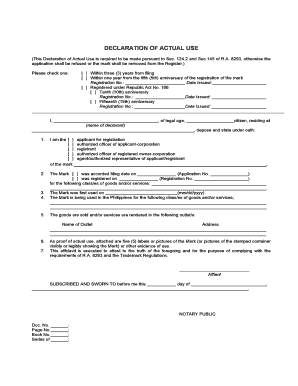
Get 4.5 Dauform.doc
How it works
-

Open form follow the instructions
-

Easily sign the form with your finger
-

Send filled & signed form or save
How to fill out the 4.5 DAUFORM.doc online
Completing the 4.5 DAUFORM.doc accurately is essential for ensuring compliance with the requirements under relevant regulations. This guide provides clear, step-by-step instructions to facilitate an efficient online filing process.
Follow the steps to complete the 4.5 DAUFORM.doc successfully.
- Press the ‘Get Form’ button to retrieve the form and open it in your online editor.
- Begin by checking the appropriate box indicating the timeline of your declaration of actual use. You may select either within three years from filing or within one year from the fifth anniversary of the registration of the mark.
- Fill in the registration number and date issued if applicable. You need to indicate if the mark is under Republic Act No. 166 and include additional registration numbers and dates for the tenth and fifteenth anniversaries, if relevant.
- In the declaration section, input your name, legal age, and citizenship status. Provide your residential address to establish your identity.
- Specify your role in relation to the mark by selecting the appropriate category from the options provided.
- Indicate the filing date and registration date for the mark, alongside listing the relevant classes of goods and/or services.
- Document the date when the mark was first used (in mm/dd/yyyy format) and confirm that it is being used in the Philippines for the specified classes of goods and/or services.
- List the outlet/s where the goods are sold or services are rendered, including the name and address.
- Attach evidence of actual use by including five labels, pictures of the mark, or other relevant proofs of usage as specified in the form.
- Review the completed form for accuracy, and then save changes, download, print, or share the form as required.
Complete your 4.5 DAUFORM.doc online today to ensure compliance and avoid any application issues.
How to Use VLOOKUP in Excel Identify a column of cells you'd like to fill with new data. Select 'Function' (Fx) > VLOOKUP and insert this formula into your highlighted cell. Enter the lookup value for which you want to retrieve new data. Enter the table array of the spreadsheet where your desired data is located.