The rate of 2% per month (both before and after judgement) from due date until the date of actual repayment or until repayment of the outstanding principal amount of the Loan has been demanded (whichever shall occur first) shall be charged on the amount of any overdue monthly repayment(s) and in the event of such default and not otherwise the Company is at liberty to disclose to the Employer of the Borrower the state of the Borrower s indebtedness. The outstanding principal amount of the Loan.
Loading
Open form follow the instructions
Easily sign the form with your finger
Send filled & signed form or save
How to use or fill out the Pnb Singapore online
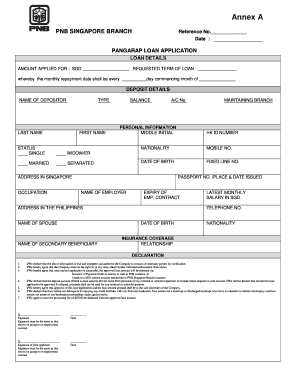
Filling out the Pnb Singapore loan application form is a straightforward process that can be completed online. This guide provides detailed, step-by-step instructions to help you navigate each section of the form effectively.
Follow the steps to complete the Pnb Singapore application online.
- Click the ‘Get Form’ button to obtain the loan application form and open it in your preferred form editor.
- In the loan details section, enter the amount you are applying for in SGD, specify the requested term of the loan, and indicate the monthly repayment date along with the starting month.
- For deposit details, provide your name, account number, and type of deposit. Fill in your last name, first name, and select your status from the options provided, such as single or married.
- Complete your personal information by providing your middle initial, nationality, mobile number, date of birth, and other relevant details including your address in Singapore and occupation.
- In the section for your employer, include the name of your employer, your employment contract's expiry date, and your address in the Philippines if applicable.
- If applicable, fill in the details of your spouse and any secondary beneficiary, including their names, nationalities, and contact information.
- Provide your latest monthly salary in SGD along with your passport number and its place and date of issue.
- In the declaration section, review the statements carefully and add your signature to authorize the information provided. Ensure that your signature matches that on your passport or employment contract.
- Finally, you can save your changes, download the completed form, print it for your records, or share it as needed.
Start filling out your application for the Pnb Singapore loan online today!
Experience a faster way to fill out and sign forms on the web. Access the most extensive library of templates available.
Related content
There is paucity of data describing the use of peripheral nerve blocks (PNB) as the sole...
Dec 3, 2020 — Fitch Ratings - Singapore/Mumbai - 03 Dec 2020: Fitch Ratings has affirmed...
Philippine Airlines ... a trade name of PAL Holdings, Inc. (PSE: PAL), also known...
Get answers to your most pressing questions about US Legal Forms API.
Which bank has a SWIFT code CITIUS33?
The SWIFT code CITIUS33 is associated with Citibank N.A. If you are transferring funds to or from Citibank, make sure to use this code. Always verify the recipient's bank details to prevent any issues with your transactions.
What is the SWIFT code for PNB bank in Singapore?
The SWIFT code for PNB bank in Singapore can vary based on the specific branch. To ensure you have the correct code, visit the official PNB website or contact customer support. Using the accurate SWIFT code is vital for smooth international transactions related to your PNB Singapore account.
Which bank's SWIFT code is BUKBGB22?
The SWIFT code BUKBGB22 belongs to Bank of the Commonwealth. If you are conducting transactions with this bank, ensure you use this code for accurate fund transfers. Always double-check the SWIFT code before initiating an international transaction to ensure successful processing.
Is the PNB SWIFT code the same in all branches?
As mentioned earlier, the PNB SWIFT code varies by branch. Each branch is assigned its own unique code to ensure precise routing of funds. Therefore, it is important to confirm the specific SWIFT code for your branch to avoid any delays in transactions. You can find this information on the PNB website or by asking your branch.
What is the swift code for PNB Singapore?
The swift code for PNB Singapore is often specific to the branch you are using. To find the correct swift code, visit the official PNB website or contact customer service. Using the right swift code is crucial for executing smooth international transactions related to your PNB Singapore account.
How to apply for PNB in Singapore?
To apply for PNB in Singapore, you need to visit the official PNB website or a local branch. Start by gathering the necessary documents, such as identification and proof of address. Then, fill out the application form accurately. Finally, submit your application along with the required documents to complete the process.
Can I open a bank account in the Philippines while in USA?
Yes, a foreigner can open a bank account in the Philippines but the type of account you can open will depend on your status as a foreigner. If you have been living in the country for more than 180 days, you're classified as a resident alien.
Can I open a Philippine bank account online while abroad?
Can I open a bank account from abroad? Due to documentation requirements, it isn't possible to open a Philippine bank account online.
Can I withdraw in PNB Singapore?
Remittance will be credited on-line, real time, and can be withdrawn from any PNB SuperTellers or any ATMs of BancNet, MegaLink, and Expressnet member banks. There is no maintaining balance requirement.
How can I open PNB account in Singapore?
Any of the following valid IDs: Your original valid Passport. Your POEA-approved Original Employment Contract (OEC) along with a photocopy of your valid passport. Professional Regulatory Commission (PRC) License. Driver's License. GSIS / SSS Membership IDs. NBI / Police Clearance. OFW ID (must be issued by either OWWA/POEA)
Use professional pre-built templates to fill in and sign documents online faster. Get access to thousands of forms.
If you believe that this page should be taken down, please follow our DMCA take down process here.