Loading
Form preview
  • US Legal Forms
  • Form Library
  • More Forms
  • More Uncategorized Forms
  • Bank Mandate Form

Get Bank Mandate Form

Instruction to your Bank to pay Direct Debits Originators Identification No.(OIN) 300180 Please complete parts 1 to 4 to instruct your Bank to make payments directly from your account. Then return.

How it works

  1. Open form

    Open form follow the instructions

  2. Easily sign form

    Easily sign the form with your finger

  3. Share form

    Send filled & signed form or save

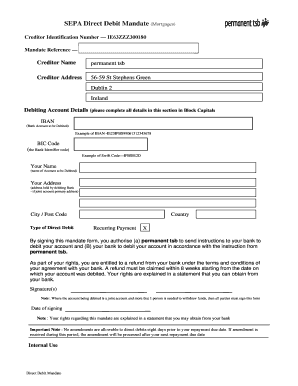
How to fill out the Bank Mandate Form online

Filling out the Bank Mandate Form online is a straightforward process that enables users to set up direct debits conveniently. This guide offers step-by-step instructions to help you complete the form accurately and efficiently.

Follow the steps to fill out the Bank Mandate Form online

  1. Click ‘Get Form’ button to obtain the Bank Mandate Form and open it for editing.
  2. In the 'Creditor Identification Number' section, enter the unique identification number associated with the creditor, which is required for direct debits.
  3. Leave the 'Mandate Reference' section blank, as this is typically filled in by the creditor.
  4. In the 'Creditor Name' field, clearly write 'permanent tsb' to identify the creditor associated with the direct debit.
  5. Fill in the 'Creditor Address' section with the address: 56-59 St Stephens Green, Dublin 2, Ireland.
  6. Proceed to the 'Debiting Account Details' section. Start by entering your IBAN (International Bank Account Number) in block capitals, ensuring accuracy. A sample is provided as a reference.
  7. Next, input the BIC code (Bank Identifier Code). Reference the example provided to ensure correctness.
  8. Enter your full name in the 'Your Name' section, exactly as it appears on the bank account.
  9. Complete the 'Your Address' section with the address linked to the debiting bank account, using block capitals.
  10. Specify your city and post code in the respective fields, ensuring the information is precise.
  11. Select the type of direct debit. In this case, mark the option for 'Recurring Payment' as applicable.
  12. After filling out the entire form, look for the signature section. Sign the form to authorize permanent tsb to debit your account.
  13. If your account is joint, make sure all necessary parties sign the form.
  14. Finally, enter the date of signing to confirm when the mandate was executed. Review all entered information for accuracy before submitting.

Complete your Bank Mandate Form online today to set up your direct debits seamlessly.

Get form

Experience a faster way to fill out and sign forms on the web. Access the most extensive library of templates available.
Get form

Related content

How do I stop automatic payments from my bank...
Jan 30, 2019 — Federal law provides certain protections for recurring automatic debit...
Learn more
mandate form - Saurashtra University
1, Please attach a photocopy of Cheque along With the verification obtained form the bank...
Learn more
Business Guide GPP Clearing Processing...
Field Value for TARGET2 MOP TARGET2 Identifier Bank BIC Settlement account Office, Account...
Learn more

Related links form

Stroke Care Now IV tPA Screening Checklist STS Adult Cardiac Surgery Discharge Form 2014 Student Drug Use Survey in the Atlantic Provinces Sudden Unexplained Infant Death Investigation Report Form

Questions & Answers

Get answers to your most pressing questions about US Legal Forms API.

Contact support

Yes, a Bank Mandate Form is legally binding once it is signed and accepted by your bank. This form acts as a contract that allows specified transactions to occur under your authorization. As with any legal document, ensure you understand the terms before signing.

You can obtain a Bank Mandate Form from your bank's website or by visiting a local branch. Many banks offer downloadable versions of the form online. If you prefer a more convenient method, platforms like uslegalforms provide templates that you can customize and print.

A Bank Mandate Form is a document that authorizes a bank to allow specified transactions on your account. It can include direct debits, fund transfers, or standing orders. This form ensures that payments can be made without requiring your direct approval each time, streamlining your financial transactions.

To set up a bank mandate, you need to fill out a Bank Mandate Form provided by your bank. This form typically requires your account details, the details of the recipient, and the amount to be authorized. Once you complete the form, submit it to your bank for processing. After approval, the mandate will be in place for future transactions.

To get a Direct Debit mandate form, contact your bank or visit their website, as most banks offer specific forms for this purpose. Alternatively, you can also check with the organization that will be receiving the Direct Debit payments, as they might provide the necessary form. For convenience, you can use uslegalforms to download a comprehensive Bank Mandate Form that includes Direct Debit options, making the process seamless.

You can obtain a bank mandate form directly from your bank, either online or in-person. Many banks provide downloadable templates on their websites. If you prefer a ready-made solution, consider visiting uslegalforms, where you can find a variety of Bank Mandate Form options that meet your needs, ensuring compliance and ease of use.

Many banks offer mandate form templates to help their customers set up automatic payments. You can usually find these templates on your bank's website or by contacting their customer service. However, it's important to ensure that the template you use aligns with your specific needs. If you want a more customizable option, consider using the Bank Mandate Form available on platforms like uslegalforms.

To fill a bank mandate form effectively, start by collecting all necessary information. Enter your personal and bank account details accurately, along with the payment specifics. Be sure to read through the form carefully to avoid any mistakes. A correctly completed Bank Mandate Form facilitates seamless transactions.

Filling out a bank mandate form requires clarity and precision. Begin by entering your name, address, and bank account details. Then, include the recipient’s information, the amount to be debited, and the payment frequency. This thoroughness ensures that your Bank Mandate Form is processed without any hiccups.

The mandate process in banking involves the authorization given by a customer to a bank to carry out transactions on their behalf. After submitting a Bank Mandate Form, the bank reviews the information and sets up the necessary arrangements. This process facilitates automatic payments, ensuring timely transactions without your direct involvement.

Get This Form Now!

Use professional pre-built templates to fill in and sign documents online faster. Get access to thousands of forms.
Get form
If you believe that this page should be taken down, please follow our DMCA take down processhere.

Industry-leading security and compliance

US Legal Forms protects your data by complying with industry-specific security standards.
  • In businnes since 1997
    25+ years providing professional legal documents.
  • Accredited business
    Guarantees that a business meets BBB accreditation standards in the US and Canada.
  • Secured by Braintree
    Validated Level 1 PCI DSS compliant payment gateway that accepts most major credit and debit card brands from across the globe.
Get Bank Mandate Form
Get form
  • Adoption
  • Bankruptcy
  • Contractors
  • Divorce
  • Home Sales
  • Employment
  • Identity Theft
  • Incorporation
  • Landlord Tenant
  • Living Trust
  • Name Change
  • Personal Planning
  • Small Business
  • Wills & Estates
  • Packages A-Z
  • Affidavits
  • Bankruptcy
  • Bill of Sale
  • Corporate - LLC
  • Divorce
  • Employment
  • Identity Theft
  • Internet Technology
  • Landlord Tenant
  • Living Wills
  • Name Change
  • Power of Attorney
  • Real Estate
  • Small Estates
  • Wills
  • All Forms
  • Forms A-Z
  • Form Library
  • Legal Hub
  • About Us
  • Help Portal
  • Legal Resources
  • Blog
  • Affiliates
  • Contact Us
  • Delete My Account
  • Site Map
  • Industries
  • Forms in Spanish
  • Localized Forms
  • State-specific Forms
  • Forms Kit
  • Real Estate Handbook
  • All Guides
  • Notarize
  • Incorporation services
  • For Consumers
  • For Small Business
  • For Attorneys
  • USLegal
  • FormsPass
  • pdfFiller
  • signNow
  • altaFlow
  • DocHub
  • Instapage
Form Packages
  • Adoption
  • Bankruptcy
  • Contractors
  • Divorce
  • Home Sales
  • Employment
  • Identity Theft
  • Incorporation
  • Landlord Tenant
  • Living Trust
  • Name Change
  • Personal Planning
  • Small Business
  • Wills & Estates
  • Packages A-Z
Form Categories
  • Affidavits
  • Bankruptcy
  • Bill of Sale
  • Corporate - LLC
  • Divorce
  • Employment
  • Identity Theft
  • Internet Technology
  • Landlord Tenant
  • Living Wills
  • Name Change
  • Power of Attorney
  • Real Estate
  • Small Estates
  • Wills
  • All Forms
  • Forms A-Z
  • Form Library
Customer Service
  • Legal Hub
  • About Us
  • Help Portal
  • Legal Resources
  • Blog
  • Affiliates
  • Contact Us
  • Delete My Account
  • Site Map
  • Industries
  • Forms in Spanish
  • Localized Forms
  • State-specific Forms
  • Forms Kit
Legal Guides
  • Real Estate Handbook
  • All Guides
Prepared for you
  • Notarize
  • Incorporation services
Our Customers
  • For Consumers
  • For Small Business
  • For Attorneys
Our Sites
  • USLegal
  • FormsPass
  • pdfFiller
  • signNow
  • altaFlow
  • DocHub
  • Instapage
Social Media
Call us now toll free:
+1 833 426 79 33
As seen in:
© Copyright 1999-2026 airSlate Legal Forms, Inc. 3720 Flowood Dr, Flowood, Mississippi 39232
  • Your Privacy Choices
  • Terms of Service
  • Privacy Notice
  • Content Takedown Policy
  • Bug Bounty Program