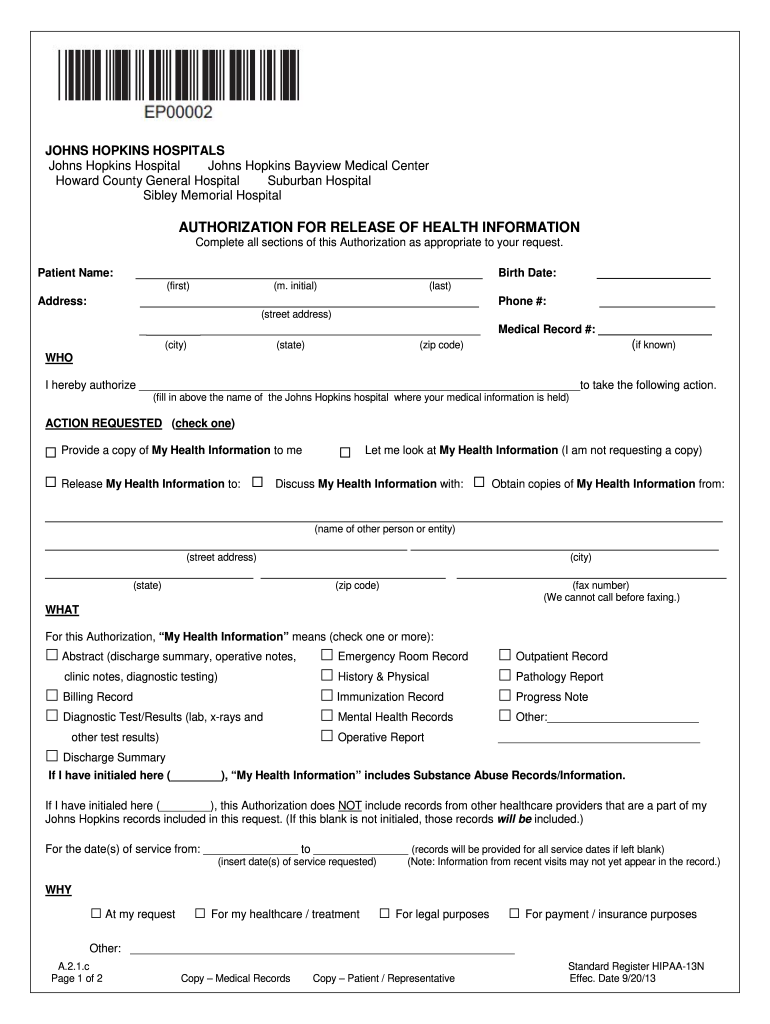
N Complete all sections of this Authorization as appropriate to your request. Patient Name: _____________________________________________ (first) (m. initial) ____________________________________________ Address: Birth Date: __________________ Phone #: _______________ (last) (street address) ________________________________________________ (city) (state) Medical Record #: __________________ (if known) (zip code) WHO I hereby authorize _____________________________________________.
Loading

Open form follow the instructions

Easily sign the form with your finger

Send filled & signed form or save
How to fill out the Standard Register HIPAA-13N online
Filling out the Standard Register HIPAA-13N online is a straightforward process that allows you to authorize the release of your health information. This guide provides clear, step-by-step instructions to help you navigate each section of the form with confidence.
Follow the steps to complete the HIPAA-13N authorization form accurately.
- Click ‘Get Form’ button to obtain the form and open it in your preferred online editor.
- Begin by entering the patient’s name in the specified fields, including their first name, middle initial, and last name. Fill out the complete address with the street address, city, state, and zip code.
- Provide the patient's birth date and phone number in the designated areas, and if known, include the medical record number.
- In the 'WHO' section, authorize the specific Johns Hopkins hospital where the medical information is held by filling in the hospital's name.
- Choose the action you wish to request regarding your health information by checking one of the provided options, such as providing a copy or allowing someone to discuss your health information.
- In the 'WHAT' section, specify what types of health information you would like to obtain by checking the applicable boxes. You may include additional details or initial to indicate special records.
- Indicate the dates of service for which you are requesting records, or leave the field blank if you want records from all service dates.
- For the format of the information, select your preferred method of receiving the records by checking the appropriate option. Be mindful of potential risks associated with electronic communication.
- Understand and acknowledge any fees associated with obtaining your health information by signing the form. Ensure you review the statements regarding the voluntary nature of this authorization.
- If you are signing on behalf of the patient, fill out the section for representatives, including the required signature and selection of the appropriate relationship.
- Once all fields are completed, review your responses for accuracy. Users can save changes, download the completed form, print it, or share it as necessary.
Take the next step to manage your health information — complete the Standard Register HIPAA-13N online today.
Experience a faster way to fill out and sign forms on the web. Access the most extensive library of templates available.
Related content
Applying your corporate compliance skills to the HIPAA security standard. ... national...
Jan 13, 2020 — 13N. APPE All Case Logs Interprofessional Interactions 2018-2019(1)...
Get answers to your most pressing questions about US Legal Forms API.
How do I document HIPAA compliance?
Documenting HIPAA compliance is essential for proving your adherence to regulations. Start by maintaining records of risk assessments, employee training sessions, and incident reports. Use the Standard Register HIPAA-13N framework as a reference for creating your documentation. Regular audits can further ensure that your records are up-to-date and comprehensive.
What are the steps to file a HIPAA case?
If you believe a HIPAA violation has occurred, start by gathering evidence and documenting your concerns. Next, reach out to the organization involved and express your issue. If unsatisfied with their response, you can file a complaint with the Office for Civil Rights (OCR). Ensure you follow these steps mindfully to support your claim effectively.
How do I file for HIPAA?
Filing for HIPAA compliance involves several steps. Begin with understanding the privacy and security rules outlined in the regulations. After that, create a compliance plan outlining how your organization will adhere to regulations like the Standard Register HIPAA-13N. Engage in training sessions and document all processes for future reference.
How do I send medical records to HIPAA compliant?
When sending medical records, you must use secure methods to ensure confidentiality. Use encrypted email services or secure file transfer options that comply with the Standard Register HIPAA-13N framework. Always verify the recipient’s identity and document the transaction. This proactive approach helps you mitigate risks associated with unauthorized access.
How do I get HIPAA approved?
To achieve HIPAA compliance, start with a thorough assessment of your current systems and practices. Evaluate your policies and procedures to identify gaps. Utilizing resources like the Standard Register HIPAA-13N can guide you in aligning your practices with HIPAA regulations. Consider training employees on compliance to ensure everyone reflects the importance of protecting patient information.
What is the standard for assessing patient information?
Assessing patient information involves evaluating the practices and policies in place to protect sensitive health data. Organizations should regularly review their compliance with HIPAA standards and make improvements where necessary. The Standard Register HIPAA-13N provides a structured framework that can help organizations effectively assess and enhance their information security practices.
How do I get HIPAA records?
To obtain HIPAA records, you must submit a formal request to the healthcare provider or organization that holds your records. This process often includes completing specific forms and providing proper identification. Using the services of uslegalforms can help you navigate these requirements efficiently, ensuring you acquire your records while remaining compliant with the Standard Register HIPAA-13N.
What is the standard for accessing patient information?
The standard for accessing patient information under HIPAA necessitates that access is granted based on role-based permissions and medical necessity. It is vital for healthcare facilities to establish policies that restrict access and ensure patient data is only available to authorized users. Compliance with the Standard Register HIPAA-13N can support organizations in enforcing these necessary access controls.
What is the standard for accessing patient info?
Accessing patient information is governed by HIPAA regulations, which stipulate that only authorized personnel may view this data. Organizations must implement procedures that ensure only those with a legitimate need have access to sensitive health information. Using the Standard Register HIPAA-13N helps to streamline these processes and maintain compliance with the laws.
What is HIPAA standard?
The HIPAA standard refers to a set of national guidelines designed to safeguard protected health information. These standards establish requirements for data security, patient confidentiality, and the proper handling of health records. By adhering to the Standard Register HIPAA-13N, organizations can effectively demonstrate compliance and enhance their data protection practices.
Use professional pre-built templates to fill in and sign documents online faster. Get access to thousands of forms.
If you believe that this page should be taken down, please follow our DMCA take down process here.