Loading
Get Vrt4
How it works
-

Open form follow the instructions
-

Easily sign the form with your finger
-

Send filled & signed form or save
How to fill out the Vrt4 online
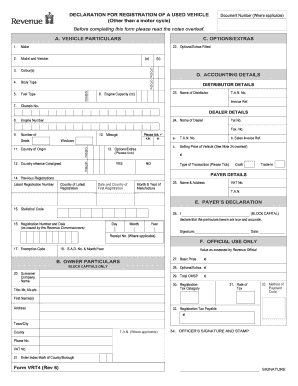
The Vrt4 form is essential for declaring the registration of a used vehicle in compliance with local regulations. This guide provides a step-by-step approach to help users navigate each section of the Vrt4 form effectively and accurately.
Follow the steps to complete the Vrt4 form online.
- Press the 'Get Form' button to access the Vrt4 and open it in the editor for online completion.
- Begin with Section A, where you will provide vehicle particulars. Enter the make, model and version, color(s), body type, fuel type, engine capacity (cc), chassis number, and engine number as applicable.
- Continue to input additional specifications such as mileage, country of origin, and the options or extras fitted to the vehicle. Make sure to include any relevant codes where required.
- In Section B, state the owner particulars using block capitals. Fill in the name and address of the individual or entity registering the vehicle, ensuring accurate representation.
- Proceed to Section D to complete the accounting details. Specify the name of the distributor and dealer, and fill out the selling price of the vehicle, indicating whether it was a cash or trade-in transaction.
- After filling out Section E, where you make a declaration regarding the accuracy of the particulars provided, ensure to sign and date the form.
- Finally, review all entries for accuracy. Users can save changes, download, print, or share the completed Vrt4 form as required.
Take the necessary steps to complete and submit your Vrt4 form online today.
The Vertiv controversy primarily revolves around its market practices and product performance. Some critics raise concerns about transparency and customer satisfaction. However, understanding these discussions can provide valuable insights into how VRT4 operates in the competitive landscape, helping you make informed decisions.