Loading
Form preview
  • US Legal Forms
  • Form Library
  • More Forms
  • More Uncategorized Forms
  • No Telp Dplk Aviva Form

Get No Telp Dplk Aviva Form

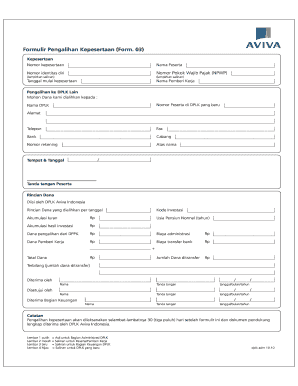
Formulir Pengalihan Kepesertaan (Form. 03) Kepesertaan Nomor kepesertaan Nama Peserta Nomor identitas diri Nomor Pokok Wajib Pajak (NPWP) (lampirkan salinan) (lampirkan salinan) Tanggal mulai kepesertaan.

How it works

  1. Open form

    Open form follow the instructions

  2. Easily sign form

    Easily sign the form with your finger

  3. Share form

    Send filled & signed form or save

How to fill out the No Telp Dplk Aviva Form online

Filling out the No Telp Dplk Aviva Form online is a straightforward process that allows users to efficiently manage their participation in the DPLK program. This guide will provide you with clear, step-by-step instructions to help you complete the form accurately.

Follow the steps to successfully fill out the No Telp Dplk Aviva Form.

  1. Click ‘Get Form’ button to obtain the form and open it in your editor.
  2. Begin by entering your kepesertaan number in the designated field. This is required for identifying your current participation status.
  3. Fill in the 'nama peserta' field with your full name. Make sure it matches the name on your identification documents.
  4. Provide your nomor identitas diri, which is your identity number. This is essential for verifying your identity.
  5. Enter your Nomor Pokok Wajib Pajak (NPWP) in the corresponding field. Ensure to attach a copy of your NPWP as indicated in the instructions.
  6. Select the tanggal mulai kepesertaan by entering the start date of your participation in the program.
  7. In the 'nama pemberi kerja' field, provide the name of your employer for reference.
  8. If you are transferring to another DPLK, specify the recipient institution by entering their nomor peserta, name, and address in the appropriate fields.
  9. Fill in the contact information of the new DPLK, including the telephone number, fax number, bank details, branch, account number, and the name of the account holder.
  10. In the 'rinci dana' section, you will need to include details on the investment codes, accumulated contributions, and transfers. Make sure to accurately input the figures as required.
  11. Complete signing and dating where indicated, ensuring all required signatures are provided for processing.
  12. Finally, review your completed form for accuracy before saving your changes, downloading a copy, printing it, or sharing it as needed.

Take proactive steps in managing your DPLK participation—fill out your forms online today.

Get form

Experience a faster way to fill out and sign forms on the web. Access the most extensive library of templates available.
Get form

Related content

(PDF) Form 04 Aviva Perubahan | Lukman Hakim...
04) Kepesertaan Nomor kepesertaan Nama Peserta Nomor identitas diri Nomor ... Usia Pensiun...
Learn more

Related links form

York Technical College Transcript/Grade Report Request 2013 Yorkville University Transcript Request Form YRDSB Arts Camp Application Package 2006 Z-Hope Zeta Adopt-a-School Program

Questions & Answers

Get answers to your most pressing questions about US Legal Forms API.

Contact support

The postcode for Aviva pension is necessary for any postal correspondence. It is usually listed on official documents or the Aviva website. For added convenience, check your policy paperwork to confirm the correct postcode. If you still have questions, consider using the 'No Telp Dplk Aviva Form' to reach out for clarification.

The sort code for your Aviva pension account is crucial for managing your finances. You can typically find this information in your account documentation or by logging into your MyAviva account. If you are unsure, the 'No Telp Dplk Aviva Form' can help you request this information directly from Aviva.

Finding your MyAviva pension details is simple. You need to log in to your MyAviva account, where you will find all relevant information about your pension. This includes your contributions, investment performance, and projected retirement income. If you need help with accessing your account, the 'No Telp Dplk Aviva Form' can provide additional resources.

When you retire, your MyAviva pension will be activated, allowing you to access your funds. You can choose how to receive your pension, whether as a lump sum or through regular payments. This process is designed to be flexible, so you can tailor it to your retirement needs. For detailed guidance, you may want to refer to the 'No Telp Dplk Aviva Form' for more information.

The postcode for Aviva is essential for sending correspondence or documents. The main postcode is typically provided on their official website, but it is often useful to check your policy documentation for specific information. If you require further assistance, consider using the 'No Telp Dplk Aviva Form' for inquiries.

Accessing your pension on Aviva is straightforward. Log in to your MyAviva account using your credentials. Once logged in, you can view your pension details, including balances and statements. If you encounter any issues, the 'No Telp Dplk Aviva Form' may provide additional guidance.

To submit a claim to Aviva, you can start by visiting the Aviva website and locating the claims section. Here, you will find the necessary forms, including the 'No Telp Dplk Aviva Form', which you need to fill out. Ensure that you provide all required documentation to support your claim. If you have any questions during the process, consider reaching out to their customer service for assistance.

दस Eleven. ११ ग्यारह Twelve. १२ ... बीस Twenty-one. २१ इक्कीस Twenty-two. २२ ... तीस Thirty-one. ३१ इकतीस Thirty-two. ३२ ... चालीस Forty-one. ४१ इकतालीस Forty-two. ४२ ... पचास Fifty-one. ५१ इक्यावन Fifty-two. ... साठ Sixty-one. ६१ इकसठ Sixty-two. ... सत्तर Seventy-one. ७१ इकहत्तर Seventy-two. ... अस्सी Eighty-one. ८१ इक्यासी Eighty-two.

The definition of a whole number is simply any positive number that does not include a fractional or decimal part. This means that, for example, the numbers 0, 1, 2, 3, 4, 5, 6, and 7 are all whole numbers. Numbers such as -3, 2.7, or 3 ½ are not whole numbers. Whole numbers are also known as integers.

Complete numbers: A positive number is said to be complete if the sum of all positive divisors of the number is equal to twice the number itself. For example, 6 is the first positive complete number. The divisors of 6 are 1, 2, 3 and 6. Therefore, the sum of the divisors = 1 + 2 + 3 + 6 = 12 = 2 × 6.

Get This Form Now!

Use professional pre-built templates to fill in and sign documents online faster. Get access to thousands of forms.
Get form
If you believe that this page should be taken down, please follow our DMCA take down processhere.

Industry-leading security and compliance

US Legal Forms protects your data by complying with industry-specific security standards.
  • In businnes since 1997
    25+ years providing professional legal documents.
  • Accredited business
    Guarantees that a business meets BBB accreditation standards in the US and Canada.
  • Secured by Braintree
    Validated Level 1 PCI DSS compliant payment gateway that accepts most major credit and debit card brands from across the globe.
Get No Telp Dplk Aviva Form
Get form
  • Adoption
  • Bankruptcy
  • Contractors
  • Divorce
  • Home Sales
  • Employment
  • Identity Theft
  • Incorporation
  • Landlord Tenant
  • Living Trust
  • Name Change
  • Personal Planning
  • Small Business
  • Wills & Estates
  • Packages A-Z
  • Affidavits
  • Bankruptcy
  • Bill of Sale
  • Corporate - LLC
  • Divorce
  • Employment
  • Identity Theft
  • Internet Technology
  • Landlord Tenant
  • Living Wills
  • Name Change
  • Power of Attorney
  • Real Estate
  • Small Estates
  • Wills
  • All Forms
  • Forms A-Z
  • Form Library
  • Legal Hub
  • About Us
  • Help Portal
  • Legal Resources
  • Blog
  • Affiliates
  • Contact Us
  • Delete My Account
  • Site Map
  • Industries
  • Forms in Spanish
  • Localized Forms
  • State-specific Forms
  • Forms Kit
  • Real Estate Handbook
  • All Guides
  • Notarize
  • Incorporation services
  • For Consumers
  • For Small Business
  • For Attorneys
  • USLegal
  • FormsPass
  • pdfFiller
  • signNow
  • altaFlow
  • DocHub
  • Instapage
Form Packages
  • Adoption
  • Bankruptcy
  • Contractors
  • Divorce
  • Home Sales
  • Employment
  • Identity Theft
  • Incorporation
  • Landlord Tenant
  • Living Trust
  • Name Change
  • Personal Planning
  • Small Business
  • Wills & Estates
  • Packages A-Z
Form Categories
  • Affidavits
  • Bankruptcy
  • Bill of Sale
  • Corporate - LLC
  • Divorce
  • Employment
  • Identity Theft
  • Internet Technology
  • Landlord Tenant
  • Living Wills
  • Name Change
  • Power of Attorney
  • Real Estate
  • Small Estates
  • Wills
  • All Forms
  • Forms A-Z
  • Form Library
Customer Service
  • Legal Hub
  • About Us
  • Help Portal
  • Legal Resources
  • Blog
  • Affiliates
  • Contact Us
  • Delete My Account
  • Site Map
  • Industries
  • Forms in Spanish
  • Localized Forms
  • State-specific Forms
  • Forms Kit
Legal Guides
  • Real Estate Handbook
  • All Guides
Prepared for you
  • Notarize
  • Incorporation services
Our Customers
  • For Consumers
  • For Small Business
  • For Attorneys
Our Sites
  • USLegal
  • FormsPass
  • pdfFiller
  • signNow
  • altaFlow
  • DocHub
  • Instapage
Social Media
Call us now toll free:
+1 833 426 79 33
As seen in:
© Copyright 1999-2026 airSlate Legal Forms, Inc. 3720 Flowood Dr, Flowood, Mississippi 39232
  • Your Privacy Choices
  • Terms of Service
  • Privacy Notice
  • Content Takedown Policy
  • Bug Bounty Program