Loading
Get Form 6 Dplk Revisi - Astra Life
How it works
-

Open form follow the instructions
-

Easily sign the form with your finger
-

Send filled & signed form or save
How to fill out the FORM 6 DPLK Revisi - Astra Life online
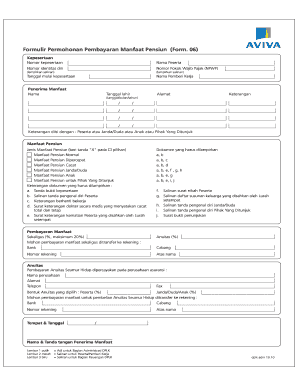
The FORM 6 DPLK Revisi - Astra Life is an essential document for users seeking to apply for pension benefit payments. This guide will provide users step-by-step instructions for completing the form online, ensuring a smooth process from start to finish.
Follow the steps to complete the FORM 6 DPLK Revisi - Astra Life online.
- Click the ‘Get Form’ button to obtain the form and open it in the editing platform.
- Fill out the 'Kepesertaan' section. Enter your membership number and personal information, including your name and identification number. Ensure to include your Tax Identification Number (NPWP) and attach the necessary copies.
- In the 'Penerima Manfaat' section, provide the name, date of birth, and address of the beneficiary. Specify the relationship of the beneficiary to the member in the 'Keterangan' field.
- Select the type of pension benefit you are applying for by marking an 'X' in the appropriate box under 'Jenis Manfaat Pensiun.' Options include Normal Pension Benefits, Accelerated Pension Benefits, Disability Pension Benefits, and others.
- Complete the 'Pembayaran Manfaat' section. Indicate if you prefer a lump-sum payment or an annuity, and provide the bank account details for the transfer.
- Gather and attach the required documents for your selected benefit type, such as proof of participation, identification copies, and any relevant medical or death certificates.
- After completing all sections of the form, review your entries for accuracy. Confirm that all necessary documents are attached.
- Save your changes, then proceed to download, print, or share the completed form as required.
Complete your documents online efficiently today!
Related links form
Upon completion of your FUNDED travel authorization/orders you must file a travel voucher/claim within 5 days of return. Click on Official Travel; Select 'Vouchers' you will see a hyperlink 'Create New Voucher from Authorization'. Select the appropriate trip to create the voucher against.