We use cookies to improve security, personalize the user experience, enhance our marketing activities (including cooperating with our marketing partners) and for other business use.
Click "here" to read our Cookie Policy. By clicking "Accept" you agree to the use of cookies. Read less
Read more
Accept
Loading
Form preview
  • US Legal Forms
  • Form Library
  • More Forms
  • More Uncategorized Forms
  • Autoclave Matika Form

Get Autoclave Matika Form

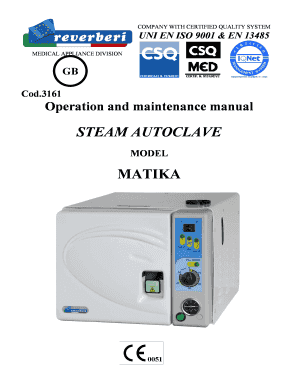
COMPANY WITH CERTIFIED QUALITY SYSTEM UNI EN ISO 9001 & EN 13485 MEDICAL APPLIANCE DIVISION GB Cod.3161 Operation and maintenance manual STEAM AUTOCLAVE MODEL MATIKA Operation and Maintenance.

How it works

  1. Open form

    Open form follow the instructions

  2. Easily sign form

    Easily sign the form with your finger

  3. Share form

    Send filled & signed form or save

How to fill out the Autoclave Matika Form online

Completing the Autoclave Matika Form online is a straightforward process designed to ensure your machine is registered correctly and efficiently. This guide provides a detailed, step-by-step approach to help you navigate each section with clarity.

Follow the steps to complete your form accurately.

  1. Click 'Get Form' button to access the Autoclave Matika Form online.
  2. Enter the serial number of the autoclave in the designated field. Ensure this number matches the label on the appliance.
  3. Fill out the installation details, including the date of first installation and the name of the technician who installed the machine.
  4. Provide your company's name and address, ensuring all information is up-to-date and accurate.
  5. Complete the warranty section, indicating whether the warranty form was sent to the manufacturer upon installation.
  6. Select the reason for returning the appliance if applicable, such as periodic calibration or repair under warranty.
  7. Describe any faults encountered, providing as much detail as possible to facilitate troubleshooting.
  8. Review all entries for accuracy. Make any necessary corrections before final submission.
  9. Submit the completed form online, ensuring you save a copy for your records.

Start filling out your Autoclave Matika Form online today to ensure proper registration and support!

Get form

Experience a faster way to fill out and sign forms on the web. Access the most extensive library of templates available.
Get form

Related content

an explosion - OSTI.gov
by FA Baum · ‎1969detonation of explosives in order to form a cavity, and on the...
Learn more
an explosion - OSTI.gov
detonation of explosives in order to form a cavity, and on the penetration of the...
Learn more
an explosion - OSTI.gov
by FA Baum · ‎1969detonation of explosives in order to form a cavity, and on the...
Learn more

Related links form

Hillyard Credit Application Holt Application 2008 Home Mortgage Group Credit Card Information Sheet Homeowner's Association Certification 2012

Questions & Answers

Get answers to your most pressing questions about US Legal Forms API.

Contact support

While certification is not always mandatory to use an autoclave, it is essential to have proper training to ensure safe and effective operation. Understanding the Autoclave Matika Form and its functionalities can enhance your confidence in using this equipment. Additionally, some facilities may require certification to comply with health and safety standards. Familiarizing yourself with best practices helps prevent accidents and ensures optimal performance.

If you need to sterilize items without an autoclave, consider using methods such as boiling or steam sterilization in a pressure cooker. However, these methods may not reach the same levels of sterilization as the Autoclave Matika Form. For reliable results, you might want to invest in a proper autoclave to ensure all materials are thoroughly sterilized. Platforms like US Legal Forms can help you find the right autoclave options for your needs.

To check for the sterility of an autoclave material, you can use biological indicators, which contain spores that only germinate in the presence of viable bacteria. After autoclaving, incubate these indicators to see if any growth occurs. If there is no growth, it indicates that the Autoclave Matika Form has effectively sterilized the materials. Regular testing ensures that your autoclave maintains its performance and reliability.

Autoclaving is typically done for 15 minutes to ensure that all microorganisms are effectively killed through exposure to high temperature and pressure. This duration, as outlined in the Autoclave Matika Form, allows enough time for steam to penetrate through the packaging and reach all surfaces of the items. Adhering to this time frame is crucial for achieving complete sterilization.

The procedures for autoclaving involve several key steps: cleaning the items, packaging them properly, and setting the autoclave to the correct temperature and pressure. With the Autoclave Matika Form, you can follow a structured approach that outlines each step, making the process straightforward and efficient. This ensures that all items are sterilized effectively.

To prepare items for an autoclave, start by cleaning and drying them completely. Next, utilize the Autoclave Matika Form to categorize and package items appropriately, ensuring they are wrapped in suitable materials that allow for steam penetration. Proper packaging is crucial as it impacts the sterilization process and overall effectiveness.

The first step in preparing instruments for autoclaving is to thoroughly clean them to remove any organic material. After cleaning, you can use the Autoclave Matika Form to correctly package the instruments, ensuring they are positioned properly for steam circulation. By following these steps, you enhance the effectiveness of the sterilization process.

Autoclaves use steam sterilization, which is an effective method for eliminating bacteria, viruses, and spores. The Autoclave Matika Form can guide you through the process, ensuring that you understand the required temperature and pressure settings for optimal results. This method is widely recognized for its reliability and efficiency in medical and laboratory environments.

To autoclave step by step, first prepare your items by cleaning and packaging them appropriately. Next, load the autoclave, ensuring proper spacing for steam circulation. Set the autoclave to the required temperature and time according to the Autoclave Matika Form, and then start the cycle. Finally, allow the autoclaved items to cool before handling to ensure safety and effectiveness.

To label an autoclave package on Quizlet, create a digital flashcard that includes key information such as the contents, sterilization date, and the person responsible for packaging. Use clear and concise language to ensure the information is easily understood. This method complements your knowledge of the Autoclave Matika Form, allowing you to reinforce proper labeling techniques.

Get This Form Now!

Use professional pre-built templates to fill in and sign documents online faster. Get access to thousands of forms.
Get form
If you believe that this page should be taken down, please follow our DMCA take down processhere.

Industry-leading security and compliance

US Legal Forms protects your data by complying with industry-specific security standards.
  • In businnes since 1997
    25+ years providing professional legal documents.
  • Accredited business
    Guarantees that a business meets BBB accreditation standards in the US and Canada.
  • Secured by Braintree
    Validated Level 1 PCI DSS compliant payment gateway that accepts most major credit and debit card brands from across the globe.
Get Autoclave Matika Form
Get form
Form Packages
Adoption
Bankruptcy
Contractors
Divorce
Home Sales
Employment
Identity Theft
Incorporation
Landlord Tenant
Living Trust
Name Change
Personal Planning
Small Business
Wills & Estates
Packages A-Z
Form Categories
Affidavits
Bankruptcy
Bill of Sale
Corporate - LLC
Divorce
Employment
Identity Theft
Internet Technology
Landlord Tenant
Living Wills
Name Change
Power of Attorney
Real Estate
Small Estates
Wills
All Forms
Forms A-Z
Form Library
Customer Service
Terms of Service
Privacy Notice
Legal Hub
Content Takedown Policy
Bug Bounty Program
About Us
Help Portal
Legal Resources
Blog
Affiliates
Contact Us
Delete My Account
Site Map
Industries
Forms in Spanish
Localized Forms
State-specific Forms
Forms Kit
Legal Guides
Real Estate Handbook
All Guides
Prepared for You
Notarize
Incorporation services
Our Customers
For Consumers
For Small Business
For Attorneys
Our Sites
US Legal Forms
USLegal
FormsPass
pdfFiller
signNow
airSlate WorkFlow
DocHub
Instapage
Social Media
Call us now toll free:
+1 833 426 79 33
As seen in:
  • USA Today logo picture
  • CBC News logo picture
  • LA Times logo picture
  • The Washington Post logo picture
  • AP logo picture
  • Forbes logo picture
© Copyright 1997-2025
airSlate Legal Forms, Inc.
3720 Flowood Dr, Flowood, Mississippi 39232
Form Packages
Adoption
Bankruptcy
Contractors
Divorce
Home Sales
Employment
Identity Theft
Incorporation
Landlord Tenant
Living Trust
Name Change
Personal Planning
Small Business
Wills & Estates
Packages A-Z
Form Categories
Affidavits
Bankruptcy
Bill of Sale
Corporate - LLC
Divorce
Employment
Identity Theft
Internet Technology
Landlord Tenant
Living Wills
Name Change
Power of Attorney
Real Estate
Small Estates
Wills
All Forms
Forms A-Z
Form Library
Customer Service
Terms of Service
Privacy Notice
Legal Hub
Content Takedown Policy
Bug Bounty Program
About Us
Help Portal
Legal Resources
Blog
Affiliates
Contact Us
Delete My Account
Site Map
Industries
Forms in Spanish
Localized Forms
State-specific Forms
Forms Kit
Legal Guides
Real Estate Handbook
All Guides
Prepared for You
Notarize
Incorporation services
Our Customers
For Consumers
For Small Business
For Attorneys
Our Sites
US Legal Forms
USLegal
FormsPass
pdfFiller
signNow
airSlate WorkFlow
DocHub
Instapage
Social Media
Call us now toll free:
+1 833 426 79 33
As seen in:
  • USA Today logo picture
  • CBC News logo picture
  • LA Times logo picture
  • The Washington Post logo picture
  • AP logo picture
  • Forbes logo picture
© Copyright 1997-2025
airSlate Legal Forms, Inc.
3720 Flowood Dr, Flowood, Mississippi 39232