Loading
Get Hillyard Credit Application
How it works
-

Open form follow the instructions
-

Easily sign the form with your finger
-

Send filled & signed form or save
How to fill out the Hillyard Credit Application online
This guide provides clear instructions on how to complete the Hillyard Credit Application online, ensuring you have the necessary information ready for a smooth submission process. Follow the steps outlined to fill out each section accurately and efficiently.
Follow the steps to complete the application successfully.
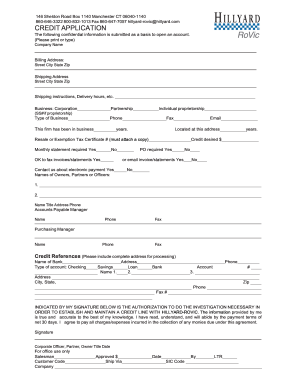
- Click ‘Get Form’ button to obtain the application form and open it in the designated editing environment.
- Begin with the 'Company Name' field. Enter the official name of your organization as registered.
- Next, fill in the billing address. Provide the street address, city, state, and zip code in the appropriate fields.
- Continue by entering the shipping address, ensuring that you include the street address, city, state, and zip code.
- In the 'Shipping instructions' section, specify any delivery hours or special instructions relevant to shipping.
- Indicate the type of business structure by selecting from the options provided: Corporation, Partnership, or Individual Proprietorship. If you select Individual Proprietorship, you will need to provide the Social Security Number.
- Fill in your business type and contact information, including phone number, fax number, and email address.
- State how long your firm has been in business by indicating the number of years in operation.
- Complete the 'Resale or Exemption Tax Certificate #' section if applicable, and ensure a copy is attached if required.
- Select whether you require a monthly statement and if a purchase order is required to process orders.
- Specify whether you are okay with receiving invoices or statements via fax or email.
- Indicate your preference regarding electronic payment communications.
- List the names of the owners, partners, or officers in the designated section, including their titles, addresses, and phone numbers.
- Provide contact information for the Accounts Payable Manager and Purchasing Manager, including their names, phone numbers, and fax numbers.
- Include your credit references. Ensure that you provide the complete address for each reference, including the name of the bank and the type of account.
- Review the authorization statement regarding the investigation for establishing credit. Sign and date the form to confirm that the information is accurate.
- Once all sections are completed, check for accuracy. Save changes, and choose to download, print, or share the form as needed.
Start filling out the Hillyard Credit Application online today to establish your credit line.
Related links form
To fill out an authorization form, clearly enter the necessary information, such as your full name, account number, and authorization details. Make sure to read any instructions carefully before submission. If it’s a Hillyard Credit Application, providing accurate information will enhance the responsiveness of the process. Finally, sign and date the form to validate your consent.