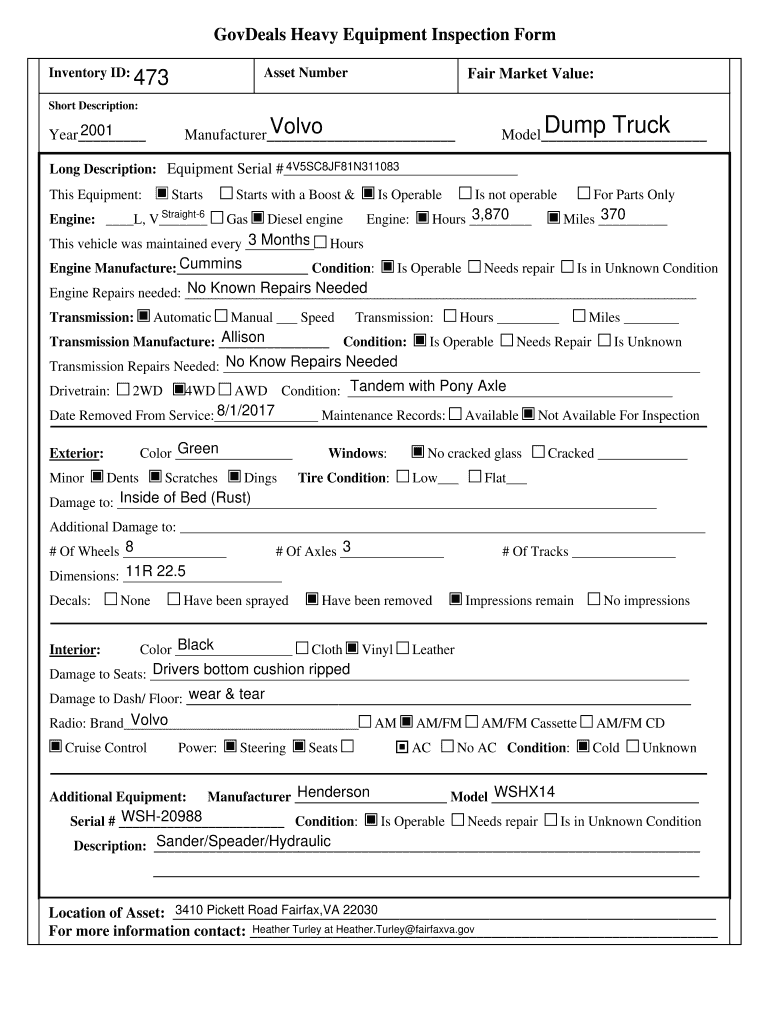
Ents Scratches Dings Windows: Available No cracked glass Tire Condition: Low Not Available For Inspection Cracked Flat Inside of Bed (Rust) Damage to: Additional Damage to: 8 # Of Wheels 3 # Of Axles # Of Tracks 11R 22.5 Dimensions: Decal.
Loading

Open form follow the instructions

Easily sign the form with your finger

Send filled & signed form or save
How to fill out the Equipment Inspection Form online
Filling out the Equipment Inspection Form online is a straightforward process that ensures accurate documentation of equipment condition and maintenance history. This guide will provide clear instructions to help you navigate through each section of the form effectively.
Follow the steps to complete the form seamlessly.
- Press the ‘Get Form’ button to access the Equipment Inspection Form and open it in your preferred editor.
- Begin by entering the inventory ID in the designated field, ensuring that you provide the correct identifier for your equipment.
- Fill in the asset number, fair market value, and a brief description of the equipment, such as 'Dump Truck.' Ensure you specify the model and manufacturer accurately.
- Indicate the year of manufacture and the equipment serial number. This information helps in identifying the specific unit you are inspecting.
- Detail the condition of the engine, specifying whether it starts, starts with a boost, or is operable. Specify the engine type and whether it operates on gas or diesel.
- Record maintenance history by indicating when the vehicle was last maintained and the total hours of operation.
- Complete the section regarding the drivetrain condition, noting whether it is 2WD, 4WD, or another configuration.
- Assess the exterior condition, including the presence of dents, scratches, or any significant damage. Note tire condition and any issues with the windows.
- Document any damage to the interior, including seats and dashboard, and specify the color and condition of the upholstery.
- Use the additional fields for describing any installed equipment, such as radios, and their condition.
- Finally, make sure to include the location of the asset and a contact person's information for follow-up inquiries.
- Once you have completed the form, review all entries for accuracy. You can then save changes, download, print, or share the document as needed.
Complete your documents online and ensure thorough records for your equipment inspections.
Experience a faster way to fill out and sign forms on the web. Access the most extensive library of templates available.
Related content
1. “DOT” or CVSA inspection in the last 12 months (if required). *. 2. Gauges and...
C. PERSONAL PROTECTIVE EQUIPMENT: (1) Is appropriate PPE available and used where...
Brazing is a metal-joining process in which two or more metal items are joined together by...
Get answers to your most pressing questions about US Legal Forms API.
How to fill an inspection report?
To fill an inspection report effectively, start by gathering all relevant information and using an Equipment Inspection Form as your template. Clearly document your findings, including any issues identified, corrective actions recommended, and any follow-up required. Make sure to include your name, date of inspection, and signatures for accountability.
What is a 7 point inspection?
A 7 point inspection is a detailed assessment that covers seven specific areas of concern regarding equipment safety and functionality. This type of inspection ensures that all crucial components are examined, minimizing risks. Using an Equipment Inspection Form can help you systematically address each point and maintain high safety standards.
What is a level 7 inspection?
A level 7 inspection refers to a comprehensive evaluation of equipment, focusing on all operational aspects and safety features. This thorough examination often includes reviewing documentation, performing hands-on checks, and analyzing equipment performance. Utilizing an Equipment Inspection Form can facilitate this process and ensure all critical areas are assessed.
What are the key steps in the inspection process?
The key steps in the inspection process include planning, conducting the inspection, identifying hazards, assessing risks, and generating a report. You start by preparing the necessary documents, such as the Equipment Inspection Form. After identifying any issues, you assess risks and recommend corrective actions to enhance safety and compliance.
Are equipment inspections required by OSHA?
Yes, equipment inspections are mandated by OSHA regulations to ensure workplace safety. They require employers to regularly inspect equipment to prevent accidents and maintain compliance. Using an Equipment Inspection Form can help you document these inspections and demonstrate adherence to safety standards.
What paperwork do you need for an inspection?
For an effective inspection, you will need various documents, including an Equipment Inspection Form, maintenance records, safety guidelines, and previous inspection reports. This paperwork helps you understand the equipment's history and ensures compliance with regulations. Having everything organized can streamline the inspection process and enhance safety outcomes.
What are the 7 steps of the inspection process?
The inspection process typically involves preparation, documentation review, equipment examination, hazard identification, risk assessment, corrective action planning, and reporting. You begin by gathering necessary documents and checklists, such as the Equipment Inspection Form. Next, you evaluate the equipment to identify any potential hazards. Finally, you document your findings and create a report to communicate necessary actions.
How to properly fill out a 2404?
To properly fill out a 2404 form, first ensure you have the correct Equipment Inspection Form at hand. Provide accurate information on the equipment being inspected, including identification numbers and inspection dates. Carefully follow the instructions for each section, documenting any discrepancies or maintenance actions required. Once completed, double-check your entries for clarity and precision before submitting the form.
How to write up an inspection report?
To write up an inspection report, start by gathering all necessary data using an Equipment Inspection Form. Clearly document the findings, including any issues or areas that need attention. Use straightforward language and organize the information logically, making it easy for readers to follow. Finally, ensure that your report is thorough, as it serves as an important reference for future inspections.
Does Wyoming require vehicle inspections?
Yes, Wyoming does require vehicle inspections, particularly for certain types of vehicles and under specific circumstances. To comply, you will need to complete an Equipment Inspection Form that meets state regulations. This form helps ensure your vehicle is safe and roadworthy, adhering to Wyoming's safety standards. You can find customizable Equipment Inspection Forms on platforms like US Legal Forms, making the process easier and more efficient.
Use professional pre-built templates to fill in and sign documents online faster. Get access to thousands of forms.
If you believe that this page should be taken down, please follow our DMCA take down process here.