Loading
Form preview
  • US Legal Forms
  • Other Templates
  • More Forms
  • More Uncategorized Forms
  • Blue Cross Extended Health Care Form

Get Blue Cross Extended Health Care Form

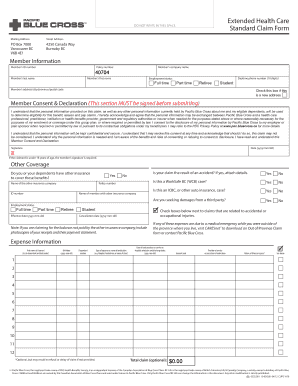
Or name of clinic) Date of each purchase or service or hospital admission and discharge dates (yyyy-mm-dd) Amount paid Provider of service or prescriber of medication Nature of illness or injury* See above 1 2 3 4 5 6 7 8 9 10 11 12 *Optional, but may result in refusal or delay of claim if not provided. Total claim (optional): $0.00 P acific Blue Cross, the registered trade-name of PBC Health Benefits Society, is an independent licensee of the Canadian Association of Blue Cross.

How it works

  1. Open form

    Open form follow the instructions

  2. Easily sign form

    Easily sign the form with your finger

  3. Share form

    Send filled & signed form or save

How to fill out the Blue Cross Extended Health Care Form online

Completing the Blue Cross Extended Health Care Form online can be a straightforward process when you have clear guidance. This document serves as a comprehensive guide to help you navigate each section of the form with ease, ensuring that all necessary details are accurately captured for your health claim submission.

Follow the steps to successfully complete your health care claim online.

  1. Press the ‘Get Form’ button to access and launch the form in your browser.
  2. Fill in the member information section, including your member ID number, policy number, company name, last name, first name, and daytime phone number. Specify your employment status as full time, part time, retiree, or student.
  3. Provide your address details including street, city, province, and postal code. Check the box if you have a new address.
  4. Review the Member Consent & Declaration section. Read the consent thoroughly. You must sign and date this section, ensuring it is completed before submission. If the claimant is under 18 years, the member’s signature is required.
  5. Indicate if there is other insurance coverage by selecting 'Yes' or 'No'. If 'Yes', provide the name of the other insurance company, policy number, member name, and any other relevant details.
  6. Answer questions regarding accidents, WorkSafe BC cases, and third-party claims. Check the boxes relevant to your claims.
  7. In the Expense Information section, list all claimants’ first names, birthdates, dependent numbers, type of expense, purchase dates, amounts paid, providers, and optional nature of the illness or injury.
  8. Once you have completed all sections and reviewed for accuracy, save your changes. You can then download, print, or share the form as needed.

Complete your Blue Cross Extended Health Care Form online today for efficient processing of your claims.

Get form

Experience a faster way to fill out and sign forms on the web. Access the most extensive library of templates available.
Get form

Related content

Subscriber Claim Form - Blue Cross Blue Shield of...
Blue Cross Blue Shield plan. 2. Submit a separate form for each patient. 3. Attach an...
Learn more
Medical Claim Form - Anthem Blue Cross Blue Shield
Medical Claim Form. Read instructions on reverse side. Mail to: Anthem Blue Cross and Blue...
Learn more
Consumer-driven healthcare - Wikipedia
Consumer-driven healthcare (CDHC), or consumer-driven health plans (CDHP) refers to a type...
Learn more

Related links form

NM Application for Subsidy 2014 NM Application for Subsidy 2013 NM MVD-10041 1990 NM MVD-10208 1998

Questions & Answers

Get answers to your most pressing questions about US Legal Forms API.

Contact support

Filling out a health insurance claim form involves several steps. Begin by entering your basic information and policy number. Next, list the services provided, including dates and costs, on the Blue Cross Extended Health Care Form. It’s essential to provide accurate information and to check for completeness before submitting the form to avoid any delays in processing your claim.

When making an insurance claim, clearly explain the situation and the services you received. Mention your policy details and provide any relevant documentation, including the Blue Cross Extended Health Care Form. Be concise yet thorough in your explanation to help the claims representative understand your request fully. This clarity will aid in a smoother claims process.

To submit documents to Blue Cross, gather all necessary paperwork, including your completed Blue Cross Extended Health Care Form. You can typically submit your claim online through their portal, by mail, or sometimes via email, depending on their guidelines. Make sure to follow the specific submission instructions outlined by Blue Cross to ensure prompt processing. Keep copies of everything you send for your records.

Filling in an insurance claim requires careful attention to detail. Begin with your personal information and policy details, then describe the services you received, including dates and costs. Use the Blue Cross Extended Health Care Form to ensure you include all necessary sections, such as provider information and diagnosis codes. After filling it out, double-check everything to avoid delays in processing.

To properly fill out a health insurance claim form, start by gathering all necessary documents, such as receipts and medical records. Ensure you provide accurate personal information, including your policy number and the details of the services received. Clearly itemize each service and include the costs associated with them. Once completed, review the Blue Cross Extended Health Care Form for any mistakes before submission.

To submit therapy expenses to insurance, start by completing the Blue Cross Extended Health Care Form. This form requires details about the therapy sessions and the provider. After filling it out, attach the relevant receipts or documentation and submit it either online or through traditional mail.

Submitting claims to Blue Cross Blue Shield involves using the Blue Cross Extended Health Care Form. Fill out the form with accurate information about your medical services and include any necessary documentation. Once completed, submit the form through their online portal or by mailing it to the appropriate claims address.

To upload documents to Blue Cross, log into your account on their website. Navigate to the claims section and look for the option to upload documents. Select the Blue Cross Extended Health Care Form and any additional files you need to attach, then follow the prompts to complete the upload process.

To submit a claim to your medical insurance, complete the Blue Cross Extended Health Care Form. Include all necessary details about your treatment and attach any relevant documents, such as bills or medical records. You can then submit this information via mail or electronically, depending on your insurance provider's options.

You will need the Blue Cross Extended Health Care Form to submit health insurance claims. This form captures essential information, including your policy number and the specifics of the services you received. Make sure to complete it accurately to avoid delays in processing your claim.

Get This Form Now!

Use professional pre-built templates to fill in and sign documents online faster. Get access to thousands of forms.
Get form
If you believe that this page should be taken down, please follow our DMCA take down processhere.
Get Blue Cross Extended Health Care Form
Get form
  • Adoption
  • Bankruptcy
  • Contractors
  • Divorce
  • Home Sales
  • Employment
  • Identity Theft
  • Incorporation
  • Landlord Tenant
  • Living Trust
  • Name Change
  • Personal Planning
  • Small Business
  • Wills & Estates
  • Packages A-Z
  • Affidavits
  • Bankruptcy
  • Bill of Sale
  • Corporate - LLC
  • Divorce
  • Employment
  • Identity Theft
  • Internet Technology
  • Landlord Tenant
  • Living Wills
  • Name Change
  • Power of Attorney
  • Real Estate
  • Small Estates
  • Wills
  • All Forms
  • Forms A-Z
  • Other Templates
  • Legal Hub
  • About Us
  • Help Portal
  • Legal Resources
  • Blog
  • Affiliates
  • Contact Us
  • Delete My Account
  • Site Map
  • Industries
  • Forms in Spanish
  • Localized Forms
  • State-specific Forms
  • Forms Kit
  • Real Estate Handbook
  • All Guides
  • Notarize
  • Incorporation services
  • For Consumers
  • For Small Business
  • For Attorneys
  • USLegal
  • FormsPass
  • pdfFiller
  • signNow
  • altaFlow
  • DocHub
  • Instapage
Form Packages
  • Adoption
  • Bankruptcy
  • Contractors
  • Divorce
  • Home Sales
  • Employment
  • Identity Theft
  • Incorporation
  • Landlord Tenant
  • Living Trust
  • Name Change
  • Personal Planning
  • Small Business
  • Wills & Estates
  • Packages A-Z
Form Categories
  • Affidavits
  • Bankruptcy
  • Bill of Sale
  • Corporate - LLC
  • Divorce
  • Employment
  • Identity Theft
  • Internet Technology
  • Landlord Tenant
  • Living Wills
  • Name Change
  • Power of Attorney
  • Real Estate
  • Small Estates
  • Wills
  • All Forms
  • Forms A-Z
  • Other Templates
Customer Service
  • Legal Hub
  • About Us
  • Help Portal
  • Legal Resources
  • Blog
  • Affiliates
  • Contact Us
  • Delete My Account
  • Site Map
  • Industries
  • Forms in Spanish
  • Localized Forms
  • State-specific Forms
  • Forms Kit
Legal Guides
  • Real Estate Handbook
  • All Guides
Prepared for you
  • Notarize
  • Incorporation services
Our Customers
  • For Consumers
  • For Small Business
  • For Attorneys
Our Sites
  • USLegal
  • FormsPass
  • pdfFiller
  • signNow
  • altaFlow
  • DocHub
  • Instapage
Social Media
Call us now toll free:
+1 833 426 79 33
As seen in:
© Copyright 1999-2026 airSlate Legal Forms, Inc. 17 Station Street, Ste. 203, Brookline, MA 02445
  • Your Privacy Choices
  • Terms of Service
  • Privacy Notice
  • Content Takedown Policy
  • Bug Bounty Program