Signature Date Please see www. cpa125. com to download forms or for more information regarding the Flexible Spending Accounts. Cpa125. com and meet all requirements necessary to participate in the FSA Dependent Care plan. The undersigned agrees to notify the plan administrator in writing within 30 days should the undersigned no longer meet eligibility as mandated by the IRS. Dependents must qualify under IRC section 152. 848. 9848 www. CPA125. com Form must be returned to Cafeteria Plan Advisors. Fax 781. 848. 8477 Personal Information Name Employer Street Plan Year City ST Zip SSN E-Mail Phone Payroll Information I am paid Weekly IF APPLICABLE I am a Bi-Weekly Municipal Employee Semi-Monthly School Employee Monthly Other Department/Location Benefits Selected FSA Dependent/ Day Care Account FSA Medical/Dental Care Account I elect to contribute for the Plan Year. AUTHORIZATION FOR PRE-TAX PAYROLL REDUCTION Cafeteria Plan Advisors Inc* 420 Washington St* Suite 100 Braintree MA 02184 Phon....
Loading
Open form follow the instructions
Easily sign the form with your finger
Send filled & signed form or save
How to fill out the Cpa125 online
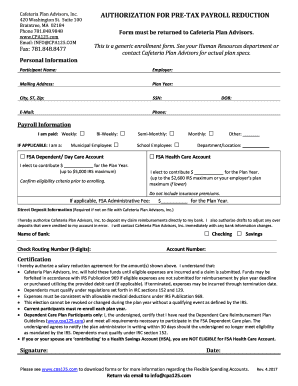
The Cpa125 form is essential for enrolling in a cafeteria plan, allowing users to manage pre-tax payroll reductions efficiently. This guide will provide clear, step-by-step instructions to help you complete the Cpa125 online with ease.
Follow the steps to successfully complete the Cpa125 form.
- Click ‘Get Form’ button to obtain the form and open it in the editor.
- Fill in your personal information, including your name, employer, street address, city, state, zip code, Social Security Number, email, and phone number. Ensure that all entries are accurate for timely processing.
- In the payroll information section, indicate how often you are paid by selecting the corresponding option: weekly, bi-weekly, semi-monthly, monthly, or other. If applicable, identify whether you are a municipal or school employee.
- Proceed to select the benefits you wish to enroll in from the available options: FSA dependent/day care account or FSA medical/dental care account. Enter the contribution amount for each plan year, ensuring that you do not exceed the maximum limits of $5,000 for the dependent/day care account and $2,500 for the medical/dental account.
- If not already on file, provide your direct deposit information. Choose between checking or savings accounts and enter the name of your bank, routing number, and account number to facilitate claim reimbursements directly to your bank.
- Read through the certification section carefully. This section contains important information about fund usage, claim submission deadlines, and eligibility criteria. Sign and date the form to authorize the salary reduction agreement.
- Once all fields are completed and verified, save your changes. You can then download, print, or share the Cpa125 form as needed.
Complete your documents online today for a seamless experience.
Experience a faster way to fill out and sign forms on the web. Access the most extensive library of templates available.
Related content
Employee Pre-tax Benefits.... Improve company benefit packages. Employees save dollars on...
Allows for pre tax (salary reduction) and reimbursement of qualified dependent care...
DYNAMCO'S DASH 1 valve family is based on a direct solenoid poppet that can be either a...
Get answers to your most pressing questions about US Legal Forms API.
What does CAF 125 mean on W-2?
CAF 125 on your W-2 is another way to refer to contributions made under a Section 125 cafeteria plan. This designation shows the total amount deducted from your paycheck for pre-tax benefits. These deductions can reduce your taxable income, which is beneficial during tax season. Knowing what CAF 125 represents can clarify your financial records.
What does cafe 125 mean on my W-2?
CAFE 125 on your W-2 refers to the amount you contributed to a Section 125 cafeteria plan. This plan allows employees to choose from a variety of pre-tax benefits, such as health insurance or flexible spending accounts. The contributions you see listed as CAFE 125 indicate the amount deducted from your salary for these benefits. Understanding this can help you grasp your tax situation better.
Is section 125 a good idea?
Implementing a Section 125 plan can be a beneficial strategy for many businesses. It enables employees to choose their benefits while enjoying tax advantages, making it appealing for both parties. Additionally, a Section 125 plan can improve employee retention and attract new talent, as it showcases a commitment to employee welfare. Therefore, considering CPA125 as part of your benefits package is certainly worth exploring.
Who prepares the Section 125 plan?
The preparation of a Section 125 plan typically involves a collaboration between the employer and a qualified benefits consultant or legal advisor. These professionals ensure the plan complies with IRS regulations and meets the specific needs of the organization. At USLegalForms, you can find resources and templates that simplify the process of creating a compliant Section 125 plan. This support can help you implement the CPA125 with confidence.
How do I combine letters into a logo?
One of the easiest ways to create logos with letters is to find two characters which can share the same stroke line—most likely a vertical stroke. You can choose between making each letter a different color to emphasis one over the other, or simply make both letters the same color to create one solid lettermark.
How to combine 2 logos into one?
0:11 3:10 Combine two logo design ideas to get a new one - YouTube YouTube Start of suggested clip End of suggested clip But it's definitely still different than the two. Here two basic shapes square. And circle withMoreBut it's definitely still different than the two. Here two basic shapes square. And circle with company name just use them combine them and you've got this example where the text is at right. Bottom.
How do I combine two logos in Photoshop?
1:30 3:47 How to combine multiple images in Photoshop instantly - YouTube YouTube Start of suggested clip End of suggested clip File go down under the file and then we're going to choose scripts. Now go under the scripts hereMoreFile go down under the file and then we're going to choose scripts. Now go under the scripts here and we have this option to load files into a stack. So click on that. We get load layers.
How do I merge two logos in Photoshop?
1:30 3:47 How to combine multiple images in Photoshop instantly - YouTube YouTube Start of suggested clip End of suggested clip File go down under the file and then we're going to choose scripts. Now go under the scripts hereMoreFile go down under the file and then we're going to choose scripts. Now go under the scripts here and we have this option to load files into a stack. So click on that. We get load layers.
How to combine two logos into one?
0:11 3:10 Combine two logo design ideas to get a new one - YouTube YouTube Start of suggested clip End of suggested clip But it's definitely still different than the two. Here two basic shapes square. And circle withMoreBut it's definitely still different than the two. Here two basic shapes square. And circle with company name just use them combine them and you've got this example where the text is at right. Bottom.
Can you have two logos for one company?
But did you know that most businesses actually have multiple logo variations? In fact, it's common for brands to have up to four logo variations, each of which is suitable for different print and digital applications.
Use professional pre-built templates to fill in and sign documents online faster. Get access to thousands of forms.
If you believe that this page should be taken down, please follow our DMCA take down process here.