Loading
Get Ny Mv-900.1 2011
How it works
-

Open form follow the instructions
-

Easily sign the form with your finger
-

Send filled & signed form or save
How to fill out the NY MV-900.1 online
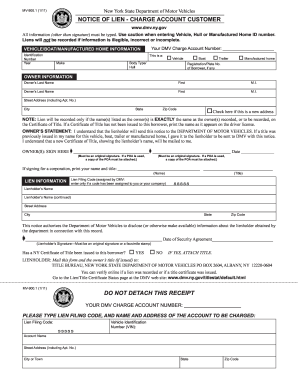
Completing the NY MV-900.1 form online can simplify the process of filing a notice of lien with the New York State Department of Motor Vehicles. This guide provides clear, step-by-step instructions to ensure that users can efficiently fill out and submit the form accurately.
Follow the steps to fill out the NY MV-900.1 online.
- Use the ‘Get Form’ button to access the NY MV-900.1 form and open it in the online editor.
- Start by entering your DMV charge account number in the designated field. Ensure that it is typed correctly to avoid delays.
- Provide the vehicle, boat, or manufactured home information. Fill in the Identification Number, Year, Make, and specify the Body Type or Hull as Vehicle, Boat, Trailer, or Manufactured Home. Include the registration or plate number of the borrower if applicable.
- Next, input the owner information accurately. List the owner’s last name, first name, and middle initial. Repeat this for a second owner if needed. Fill in the street address, city, state, and zip code. If there is a new address, check the provided box.
- Review the note regarding the owner’s name. Ensure that it matches exactly as it appears on the Certificate of Title or the driver's license since the lien will only be recorded under matching names.
- In the Owner’s Statement section, confirm your understanding by typing your signature and date. If signing on behalf of a corporation, include the name and title of the signer.
- Provide the lien information including the Lien Filing Code (if assigned), Lienholder’s Name, and their address details. This ensures accurate processing of your notice.
- Include the date of the security agreement and the lienholder’s signature in the designated areas, ensuring it is either an original signature or a facsimile stamp.
- Indicate whether a New York Certificate of Title has been issued to the borrower by marking 'YES' or 'NO'. If 'YES', be sure to attach the title.
- After completing all sections, verify the information one last time for accuracy. Once confirmed, save your changes, print, download, or share the completed form as necessary.
Complete your documents online effectively and efficiently by following these guidelines.
Get form
Experience a faster way to fill out and sign forms on the web. Access the most extensive library of templates available.
For a title transfer in New York, it is not mandatory for both parties to be present. The seller can complete the necessary paperwork alone and provide all required information to the buyer. Keeping the NY MV-900.1 form in mind can facilitate understanding of the process, ensuring all necessary steps are followed.
Get This Form Now!
Use professional pre-built templates to fill in and sign documents online faster. Get access to thousands of forms.