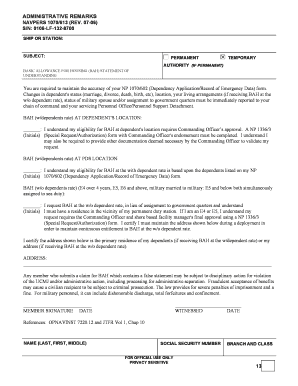
FILLABLE FORM ADMINISTRATIVE REMARKS NAVPERS 1070/613 (REV. 0706) S/N: 0106LF1328700 SHIP OR STATION: SUBJECT: PERMANENT BASIC ALLOWANCE FOR HOUSING (BAH) STATEMENT OF UNDERSTANDING TEMPORARY AUTHORITY.
Open form follow the instructions
Easily sign the form with your finger
Send filled & signed form or save
How to fill out the Navpers 1070 613 Bah online
Filling out the Navpers 1070 613 Bah form online is an essential process for users who want to understand their Basic Allowance for Housing eligibility. This guide provides a clear and concise roadmap to help you navigate each section of the form efficiently.
Follow the steps to confidently complete the Navpers 1070 613 Bah form.
- Press the ‘Get Form’ button to acquire the form and open it in your editor.
- Begin by entering your ship or station name in the designated field at the top of the form.
- Indicate whether your request is for a permanent or temporary status by checking the appropriate box.
- Fill in the necessary information regarding your eligibility for BAH at the dependent's location, ensuring you understand the requirement for Commanding Officer's approval.
- If applicable, provide your initials where prompted to confirm your understanding of BAH eligibility at your Permanent Duty Station (PDS) location.
- Complete the section for requesting BAH at the without dependent rate, ensuring you understand the requirements for Commanding Officer approval.
- In the address field, clearly write the primary residence of your dependents or your own address, as applicable.
- Date and sign the form in the member signature section to validate your submission.
- A witness should sign and date the field labeled ‘WITNESSED’ to complete the form.
- Once you have filled in all required sections, you can save your changes, download, print, or share the form as necessary.
Complete your Navpers 1070 613 Bah form online today for an efficient submission process.
Experience a faster way to fill out and sign forms on the web. Access the most extensive library of templates available.
Related content
Beginning with the 2012 BAH rates, the Department is publishing the average percentage...
ADMINISTRATIVE REMARKS. NAVPERS 1070/613 (REV. 08-2012) PREVIOUS EDITIONS ARE OBSOLETE...
Get answers to your most pressing questions about US Legal Forms API.
How to get 1070 602 from NSIPs?
To obtain the Navpers 1070 602 from the Navy Standard Integrated Personnel System (NSIPs), you will need to log in to your account securely. Navigate to the appropriate section for personnel forms and request the 1070 602. If you encounter any issues, reaching out to your personnel support office can provide the assistance you need. Additionally, uslegalforms offers resources to guide you through this process.
How to fill out navpers 1070 613?
When filling out the Navpers 1070 613, start by entering your personal identification information. Follow this by detailing your housing allowance and any dependents you may have. It’s crucial to ensure that all information is correct to facilitate a smooth processing of your BAH. For additional assistance, consider our platform, which offers resources for completing this form correctly.
How to fill out Navy leave chit?
Filling out a Navy leave chit involves providing your personal information, dates of leave, and the reason for your absence. Ensure that you have your command's approval before submitting the chit. Remember, accuracy is vital, as any errors can lead to misunderstandings regarding your leave. Using uslegalforms can help simplify this process.
How to fill out 1070 613?
To fill out the Navpers 1070 613, begin with your personal data, including your name and service details. Next, accurately list your dependents and their information. Double-check all entries for accuracy before submission to avoid delays in receiving your BAH. Consider using uslegalforms to access templates and instructions for filling out this form.
How to receive BAH Navy?
To receive Basic Allowance for Housing (BAH) in the Navy, you must first complete the necessary paperwork, including the Navpers 1070 613 Bah form. Ensure that your commanding officer approves your housing situation. Once your form is processed, you will receive your BAH based on your duty station's location and your dependent status.
How to fill out navpers 1306 7?
To fill out the Navpers 1306 7, start by entering your personal information accurately, including your current duty station and any relevant service details. Follow the instructions on the form carefully, ensuring that all required fields are completed. If you have any questions, the resources at USLegalForms can provide helpful templates.
How to get BAH in the navy?
To receive Basic Allowance for Housing (BAH) in the Navy, you must first ensure you meet the eligibility criteria. Typically, you need to be on active duty and have dependents. Once you complete the Navpers 1070 613, you can submit it along with your housing request to initiate BAH payments.
How to fill out a navpers 1070 613?
Filling out the Navpers 1070 613 involves entering your personal details, such as your name, rate, and social security number. You will also need to provide information on your duty status and the specific absences you are documenting. Carefully review all entries for completeness and correctness before submission. For assistance, USLegalForms offers easy-to-follow guides on completing the Navpers 1070 613 Bah accurately.
Do you get bas twice a month?
They get paid twice a month; on the 1st and on the 15th. If the 1st or 15th land on a weekend, they get paid the Friday before. Your airman has more than likely set up a direct deposit to receive his pay, (do YOU have access to your husband's/your joint account?).
Is BAH paid monthly or bimonthly?
Since BAH is split between your two monthly paychecks, and rent or mortgage payments are due in full at the beginning of each month, it is a good idea to develop a spending plan to keep your payments up to date.
Use professional pre-built templates to fill in and sign documents online faster. Get access to thousands of forms.
If you believe that this page should be taken down, please follow our DMCA take down process here.