Loading
Form preview
  • US Legal Forms
  • Form Library
  • More Forms
  • More Multi-State Forms
  • Salary Advance Application Form

Get Salary Advance Application Form

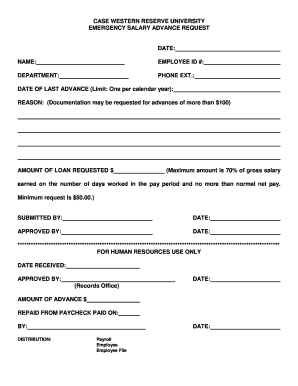
CASE WESTERN RESERVE UNIVERSITY EMERGENCY SALARY ADVANCE REQUESTDATE: NAME:EMPLOYEE ID #:DEPARTMENT:PHONE EXT.:DATE OF LAST ADVANCE (Limit: One per calendar year): REASON: (Documentation may be requested.

How it works

  1. Open form

    Open form follow the instructions

  2. Easily sign form

    Easily sign the form with your finger

  3. Share form

    Send filled & signed form or save

How to fill out the Salary Advance Application Form online

Filling out the Salary Advance Application Form online is a straightforward process that allows users to request an advance on their salary in cases of emergency. This guide provides detailed instructions on how to accurately complete each section of the form to ensure a smooth application process.

Follow the steps to complete your application successfully.

  1. Click 'Get Form' button to access the Salary Advance Application Form and open it in the editor.
  2. Begin by entering the date in the designated field at the top of the form. This date typically reflects when you are submitting the request.
  3. Fill in your full name in the 'Name' field. Ensure that the name matches what is listed in your company records to avoid any identification issues.
  4. Provide your employee ID number in the corresponding section. If you are unsure of your ID, refer to your employee verification documents.
  5. Indicate your department accurately. Make sure this reflects where you are currently employed within the organization.
  6. Enter your phone extension in the field provided. This should be your direct line to allow for easy communication regarding your application.
  7. Document the date of your last advance in the specified section. Keep in mind that according to policy, only one advance is permitted per calendar year.
  8. Clearly state the reason for your salary advance request. Be prepared to provide additional documentation if the amount requested exceeds $100.
  9. Enter the amount of loan requested in the designated field. Remember, the maximum allowed is 70% of your gross salary earned in the current pay period, with a minimum request of $50.
  10. Complete the 'Submitted By' section by entering your name once again and the date of submission.
  11. Leave the 'Approved By' section blank for the Human Resources department to fill out once they review your request.
  12. Once you have filled out all required fields, save your changes. You can download, print, or share the completed form as necessary.

Start your application process by filling out the Salary Advance Application Form online today!

Get form

Experience a faster way to fill out and sign forms on the web. Access the most extensive library of templates available.
Get form

Related content

Request for Salary Advance Form | Department of...
Request for Salary Advance Form. Monday, October 23, 2017. File: File...
Learn more
Payroll Salary Advance Request Form - Vassar...
Faculty and Administrators: You may request a salary advance only in emergency...
Learn more
NBA salary cap - Wikipedia
The NBA salary cap is the limit to the total amount of money that National Basketball...
Learn more

Related links form

Gafachi Toll Fee RespOrg Change Letter of Authorization Galaxy Gala Space Race Scavenger Hunt 2007 Gas Integrity Test & Gas Turn-On Affidavit 2013 GAS T-Shirt Template Form

Questions & Answers

Get answers to your most pressing questions about US Legal Forms API.

Contact support

Writing an advance salary application begins with addressing the appropriate person, such as your manager or HR representative. Clearly state your request, including the amount you wish to advance and the reason for your application. Use a respectful tone and provide your Salary Advance Application Form with all necessary details. This clarity will aid in a smoother review process.

Requesting an advance salary involves submitting a Salary Advance Application Form to your employer. Clearly articulate the reason for your request and the amount you need. It's important to be honest and straightforward, as this builds trust with your employer. You may also want to follow up in person or via email to ensure your request is being processed.

To apply for a salary advance, start by obtaining a Salary Advance Application Form from your employer or their online platform. Fill in the required details, including your reason for the request and the amount needed. After completing the form, submit it to your manager or HR department for approval. Be prepared to discuss your request and provide any necessary supporting documents.

Applying for a salary advance involves completing the Salary Advance Application Form, where you'll need to provide your personal details and the requested amount. Clearly state the reasons for your request, as this will help your employer understand your situation. Submit the form to your HR department or supervisor, and they will guide you through the approval process.

To request a salary advance, prepare a written request that explains your situation. Be specific about the amount you need and why you require it. Utilizing the Salary Advance Application Form can streamline this process, providing a structured format for your request.

When asking for an advance on your paycheck, it helps to present your request in writing. Your message should include personal information, the amount needed, and a clear reason for your request. The Salary Advance Application Form available on uslegalforms can serve as a useful template for structuring your request professionally.

To request a salary advance, you can refer to a sample letter or email format that outlines your request clearly. Include your personal details, the amount you wish to advance, and a brief explanation of your circumstances. Using the Salary Advance Application Form from uslegalforms can provide you with a professional template to follow.

To obtain a salary advance, first, review your company's policy on salary advances. Next, complete the Salary Advance Application Form, detailing your request and the reason for it. Submit the form to the appropriate department, and await their decision regarding your application.

To politely ask for an advance salary, start by scheduling a conversation with your supervisor or HR representative. Clearly explain your situation, expressing the need for financial assistance. Use the Salary Advance Application Form to provide a formal request, ensuring you outline how the advance will help you manage your current financial obligations.

Processing a salary advance typically involves submitting your Salary Advance Application Form to your HR department or manager. After submission, your request will be reviewed based on company policies and your past performance. Stay proactive by following up to check the status of your application, ensuring you remain informed throughout the process.

Get This Form Now!

Use professional pre-built templates to fill in and sign documents online faster. Get access to thousands of forms.
Get form
If you believe that this page should be taken down, please follow our DMCA take down processhere.

Industry-leading security and compliance

US Legal Forms protects your data by complying with industry-specific security standards.
  • In businnes since 1997
    25+ years providing professional legal documents.
  • Accredited business
    Guarantees that a business meets BBB accreditation standards in the US and Canada.
  • Secured by Braintree
    Validated Level 1 PCI DSS compliant payment gateway that accepts most major credit and debit card brands from across the globe.
Get Salary Advance Application Form
Get form
  • Adoption
  • Bankruptcy
  • Contractors
  • Divorce
  • Home Sales
  • Employment
  • Identity Theft
  • Incorporation
  • Landlord Tenant
  • Living Trust
  • Name Change
  • Personal Planning
  • Small Business
  • Wills & Estates
  • Packages A-Z
  • Affidavits
  • Bankruptcy
  • Bill of Sale
  • Corporate - LLC
  • Divorce
  • Employment
  • Identity Theft
  • Internet Technology
  • Landlord Tenant
  • Living Wills
  • Name Change
  • Power of Attorney
  • Real Estate
  • Small Estates
  • Wills
  • All Forms
  • Forms A-Z
  • Form Library
  • Legal Hub
  • About Us
  • Help Portal
  • Legal Resources
  • Blog
  • Affiliates
  • Contact Us
  • Delete My Account
  • Site Map
  • Industries
  • Forms in Spanish
  • Localized Forms
  • State-specific Forms
  • Forms Kit
  • Real Estate Handbook
  • All Guides
  • Notarize
  • Incorporation services
  • For Consumers
  • For Small Business
  • For Attorneys
  • USLegal
  • FormsPass
  • pdfFiller
  • signNow
  • altaFlow
  • DocHub
  • Instapage
Form Packages
  • Adoption
  • Bankruptcy
  • Contractors
  • Divorce
  • Home Sales
  • Employment
  • Identity Theft
  • Incorporation
  • Landlord Tenant
  • Living Trust
  • Name Change
  • Personal Planning
  • Small Business
  • Wills & Estates
  • Packages A-Z
Form Categories
  • Affidavits
  • Bankruptcy
  • Bill of Sale
  • Corporate - LLC
  • Divorce
  • Employment
  • Identity Theft
  • Internet Technology
  • Landlord Tenant
  • Living Wills
  • Name Change
  • Power of Attorney
  • Real Estate
  • Small Estates
  • Wills
  • All Forms
  • Forms A-Z
  • Form Library
Customer Service
  • Legal Hub
  • About Us
  • Help Portal
  • Legal Resources
  • Blog
  • Affiliates
  • Contact Us
  • Delete My Account
  • Site Map
  • Industries
  • Forms in Spanish
  • Localized Forms
  • State-specific Forms
  • Forms Kit
Legal Guides
  • Real Estate Handbook
  • All Guides
Prepared for you
  • Notarize
  • Incorporation services
Our Customers
  • For Consumers
  • For Small Business
  • For Attorneys
Our Sites
  • USLegal
  • FormsPass
  • pdfFiller
  • signNow
  • altaFlow
  • DocHub
  • Instapage
Social Media
Call us now toll free:
+1 833 426 79 33
As seen in:
© Copyright 1999-2026 airSlate Legal Forms, Inc. 3720 Flowood Dr, Flowood, Mississippi 39232
  • Your Privacy Choices
  • Terms of Service
  • Privacy Notice
  • Content Takedown Policy
  • Bug Bounty Program