Loading
Form preview
  • US Legal Forms
  • Form Library
  • More Forms
  • More Uncategorized Forms
  • Petition For Change In Classification For Tuition Form

Get Petition For Change In Classification For Tuition Form

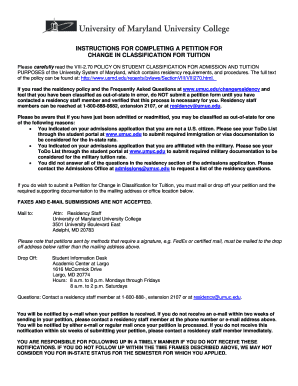
INSTRUCTIONS FOR COMPLETING A PETITION FOR CHANGE IN CLASSIFICATION FOR TUITION Please carefully read the VIII-2.70 POLICY ON STUDENT CLASSIFICATION FOR ADMISSION AND TUITION PURPOSES of the University.

How it works

  1. Open form

    Open form follow the instructions

  2. Easily sign form

    Easily sign the form with your finger

  3. Share form

    Send filled & signed form or save

How to fill out the Petition For Change In Classification For Tuition Form online

This guide provides a comprehensive overview of how to accurately complete the Petition For Change In Classification For Tuition Form online. By following these instructions, you can ensure that you meet all necessary requirements and submit a complete petition.

Follow the steps to complete your petition effectively.

  1. Click ‘Get Form’ button to access the Petition For Change In Classification For Tuition Form and open it for editing.
  2. In Section 1, provide all necessary student information. This includes your name, student ID number, address, and contact details. Ensure all fields are filled meticulously.
  3. Proceed to Section 2, which outlines the basis for claiming in-state status. Choose only one option that accurately reflects your situation and complete the relevant sections as directed.
  4. In Section 3, detail your income and expenses. Include documentation for all sources of funds and expenses over the past twelve months. Be diligent in providing accurate financial information to support your claim.
  5. Complete Section 4 by indicating your residency information. Attach copies of requested documents, including leases or deeds, to substantiate your residency status.
  6. If applicable, ask the person upon whom you are financially dependent to complete Section 5, ensuring they also provide necessary documentation.
  7. For members of the U.S. Armed Forces or their dependents, complete Section 6. Provide any required military documentation as specified.
  8. In Section 7, provide any rebuttal evidence as necessary, detailing your involvement in community or professional organizations within Maryland.
  9. Finally, in Section 8, sign the affirmation section. If applicable, include a notarized signature from the person upon whom you are financially dependent.
  10. Once all sections are completed, review the form for accuracy. You have the option to save your changes, download, print, or share the completed form before submission.

Complete your Petition For Change In Classification For Tuition Form online today to ensure your application is processed timely.

Get form

Experience a faster way to fill out and sign forms on the web. Access the most extensive library of templates available.
Get form

Related content

tuition classification guidelines - Colorado...
These guidelines for application of the Colorado tuition classification law, revised...
Learn more
Petition for Change in Classification for Tuition...
Students who seek a change in residency classification; or; Those whose status cannot be...
Learn more
Massachusetts Institute of Technology - Wikipedia
Massachusetts Institute of Technology (MIT) is a private land-grant research university in...
Learn more

Related links form

NY DOH-4220 2003 NY DOH-4316 2007 NY DOH-4402 2012 NY DSS 3123 2012

Questions & Answers

Get answers to your most pressing questions about US Legal Forms API.

Contact support

To change your residency status, you usually need to submit a formal request to your educational institution. This often involves completing a Petition For Change In Classification For Tuition Form and providing necessary documentation, such as proof of residency. Be prepared to show evidence of your living situation, employment, and other ties to the state. Following your school's guidelines carefully will help ensure a smooth process.

Using someone else's address to qualify for in-state tuition can lead to serious consequences, including legal issues and financial penalties. Educational institutions often have strict policies against this practice. To avoid complications, consider the legitimate route of submitting a Petition For Change In Classification For Tuition Form, which allows you to establish your residency without risking your academic future.

To qualify for in-state tuition, you typically need to prove that you have lived in the state for a specified duration. Other criteria may include showing economic independence, voter registration, or having a parent who resides in the state. Submitting a Petition For Change In Classification For Tuition Form can help present your case effectively to the institution. Understanding your state's specific requirements can also be beneficial.

Yes, there are ways to potentially avoid out-of-state tuition. One common method is to establish residency in the state where you plan to attend school. Completing a Petition For Change In Classification For Tuition Form can strengthen your case for in-state tuition. Additionally, some states offer exceptions or waivers for specific circumstances, so it’s worth exploring all available options.

The parent who has established residency in the state usually qualifies you for in-state tuition. Factors such as the length of residency, tax filings, and physical presence in the state are considered. If your parents live in different states, you will need to determine which parent's residency can be used for your Petition For Change In Classification For Tuition Form. This will help ensure you receive the appropriate tuition rate.

Proof of in-state tuition qualification typically includes documents that demonstrate residency in the state for a certain period. This can include utility bills, lease agreements, or tax returns. To support your claim, you may need to submit a Petition For Change In Classification For Tuition Form along with your documentation. This form helps clarify your residency status to the educational institution.

The Jenks method clusters data into groups that minimize the within-group variance and maximize the between-group variance. The modification rounds the data cut points to assist map reading by a general audience.

The natural breaks classification method (also known as Jenks' optimization) is based on natural groupings inherent in the data. Class breaks that best group similar values and maximize the differences between classes—for example, tree height in a national forest—are identified.

Quantile classification is a data classification method that distributes a set of values into groups that contain an equal number of values. The attribute values are added up, then divided into the predetermined number of classes. Graph showing 10 points in each interval, which makes the intervals uneven sizes.

Pretty Breaks Classification. If you want round numbers in your ranges, then you should choose pretty breaks. All “pretty breaks” classification does is rounds each break-point up or down. So instead of having a breakpoint of 599.364, it will become 600,000 with pretty breaks.

Get This Form Now!

Use professional pre-built templates to fill in and sign documents online faster. Get access to thousands of forms.
Get form
If you believe that this page should be taken down, please follow our DMCA take down processhere.
Get Petition For Change In Classification For Tuition Form
Get form
  • Adoption
  • Bankruptcy
  • Contractors
  • Divorce
  • Home Sales
  • Employment
  • Identity Theft
  • Incorporation
  • Landlord Tenant
  • Living Trust
  • Name Change
  • Personal Planning
  • Small Business
  • Wills & Estates
  • Packages A-Z
  • Affidavits
  • Bankruptcy
  • Bill of Sale
  • Corporate - LLC
  • Divorce
  • Employment
  • Identity Theft
  • Internet Technology
  • Landlord Tenant
  • Living Wills
  • Name Change
  • Power of Attorney
  • Real Estate
  • Small Estates
  • Wills
  • All Forms
  • Forms A-Z
  • Form Library
  • Legal Hub
  • About Us
  • Help Portal
  • Legal Resources
  • Blog
  • Affiliates
  • Contact Us
  • Delete My Account
  • Site Map
  • Industries
  • Forms in Spanish
  • Localized Forms
  • State-specific Forms
  • Forms Kit
  • Real Estate Handbook
  • All Guides
  • Notarize
  • Incorporation services
  • For Consumers
  • For Small Business
  • For Attorneys
  • USLegal
  • FormsPass
  • pdfFiller
  • signNow
  • altaFlow
  • DocHub
  • Instapage
Form Packages
  • Adoption
  • Bankruptcy
  • Contractors
  • Divorce
  • Home Sales
  • Employment
  • Identity Theft
  • Incorporation
  • Landlord Tenant
  • Living Trust
  • Name Change
  • Personal Planning
  • Small Business
  • Wills & Estates
  • Packages A-Z
Form Categories
  • Affidavits
  • Bankruptcy
  • Bill of Sale
  • Corporate - LLC
  • Divorce
  • Employment
  • Identity Theft
  • Internet Technology
  • Landlord Tenant
  • Living Wills
  • Name Change
  • Power of Attorney
  • Real Estate
  • Small Estates
  • Wills
  • All Forms
  • Forms A-Z
  • Form Library
Customer Service
  • Legal Hub
  • About Us
  • Help Portal
  • Legal Resources
  • Blog
  • Affiliates
  • Contact Us
  • Delete My Account
  • Site Map
  • Industries
  • Forms in Spanish
  • Localized Forms
  • State-specific Forms
  • Forms Kit
Legal Guides
  • Real Estate Handbook
  • All Guides
Prepared for you
  • Notarize
  • Incorporation services
Our Customers
  • For Consumers
  • For Small Business
  • For Attorneys
Our Sites
  • USLegal
  • FormsPass
  • pdfFiller
  • signNow
  • altaFlow
  • DocHub
  • Instapage
Social Media
Call us now toll free:
+1 833 426 79 33
As seen in:
© Copyright 1999-2026 airSlate Legal Forms, Inc. 3720 Flowood Dr, Flowood, Mississippi 39232
  • Your Privacy Choices
  • Terms of Service
  • Privacy Notice
  • Content Takedown Policy
  • Bug Bounty Program