Loading
Form preview
  • US Legal Forms
  • Form Library
  • More Forms
  • More Uncategorized Forms
  • Temple Email

Get Temple Email

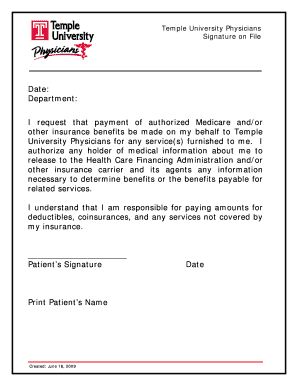
Temple University Physicians Signature on File Date: Department: I request that payment of authorized Medicare and/or other insurance benefits be made on my behalf to Temple University Physicians.

How it works

  1. Open form

    Open form follow the instructions

  2. Easily sign form

    Easily sign the form with your finger

  3. Share form

    Send filled & signed form or save

How to fill out the Temple Email online

Filling out the Temple Email is an essential step for ensuring your medical payments are processed efficiently. This guide provides a clear and concise approach to completing the document online, ensuring that all necessary details are accurately recorded.

Follow the steps to complete the form accurately.

  1. Click ‘Get Form’ button to obtain the form and open it for editing.
  2. Enter the date at the top of the form in the designated space.
  3. Fill in the department name where you are receiving services. This information helps identify the correct billing department.
  4. In the payment authorization section, clearly indicate that you request payment of authorized Medicare and/or other insurance benefits to be made on your behalf to Temple University Physicians. Ensure this is accurately noted.
  5. Authorize the release of your medical information by allowing any holder of medical information about you to disclose relevant information to the Health Care Financing Administration and/or other insurance carriers. Make sure to read this section carefully to understand its implications.
  6. Acknowledge your responsibility for deductibles, coinsurances, and services not covered by your insurance by reading the statement provided and ensuring you understand any financial obligations.
  7. Sign the form in the designated area labeled 'Patient’s Signature'. This confirms your agreement to the terms outlined in the document.
  8. Print your name under the signature line to clearly identify yourself as the patient.
  9. Final steps include reviewing all the information for accuracy. Once confirmed, you can save changes, download a copy of the form, print it, or share it with relevant parties.

Complete your documentation online to ensure a smooth experience with your medical services.

Get form

Experience a faster way to fill out and sign forms on the web. Access the most extensive library of templates available.
Get form

Related content

Temple Philadelphia Christian Academy - School...
School, Temple Philadelphia Christian Academy. CDS Code ... Mailing Address, Information...
Learn more
Temple University
Temple University. Login with your AccessNet Username and Password: Username. Password...
Learn more
Original pigments of inscriptions at the temple of...
Nov 16, 2020 — More than 200 years after the rediscovery of an Egyptian temple, a...
Learn more

Related links form

iGoLogic Credit Reference Request 2011 Indiana University Bloomington Talent Release Form 2002 Isagenix Enrollment Form 2014 Job Ticket

Questions & Answers

Get answers to your most pressing questions about US Legal Forms API.

Contact support

You can find your Temple ID by logging into your student portal. Once logged in, navigate to your profile or account settings, where your Temple ID will be displayed. This ID is important for accessing various university services, including your Temple Email.

Finding your Temple Email is easy. If you are unsure of your email address, check your university’s student portal or any official communications you have received. Your Temple Email typically follows a standard format, usually including your name and the university domain.

Accessing Temple mail is straightforward. Simply navigate to the Temple University email portal and enter your login details. Your Temple Email acts as your primary method of communication, so make sure to check it regularly for updates from the university.

To access your university email, visit the official Temple University website. Look for the login section dedicated to Temple Email. Enter your credentials, which typically include your username and password. Once logged in, you will have full access to your Temple Email inbox and features.

Yes, Temple University is recognized as one of the top 50 public universities in the United States. This ranking reflects the university's commitment to academic excellence, diverse programs, and student support services. Attending Temple offers you access to quality education and a vibrant campus community. Don't forget to leverage your Temple Email for communication and resources that enhance your experience at this prestigious institution.

Logging into your Temple Email is straightforward. Simply go to the TUmail login page, enter your Temple username and password, and click 'Log In.' If you've forgotten your password, utilize the password recovery options provided on the login page. Remember to keep your login information secure to protect your Temple Email and personal data.

To access your Temple Email, visit the TUmail login page and enter your credentials, which typically include your Temple University username and password. If you are on campus, you might also be able to access your email through campus Wi-Fi. It's advisable to bookmark the login page for quick access. Should you encounter any difficulties, don't hesitate to contact the IT help desk for support.

Tu Portal is the central hub for all your Temple University resources, including your Temple Email, course registration, and academic records. It provides a convenient way to access various university services in one place. By logging into Tu Portal, you can navigate easily to your Temple Email and other essential tools. This integration helps streamline your university experience and keeps everything you need at your fingertips.

Yes, TUmail is still active and serves as the official email service for Temple University students, faculty, and staff. You can rely on your Temple Email to receive important updates, announcements, and communications from the university. It's essential to regularly check your TUmail account to stay informed about university events and deadlines. If you have any issues accessing TUmail, consider reaching out to the IT help desk for assistance.

The code for Temple College is typically used for administrative purposes and can vary based on specific departments or programs. If you need the exact code, it’s best to consult the Temple College website or contact the administration directly. Having this information handy can help streamline your processes within the university.

Get This Form Now!

Use professional pre-built templates to fill in and sign documents online faster. Get access to thousands of forms.
Get form
If you believe that this page should be taken down, please follow our DMCA take down processhere.

Industry-leading security and compliance

US Legal Forms protects your data by complying with industry-specific security standards.
  • In businnes since 1997
    25+ years providing professional legal documents.
  • Accredited business
    Guarantees that a business meets BBB accreditation standards in the US and Canada.
  • Secured by Braintree
    Validated Level 1 PCI DSS compliant payment gateway that accepts most major credit and debit card brands from across the globe.
Get Temple Email
Get form
  • Adoption
  • Bankruptcy
  • Contractors
  • Divorce
  • Home Sales
  • Employment
  • Identity Theft
  • Incorporation
  • Landlord Tenant
  • Living Trust
  • Name Change
  • Personal Planning
  • Small Business
  • Wills & Estates
  • Packages A-Z
  • Affidavits
  • Bankruptcy
  • Bill of Sale
  • Corporate - LLC
  • Divorce
  • Employment
  • Identity Theft
  • Internet Technology
  • Landlord Tenant
  • Living Wills
  • Name Change
  • Power of Attorney
  • Real Estate
  • Small Estates
  • Wills
  • All Forms
  • Forms A-Z
  • Form Library
  • Legal Hub
  • About Us
  • Help Portal
  • Legal Resources
  • Blog
  • Affiliates
  • Contact Us
  • Delete My Account
  • Site Map
  • Industries
  • Forms in Spanish
  • Localized Forms
  • State-specific Forms
  • Forms Kit
  • Real Estate Handbook
  • All Guides
  • Notarize
  • Incorporation services
  • For Consumers
  • For Small Business
  • For Attorneys
  • USLegal
  • FormsPass
  • pdfFiller
  • signNow
  • altaFlow
  • DocHub
  • Instapage
Form Packages
  • Adoption
  • Bankruptcy
  • Contractors
  • Divorce
  • Home Sales
  • Employment
  • Identity Theft
  • Incorporation
  • Landlord Tenant
  • Living Trust
  • Name Change
  • Personal Planning
  • Small Business
  • Wills & Estates
  • Packages A-Z
Form Categories
  • Affidavits
  • Bankruptcy
  • Bill of Sale
  • Corporate - LLC
  • Divorce
  • Employment
  • Identity Theft
  • Internet Technology
  • Landlord Tenant
  • Living Wills
  • Name Change
  • Power of Attorney
  • Real Estate
  • Small Estates
  • Wills
  • All Forms
  • Forms A-Z
  • Form Library
Customer Service
  • Legal Hub
  • About Us
  • Help Portal
  • Legal Resources
  • Blog
  • Affiliates
  • Contact Us
  • Delete My Account
  • Site Map
  • Industries
  • Forms in Spanish
  • Localized Forms
  • State-specific Forms
  • Forms Kit
Legal Guides
  • Real Estate Handbook
  • All Guides
Prepared for you
  • Notarize
  • Incorporation services
Our Customers
  • For Consumers
  • For Small Business
  • For Attorneys
Our Sites
  • USLegal
  • FormsPass
  • pdfFiller
  • signNow
  • altaFlow
  • DocHub
  • Instapage
Social Media
Call us now toll free:
+1 833 426 79 33
As seen in:
© Copyright 1999-2026 airSlate Legal Forms, Inc. 3720 Flowood Dr, Flowood, Mississippi 39232
  • Your Privacy Choices
  • Terms of Service
  • Privacy Notice
  • Content Takedown Policy
  • Bug Bounty Program