Loading
Get Fire Alarm Incident Report
How it works
-

Open form follow the instructions
-

Easily sign the form with your finger
-

Send filled & signed form or save
How to fill out the Fire Alarm Incident Report online
Filling out the Fire Alarm Incident Report accurately is essential for documenting fire alarm incidents at Ohio University. This guide provides clear, step-by-step instructions to help users complete the form correctly and efficiently.
Follow the steps to complete the Fire Alarm Incident Report.
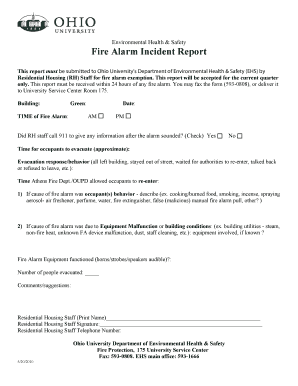
- Press the ‘Get Form’ button to access the Fire Alarm Incident Report and open it in your preferred online editor.
- Begin by filling in the 'Building' section, specifying the name of the building where the alarm occurred.
- Enter the 'Date' and 'TIME of Fire Alarm,' selecting AM or PM appropriately to indicate when the incident took place.
- Indicate whether the Residential Housing staff called 911 after the alarm sounded by checking 'Yes' or 'No.'
- Provide the approximate 'Time for occupants to evacuate.' This helps assess the response time during the incident.
- Describe the 'Evacuation response/behavior,' detailing how occupants reacted to the fire alarm, such as leaving the building or waiting for authorities.
- Record the 'Time Athens Fire Dept./OUPD allowed occupants to re-enter' the building to ensure accurate documentation of the incident timeline.
- In section 1, describe any occupant behavior that triggered the fire alarm, citing examples like cooking or malicious false pulls.
- In section 2, if applicable, describe any equipment malfunction or building conditions that may have caused the alarm, including utilities or device issues.
- Note whether the fire alarm equipment functioned correctly, checking if horns, strobes, or speakers were audible during the incident.
- Enter the 'Number of people evacuated,' providing an accurate count to help analyze the impact of the incident.
- Add any 'Comments/suggestions' to provide additional context or recommend improvements based on the incident.
- Complete the form by printing your name as the Residential Housing staff member, signing it, and entering your telephone number.
- Once all fields are filled, review the report for accuracy before saving your changes. You can then download, print, or share the form as needed.
Complete the Fire Alarm Incident Report online today to ensure proper documentation and compliance.
To write a fire incident report, first outline the key facts, including the date, time, and location of the fire. Next, describe the sequence of events leading up to the fire and the response efforts. Make sure to include any injuries or property damage sustained. Utilizing US Legal Forms can streamline this process by providing you with well-organized templates for a Fire Alarm Incident Report.
Industry-leading security and compliance
US Legal Forms protects your data by complying with industry-specific security standards.
-
In businnes since 199725+ years providing professional legal documents.
-
Accredited businessGuarantees that a business meets BBB accreditation standards in the US and Canada.
-
Secured by BraintreeValidated Level 1 PCI DSS compliant payment gateway that accepts most major credit and debit card brands from across the globe.