Loading
Form preview
  • US Legal Forms
  • Other Templates
  • More Forms
  • More Uncategorized Forms
  • St Mary's University Of Minnesota Transcript Request

Get St Mary's University Of Minnesota Transcript Request

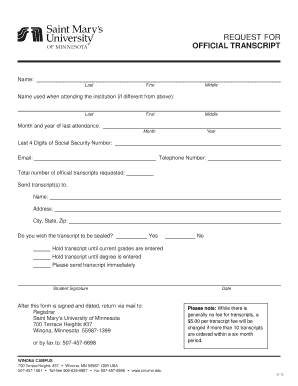
REQUEST FOR OFFICIAL TRANSCRIPT Name: Last First Middle Name used when attending the institution (if different from above): Last First Middle Month and year of last attendance: Month Year Social Security.

How it works

  1. Open form

    Open form follow the instructions

  2. Easily sign form

    Easily sign the form with your finger

  3. Share form

    Send filled & signed form or save

How to fill out the St Mary's University Of Minnesota Transcript Request online

This guide provides a clear and supportive overview of how to complete the St Mary's University of Minnesota Transcript Request online. Users will find step-by-step instructions tailored to help them successfully fill out the form.

Follow the steps to complete the transcript request form.

  1. Click ‘Get Form’ button to obtain the transcript request form and open it in the editor.
  2. Input your personal information in the designated fields. Include your last name, first name, and middle name. If your name has changed since your attendance at the institution, fill in the ‘Name used when attending the institution’ fields accordingly.
  3. Indicate the month and year of your last attendance at St Mary's University of Minnesota. This information helps identify your student records accurately.
  4. Provide the last four digits of your Social Security Number in the specified field to assist with identity verification.
  5. Enter your email address and telephone number. This contact information is essential for the university to reach you regarding your transcript request.
  6. Specify the total number of official transcripts you are requesting. Ensure that this number reflects your needs accurately.
  7. Fill in the details of the recipient or destination of the transcript. This includes their name, address, city, state, and zip code.
  8. Decide whether you want the transcript to be sealed. Select 'Yes' or 'No' in response to the relevant question.
  9. You can choose to hold the transcript until current grades or degrees are entered or request immediate sending by checking the appropriate options.
  10. Sign and date the form. Your signature is crucial for the processing of the request.
  11. After completing the form, submit it either by mailing it to the Registrar’s office at the specified address or by faxing it to the provided number.

Complete your transcript request online today for a smooth and efficient process.

Get form

Experience a faster way to fill out and sign forms on the web. Access the most extensive library of templates available.
Get form

Related content

U.S. DEPARTMENT OF EDUCATION CLOSED SCHOOL UNIT
Oct 2, 2017 — SAINT MARY'S UNIVERSITY OF MINNESOTA - SERVICE CENTER ... All financial...
Learn more
Request Transcripts - Saint Mary's University of...
How to Request Transcripts. All transcript requests are now made online using the National...
Learn more
F. Scott Fitzgerald - Wikipedia
Francis Scott Key Fitzgerald (September 24, 1896 – December 21, 1940) was an American...
Learn more

Related links form

IL DPR-PERC 2012 Alliance HHA Dept. 021 2012 Instant Technologies Initial Drug Screen Result Form Express Evictions 3-Day Notice to Pay Rent or Quit

Questions & Answers

Get answers to your most pressing questions about US Legal Forms API.

Contact support

What Documents are Required to Apply for Transcripts? Completed application form. Receipt of payment of required fees. Copies of marksheets and degree certificate. Copies of photo ID proof. Request letter of transcripts. Acknowledgment receipt of application, if any.

By Fax: 902-420-5151. By Email: service.centre@smu.ca. By Mail: Service Centre, MM108. 923 Robie Street, Halifax, NS.

In the case of closed higher education institutions, please contact the Minnesota Office of Higher Education at 651-642-0567 or 800-657-3866.

In most cases, you don't even have to call or go in person; the registrar's office may have an online form for requesting your transcript. You can usually pay the transcript fee online too. If the school does not offer such a form, you may need to download and print the right document, then send a check.

Order an official transcript Order a paper or electronic file of your official transcript through our online vendor, Parchment. Login to Parchment to order an official transcript with your UMN Internet ID. If you're a former student, you may need to create a Parchment account.

College transcript(s) To submit your OFFICIAL transcript(s): You can request this through your school's digital transcript system. Your school can email a copy directly to transferadmission@msmu.edu. Your school can mail an official version to Office of Admissions, 10 Chester Place, Los Angeles, CA 90007.

Students may visit .minnesota.edu/forms to request a transcript. There is a fee charged for this service.

To get an official copy of your transcript, contact your school's registrar. In most cases, you don't even have to call or go in person; the registrar's office may have an online form for requesting your transcript. You can usually pay the transcript fee online too.

Get This Form Now!

Use professional pre-built templates to fill in and sign documents online faster. Get access to thousands of forms.
Get form
If you believe that this page should be taken down, please follow our DMCA take down processhere.
Get St Mary's University Of Minnesota Transcript Request
Get form
  • Adoption
  • Bankruptcy
  • Contractors
  • Divorce
  • Home Sales
  • Employment
  • Identity Theft
  • Incorporation
  • Landlord Tenant
  • Living Trust
  • Name Change
  • Personal Planning
  • Small Business
  • Wills & Estates
  • Packages A-Z
  • Affidavits
  • Bankruptcy
  • Bill of Sale
  • Corporate - LLC
  • Divorce
  • Employment
  • Identity Theft
  • Internet Technology
  • Landlord Tenant
  • Living Wills
  • Name Change
  • Power of Attorney
  • Real Estate
  • Small Estates
  • Wills
  • All Forms
  • Forms A-Z
  • Other Templates
  • Legal Hub
  • About Us
  • Help Portal
  • Legal Resources
  • Blog
  • Affiliates
  • Contact Us
  • Delete My Account
  • Site Map
  • Industries
  • Forms in Spanish
  • Localized Forms
  • State-specific Forms
  • Forms Kit
  • Real Estate Handbook
  • All Guides
  • Notarize
  • Incorporation services
  • For Consumers
  • For Small Business
  • For Attorneys
  • USLegal
  • FormsPass
  • pdfFiller
  • signNow
  • altaFlow
  • DocHub
  • Instapage
Form Packages
  • Adoption
  • Bankruptcy
  • Contractors
  • Divorce
  • Home Sales
  • Employment
  • Identity Theft
  • Incorporation
  • Landlord Tenant
  • Living Trust
  • Name Change
  • Personal Planning
  • Small Business
  • Wills & Estates
  • Packages A-Z
Form Categories
  • Affidavits
  • Bankruptcy
  • Bill of Sale
  • Corporate - LLC
  • Divorce
  • Employment
  • Identity Theft
  • Internet Technology
  • Landlord Tenant
  • Living Wills
  • Name Change
  • Power of Attorney
  • Real Estate
  • Small Estates
  • Wills
  • All Forms
  • Forms A-Z
  • Other Templates
Customer Service
  • Legal Hub
  • About Us
  • Help Portal
  • Legal Resources
  • Blog
  • Affiliates
  • Contact Us
  • Delete My Account
  • Site Map
  • Industries
  • Forms in Spanish
  • Localized Forms
  • State-specific Forms
  • Forms Kit
Legal Guides
  • Real Estate Handbook
  • All Guides
Prepared for you
  • Notarize
  • Incorporation services
Our Customers
  • For Consumers
  • For Small Business
  • For Attorneys
Our Sites
  • USLegal
  • FormsPass
  • pdfFiller
  • signNow
  • altaFlow
  • DocHub
  • Instapage
Social Media
Call us now toll free:
+1 833 426 79 33
As seen in:
© Copyright 1999-2026 airSlate Legal Forms, Inc. 17 Station Street, Ste. 203, Brookline, MA 02445
  • Your Privacy Choices
  • Terms of Service
  • Privacy Notice
  • Content Takedown Policy
  • Bug Bounty Program