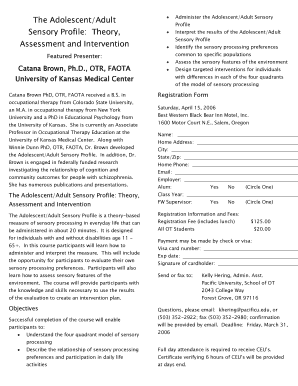
Get Sensory Profile Pdf
How it works
-

Open form follow the instructions
-

Easily sign the form with your finger
-

Send filled & signed form or save
How to fill out the Sensory Profile Pdf online
Filling out the Sensory Profile Pdf is a straightforward process that enables users to assess sensory processing preferences. This guide will provide step-by-step instructions to help you navigate and complete the form effectively.
Follow the steps to fill out the Sensory Profile Pdf online.
- Press the ‘Get Form’ button to access the Sensory Profile Pdf and open it in your preferred PDF editor.
- Begin by entering your personal information in the designated fields. This includes your name, home address, city, state, and ZIP code.
- Provide your contact details including your home phone number and email address. This information is essential for follow-up communications.
- Fill out the employer section by entering your current employment information.
- Complete the registration information section by indicating if you are an alum and providing your class year.
- Select whether you require a fieldwork supervisor by circling 'Yes' or 'No'.
- Enter the payment information, including your Visa card number and expiration date, along with the cardholder's signature.
- Review all entered information for accuracy before saving the form.
- Once all required fields are filled, save changes, and download the completed form to your device. Alternatively, you can print or share it as needed.
Start completing the Sensory Profile Pdf online now to facilitate your sensory assessment.
Related links form
An example of a sensory profile might include sections dedicated to touch, sound, taste, and movement preferences. For instance, in a Sensory Profile Pdf, you might find that a child enjoys soft textures but is bothered by loud noises. This document outlines sensory strengths and areas for improvement, offering a clear picture of how to best support the child's needs. Such examples help guide caregivers and educators in creating appropriate environments.