Loading
Get Embroidery Birth Announcement Request Form
How it works
-

Open form follow the instructions
-

Easily sign the form with your finger
-

Send filled & signed form or save
How to fill out the Embroidery Birth Announcement Request Form online
Filling out the Embroidery Birth Announcement Request Form online is a straightforward process that ensures you provide all necessary details accurately. This guide will assist you step-by-step to enhance your experience.
Follow the steps to complete the form effectively.
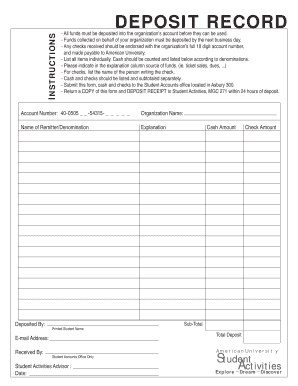
- Press the ‘Get Form’ button to access the Embroidery Birth Announcement Request Form and open it in your preferred online editor.
- Begin by entering your organization name in the designated field. This identifies the group for which the announcement is being requested.
- In the following sections, fill in the name of the remitter and the appropriate denominations, ensuring accuracy to avoid any delays.
- Use the explanation column to specify the source of funds, such as ticket sales or dues. This information helps clarify the origin of the funds collected.
- If you are depositing checks, list the name of the person who issued each check in the corresponding section to maintain proper records.
- Separate the amounts of cash and checks, listing and subtotaling them in their respective sections to provide a clear financial overview.
- Complete the deposited by section with the printed name of the student managing the deposits to maintain accountability.
- Fill in the email address for further communication or queries regarding the announcement to ensure you receive any necessary follow-ups.
- Finally, review the form for accuracy, save any changes you’ve made, and prepare to download, print, or share the completed document as needed.
Complete your Embroidery Birth Announcement Request Form online today!
Related links form
For embroidery, the best file types include vector formats such as .DST, .PES, and .EXP. These formats provide the necessary data for embroidery machines to stitch designs accurately. Avoid raster formats like JPEG or PNG, as they do not translate well for embroidery applications. By filling out the Embroidery Birth Announcement Request Form, you can specify your design needs and file type requirements, ensuring a smooth embroidery experience.
Industry-leading security and compliance
US Legal Forms protects your data by complying with industry-specific security standards.
-
In businnes since 199725+ years providing professional legal documents.
-
Accredited businessGuarantees that a business meets BBB accreditation standards in the US and Canada.
-
Secured by BraintreeValidated Level 1 PCI DSS compliant payment gateway that accepts most major credit and debit card brands from across the globe.