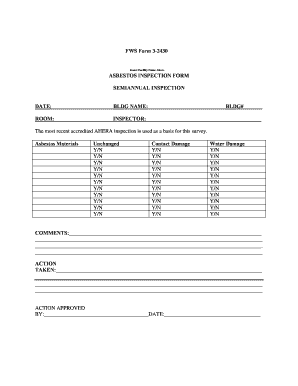
FWS Form 3-2430 Insert Facility Name Above ASBESTOS INSPECTION FORM SEMIANNUAL INSPECTION DATE BLDG NAME BLDG ROOM INSPECTOR The most recent accredited AHERA inspection is used as a basis for this survey.

How it works
  • Open form

    Open form follow the instructions

  • Easily sign form

    Easily sign the form with your finger

  • Share form

    Send filled & signed form or save

How to fill out the Fws Forms 3 2430 online

Filling out the Fws Forms 3 2430 is essential for documenting asbestos inspections in facilities. This guide provides a clear and structured approach to completing the form online, ensuring that users can navigate the process with confidence.

Follow the steps to successfully complete the form.

  1. Press the ‘Get Form’ button to access the Fws Forms 3 2430 and open it in the editor.
  2. Enter the date of the inspection in the designated field marked 'DATE.' This should reflect the actual date when the inspection is conducted.
  3. In the 'BLDG NAME' field, input the name of the building where the inspection is taking place. Make sure this is accurate, as it is crucial for documentation.
  4. Fill in the 'BLDG#' field with the building number assigned to the facility to maintain proper identification.
  5. Specify the room in which the inspection occurred by noting it in the 'ROOM' field.
  6. Write the name of the inspector conducting the inspection in the 'INSPECTOR' field. This ensures accountability and traceability.
  7. For each section labeled 'Unchanged,' 'Contact Damage,' and 'Water Damage,' mark 'Y' for yes or 'N' for no, regarding the presence of asbestos materials.
  8. Use the 'COMMENTS' section to provide any additional observations or notes related to the inspection.
  9. Detail any actions taken regarding asbestos management in the 'ACTION TAKEN' section to document remedial steps.
  10. In the 'ACTION APPROVED BY' field, enter the name of the person who approved the action taken, followed by the date for record-keeping.
  11. Once all fields are filled, you can save your changes, download the form, print it, or share it as needed.

Complete your asbestos inspection forms online today for efficient documentation.

Get form

Experience a faster way to fill out and sign forms on the web. Access the most extensive library of templates available.

Related content

Fish & Wildlife Service - Forms - US Fish and...

Nov 12, 2020 — (accessible to FWS employees with PIV card). Quick Search - Enter a word...

Learn more
Steps to Finding a FWS Position | Office of...

Apr 27, 2020 — ... will get an email from FSU (within 2-3 days) with a link to our job...

Learn more
Ruckus FastIron Family Ation Updates, 07.4.00 Fast...

Apr 26, 2017 — 25 FWS supports DSA keys only . ... FIGURE 3 1 Attaching the brackets on...

Learn more
Questions & Answers

Get answers to your most pressing questions about US Legal Forms API.

Contact support

How do I know if my EDD debit card has been mailed?

If you are unsure of your status and have not received your EDD Bank of America Prepaid Debit Card within 10 business days then you can call the EDD Bank of America Phone Customer Service Number 1-866-692-9374 or EDD Claims Line at 1-800-300-5616.

If eligible, you can receive up to 26 weeks of benefits. Visit UI Online (portal.edd.ca.gov) to apply.

If you are having trouble logging in to your Department of Labor Online Services account, follow these tips before continuing: Tip 1: Clear your cookies, temporary files, and history from your browser. Close all of your browser windows and open a new browser session. Follow the instructions below for your browser.

After you file a claim for unemployment benefits, follow these steps to make sure you get your benefit payments. It takes at least three weeks to process a claim and issue payment to most eligible workers. With the large amount of claims we are processing, there may be delays.

Go to .labor.ny.gov/signin. Enter your NY.gov username and password. Click the “Unemployment Services” button on the My Online Services page.

Note: If you submitted your certification by mail and/or requested your benefit payments by check, allow 10 days for processing. If it has been more than 10 days since you submitted your certifications, Contact UI.

If you do not receive a call from the EDD at your scheduled appointment time, we may have canceled your appointment because we confirmed your eligibility or resolved the issue before your interview. Check UI Online for your current payment status.

Certify with EDD Tele-Cert SM Call the UI Automated Self-Service Line at 1-866-333-4606. Select Menu Option 1. Enter your four-digit PIN. If you do not have one, the system will tell you how to create one. Answer all certification questions and confirm your answers.

Get This Form Now!

Use professional pre-built templates to fill in and sign documents online faster. Get access to thousands of forms.

If you believe that this page should be taken down, please follow our DMCA take down process here.

Get Fws Forms 3 2430