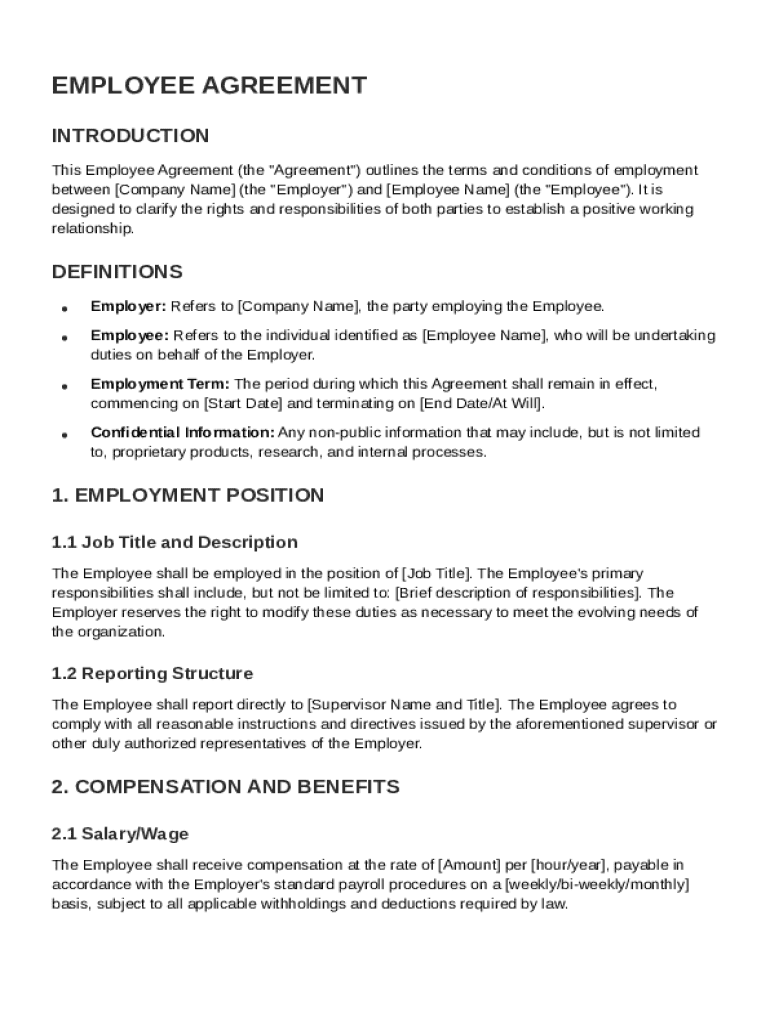
It is designed to clarify the rights and responsibilities of both parties to establish a positive working relationship. DEFINITIONS Employer: Refers to Company Name , the party employing the Employee. Employee: Refers to the individual identified as Employee Name , who will be undertaking duties on behalf of the Employer. Employment Term: The period during which this Agreement shall remain in effect, commencing on Start Date and terminating on End Date/At Will . Confidential Information:.

Open form follow the instructions

Easily sign the form with your finger

Send filled & signed form or save
How to fill out and sign Employee Agreement Template online?
Get your online template and fill it in using progressive features. Enjoy smart fillable fields and interactivity.Follow the simple instructions below:
The preparing of lawful papers can be expensive and time-ingesting. However, with our preconfigured web templates, everything gets simpler. Now, working with a Employee Agreement Template requires at most 5 minutes. Our state-specific browser-based samples and clear recommendations remove human-prone faults.
Comply with our simple steps to get your Employee Agreement Template ready quickly:
- Pick the web sample in the catalogue.
- Type all necessary information in the necessary fillable areas. The intuitive drag&drop graphical user interface makes it easy to include or move fields.
- Ensure everything is filled in appropriately, with no typos or missing blocks.
- Place your e-signature to the page.
- Click Done to confirm the alterations.
- Download the papers or print out your PDF version.
- Distribute instantly towards the receiver.
Use the fast search and powerful cloud editor to create a precise Employee Agreement Template. Eliminate the routine and create paperwork on the internet!
Tips on how to fill out, edit and sign Employee Agreement Template online
How to fill and sign Employee Agreement Template
Get your online template and fill it in using progressive features. Enjoy smart fillable fields and interactivity.Follow the simple instructions below:
The preparing of lawful papers can be expensive and time-ingesting. However, with our preconfigured web templates, everything gets simpler. Now, working with a Employee Agreement Template requires at most 5 minutes. Our state-specific browser-based samples and clear recommendations remove human-prone faults.
Comply with our simple steps to get your Employee Agreement Template ready quickly:
- Pick the web sample in the catalogue.
- Type all necessary information in the necessary fillable areas. The intuitive drag&drop graphical user interface makes it easy to include or move fields.
- Ensure everything is filled in appropriately, with no typos or missing blocks.
- Place your e-signature to the page.
- Click Done to confirm the alterations.
- Download the papers or print out your PDF version.
- Distribute instantly towards the receiver.
Use the fast search and powerful cloud editor to create a precise Employee Agreement Template. Eliminate the routine and create paperwork on the internet!
How to edit Employee Agreement Template
Take full advantage of our extensive online document editor while completing your forms. Fill out the Employee Agreement Template, indicate the most important details, and effortlessly make any other necessary alterations to its content.
Completing paperwork electronically is not only time-saving but also gives a possibility to alter the template according to your needs. If you’re about to manage the Employee Agreement Template, consider completing it with our extensive online editing tools. Whether you make an error or enter the requested details into the wrong field, you can easily make changes to the form without the need to restart it from the beginning as during manual fill-out. In addition to that, you can point out the crucial data in your paperwork by highlighting particular pieces of content with colors, underlining them, or circling them.
Follow these simple and quick steps to complete and modify your Employee Agreement Template online:
- Open the form in the editor.
- Enter the required information in the blank areas using Text, Check, and Cross tools.
- Follow the form navigation not to miss any mandatory areas in the template.
- Circle some of the important details and add a URL to it if needed.
- Use the Highlight or Line tools to point out the most important facts.
- Select colors and thickness for these lines to make your form look professional.
- Erase or blackout the details you don’t want to be visible to other people.
- Replace pieces of content that contain mistakes and type in text that you need.
- Finish editing with the Done button once you make certain everything is correct in the form.
Our extensive online solutions are the most effective way to complete and modify Employee Agreement Template according to your needs. Use it to manage personal or professional paperwork from anyplace. Open it in a browser, make any adjustments to your forms, and get back to them at any moment in the future - they all will be securely stored in the cloud.
How to fill and sign Employee Agreement Template
Get your online template and fill it in using progressive features. Enjoy smart fillable fields and interactivity.Follow the simple instructions below:
The preparing of lawful papers can be expensive and time-ingesting. However, with our preconfigured web templates, everything gets simpler. Now, working with a Employee Agreement Template requires at most 5 minutes. Our state-specific browser-based samples and clear recommendations remove human-prone faults.
Comply with our simple steps to get your Employee Agreement Template ready quickly:
- Pick the web sample in the catalogue.
- Type all necessary information in the necessary fillable areas. The intuitive drag&drop graphical user interface makes it easy to include or move fields.
- Ensure everything is filled in appropriately, with no typos or missing blocks.
- Place your e-signature to the page.
- Click Done to confirm the alterations.
- Download the papers or print out your PDF version.
- Distribute instantly towards the receiver.
Use the fast search and powerful cloud editor to create a precise Employee Agreement Template. Eliminate the routine and create paperwork on the internet!
Experience a faster way to fill out and sign forms on the web. Access the most extensive library of templates available.
Related content
This agreement covers employment as President, at-will employment, duties, $14,583 monthly...
This agreement sets forth the terms and conditions of your employment in the position of...
May 24, 2012 — Employers are required to give employees written particulars of...
Get answers to your most pressing questions about US Legal Forms API.
How to write an agreement between employer and employee?
Writing an agreement between an employer and employee requires clear communication of expectations and responsibilities. Start by outlining the terms in a logical format, and consider using an Employee Agreement Template to guide you through the process. This approach ensures that both parties are aware of their commitments and helps build a strong professional relationship.
How to write an employment agreement?
Writing an employment agreement starts with understanding the key components such as the role, salary, and duration of employment. An Employee Agreement Template simplifies this process by providing a clear structure to follow. By customizing this template to reflect your specific agreement, you can ensure clarity and prevent potential misunderstandings.
What happens if an employee doesn't have a contract?
If an employee doesn't have a contract, it can lead to confusion regarding job responsibilities and compensation. Without an Employee Agreement Template, both parties may have different expectations about the employment arrangement. Additionally, in the absence of a formal agreement, it can be more challenging to resolve disputes, so having a contract is recommended.
How to create an employee contract?
Creating an employee contract involves drafting a document that includes essential elements such as job responsibilities, compensation, and duration of employment. Utilize an Employee Agreement Template to ensure you cover all necessary points while keeping the contract organized and comprehensive. This not only protects both parties, but also fosters a professional relationship.
How do I set up a contract?
Setting up a contract requires outlining the essential terms of the agreement in a readable format. An Employee Agreement Template provides a straightforward approach to organizing this information. Make sure both parties review and agree to the terms to avoid misunderstandings down the line.
How to create a contract for an employee?
To create a contract for an employee, start by gathering essential information about the role and your expectations. Use an Employee Agreement Template as a structured foundation that outlines job duties, salary, benefits, and other terms. This template allows you to focus on details unique to your business while maintaining a clear agreement format.
How do I create my own contract?
Creating your own contract starts with clearly defining the terms and conditions you want to include. With an Employee Agreement Template, you can easily customize sections to fit your specific needs, ensuring both parties understand their rights and responsibilities. Remember to review legal requirements to ensure compliance and validity.
How do you write an employment contract?
Writing an employment contract involves drafting clear terms regarding job expectations and compensation. Make sure to include provisions for confidentiality and dispute resolution. Using an Employee Agreement Template can simplify this process, providing a well-structured document that meets legal standards.
What is in an employee agreement?
An employee agreement typically includes job responsibilities, salary, benefits, and confidentiality agreements. It should also cover terms of employment, such as probation periods and grounds for termination. The Employee Agreement Template we provide can help you create a comprehensive agreement tailored to your needs.
How to write a simple contract agreement?
To write a simple contract agreement, start by clearly stating the parties involved and the purpose of the contract. Define the obligations of each party, and specify payment terms or compensation. An Employee Agreement Template can streamline this process by providing a foundational structure for your agreement.
Use professional pre-built templates to fill in and sign documents online faster. Get access to thousands of forms.
If you believe that this page should be taken down, please follow our DMCA take down process here.