Loading
Get 1550 8
How it works
-

Open form follow the instructions
-

Easily sign the form with your finger
-

Send filled & signed form or save
How to fill out the 1550 8 online
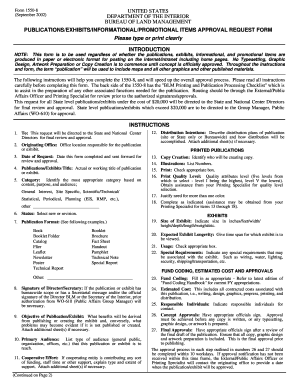
The 1550 8 form is essential for requesting approval for publications, exhibits, and promotional items within the Bureau of Land Management. This guide provides a concise, step-by-step process to help you effectively complete the form online.
Follow the steps to fill out the 1550 8 form successfully
- Click ‘Get Form’ button to obtain the form and open it in your browser.
- Complete the 'To' field, indicating the State and National Center Directors to whom the request will be directed for final review and approval.
- Enter the 'Originating Office' details, specifying the office responsible for the publication or exhibit.
- Fill in the 'Date of Request', which is the date you complete the form and send it for review.
- Provide the 'Publications/Exhibits Title', which could be the actual or working title of your submission.
- Select the appropriate 'Category' that reflects the content, purpose, and audience of the publication.
- Indicate the 'Status' of the publication as either new or a revision.
- Choose the 'Publication Format' from the provided options that best fits your project.
- If applicable, complete the 'Signature of Director/Secretary' section, ensuring you have prior approval if required.
- Describe the 'Objective of Publication/Exhibit', outlining potential benefits and issues if it is not published.
- Identify the 'Primary Audience' for your publication or exhibit.
- Detail any 'Cooperative Efforts', indicating support from other entities.
- Outline your 'Distribution Intentions', explaining how the publication will be distributed.
- Identify the individual responsible for 'Copy Creation' and list the number of 'Illustrations' needed.
- Select the 'Print Quality Level' and check the appropriate box for 'Print'.
- Justify the need for multiple colors if applicable.
- Fill out the additional required information for printed publications and exhibits.
- Complete the 'Fund Coding' and 'Estimated Costs' sections, ensuring to detail all costs associated with the publication.
- Identify 'Responsible Individuals' and obtain their signatures for 'Concept Approvals' and 'Final Approvals' as necessary.
- Review the completed form for accuracy before submission. You may save changes, download a copy, print, or share the form as needed.
Start completing the 1550 8 form online today!
To write a check for 1550 in words, write 'One thousand five hundred fifty and 00/100 dollars' clearly in the designated area of the check. This form ensures that the recipient understands the exact amount. For assistance with check writing and to access resources tailored to your needs, consider using US Legal Forms. It provides valuable tools for handling financial documents, including checks for 1550 8.