Loading
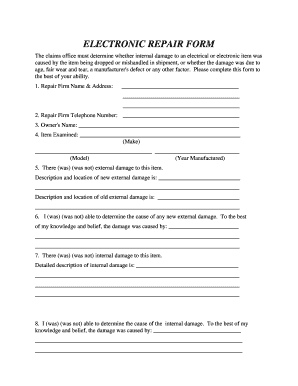
Get Electronic Repair Form - Fincen Uscg
How it works
-

Open form follow the instructions
-

Easily sign the form with your finger
-

Send filled & signed form or save
How to fill out the ELECTRONIC REPAIR FORM - Fincen Uscg online
Completing the Electronic Repair Form for Fincen Uscg is an essential step in reporting any damage to electrical or electronic items. This guide will walk you through each section of the form to ensure accurate and thorough information submission.
Follow the steps to fill out the form successfully.
- Click ‘Get Form’ button to obtain the form and open it in your preferred editor.
- Begin filling out the form by entering the repair firm name and address in the designated fields. Ensure all sections are completed accurately to avoid any delays.
- Provide the repair firm’s telephone number to facilitate communication regarding the repair process.
- Input the owner's name in the specified space for identification purposes.
- Document the item examined by stating the make, model, and year manufactured of the electrical or electronic item.
- Indicate whether there was external damage to the item. If so, describe the new external damage and its location, as well as any previous external damage.
- State if you were able to determine the cause of any new external damage, providing an explanation based on your assessment.
- Note if there was any internal damage, followed by a detailed description of this damage.
- Assess if you could determine the internal damage's cause, again providing an explanation based on your findings.
- Circle the appropriate option regarding whether the internal damage was caused by shipment, based on your analysis.
- Detail your reasons for concluding the assessment of internal damage in the provided space.
- Estimate the costs for repairing the internal damage by listing parts, labor, and tax, and calculating the total.
- List any non-essential charges that are not required for the functionality of the item.
- If applicable, specify any charges for new external damage repairs, detailing the nature of the repairs and calculating the total.
- Indicate if the estimate fee will be deducted from the total bill, selecting 'Yes', 'No', or 'Estimate fee not charged'.
- Print your name in the designated field.
- Sign the form in the designated signature area.
- Date the form in the provided space to validate the submission.
- Once completed, review the form for accuracy before proceeding to save changes, download, print, or share the document as needed.
Complete your documents online to ensure a smooth and efficient repair process.
Related links form
In the Coast Guard, an electronics technician performs maintenance, repair, and troubleshooting of various electronic systems such as communication and navigation equipment. They ensure that all devices function properly so missions can be conducted effectively. By using tools like the ELECTRONIC REPAIR FORM - Fincen Uscg, they can keep accurate records of repairs and maintenance tasks.