Loading
Get Or Form 150-102-041-2 2000-2026
How it works
-

Open form follow the instructions
-

Easily sign the form with your finger
-

Send filled & signed form or save
How to use or fill out the OR Form 150-102-041-2 online
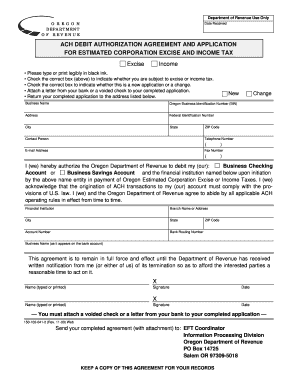
Filling out the OR Form 150-102-041-2, also known as the ACH debit authorization agreement and application for estimated corporation excise and income tax, can be straightforward if you follow the proper steps. This guide provides a clear and supportive overview of how to complete the form online effectively.
Follow the steps to complete the OR Form 150-102-041-2 online easily.
- Click ‘Get Form’ button to obtain the form and open it in the editor.
- Indicate whether you are subject to excise or income tax by checking the appropriate box at the top of the form.
- Select whether you are submitting a new application or making a change by checking the relevant box.
- Provide your business name in the designated field, followed by your Oregon business identification number (BIN) and federal identification number.
- Fill out your address details, including city, state, and ZIP code.
- Include the contact person's name, telephone number, email address, and fax number in the respective fields.
- Authorize the Oregon Department of Revenue to debit your account by checking either the business checking or business savings account option.
- Enter the name and address of your financial institution, including the city, state, and ZIP code.
- Fill in your account number and bank routing number.
- Print and sign your name in the signature fields, including the date.
- Remember to attach a voided check or a letter from your bank with the completed application.
- Finally, save your changes, and you can download or print the completed form to send it to the Oregon Department of Revenue.
Complete your documents online today for a smoother process.
Related links form
For 2023, the maximum credit is $236 for each qualifying personal exemption.