Loading
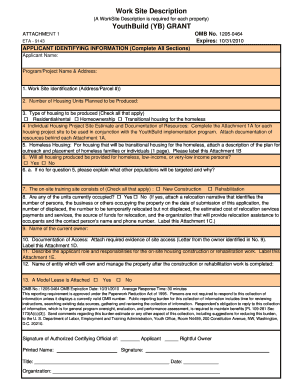
Get Worksite Description Eta 9143
How it works
-

Open form follow the instructions
-

Easily sign the form with your finger
-

Send filled & signed form or save
How to fill out the Worksite Description Eta 9143 online
This guide provides a comprehensive overview of the Worksite Description Eta 9143 form, designed to help users complete it effectively. By following these steps, users can ensure that all required information is submitted accurately and efficiently.
Follow the steps to complete the Worksite Description Eta 9143 form online.
- Click ‘Get Form’ button to obtain the form and open it in the editor.
- Begin by filling out the applicant identifying information. This includes the applicant name, program or project name, and address.
- In the work site identification section, provide the address and parcel number for the property.
- Indicate the number of housing units planned to be produced by entering the relevant figure in the designated field.
- Check all applicable types of housing to be produced: residential/rental, homeownership, or transitional housing for the homeless.
- Complete Attachment 1A for each housing project site and attach documentation of resources to support your claims.
- For transitional housing, attach a detailed description of the outreach and placement plan for homeless families or individuals as Attachment 1B.
- Answer whether all housing produced will be provided for homeless, low-income, or very-low income persons by checking 'Yes' or 'No'. If 'No', explain the target populations.
- Indicate what the on-site training site consists of by checking all applicable options: new construction or rehabilitation.
- If any units are currently occupied, check ‘Yes’, and make sure to attach a detailed relocation narrative as Attachment 1C.
- Enter the name of the current owner of the property in the respective field.
- Attach the required evidence of site access (letter from the current owner) as Attachment 1D.
- Describe the applicant's role and responsibilities regarding on-site housing construction or rehabilitation work and label this Attachment 1E.
- Provide the name of the entity that will own and manage the property post-construction or rehabilitation.
- Indicate whether a model lease is attached by checking 'Yes' or 'No'.
- After ensuring that all fields are filled out accurately, save your changes, and download, print, or share the completed form.
Complete your Worksite Description Eta 9143 form online today to ensure a smooth submission process.
Get form
Experience a faster way to fill out and sign forms on the web. Access the most extensive library of templates available.
Get This Form Now!
Use professional pre-built templates to fill in and sign documents online faster. Get access to thousands of forms.