Loading
Get Ic134
How it works
-

Open form follow the instructions
-

Easily sign the form with your finger
-

Send filled & signed form or save
How to fill out the Ic134 online
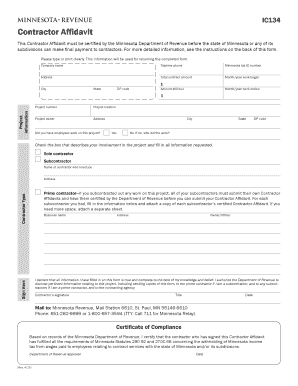
Filling out the Ic134 form is essential for contractors to declare their compliance with Minnesota tax laws. This guide provides step-by-step instructions to assist users in completing the form online accurately and efficiently.
Follow the steps to complete the Ic134 form online.
- Click the ‘Get Form’ button to access the Ic134 form and open it in the editor.
- Begin by entering the company name, daytime phone number, and Minnesota tax ID number in the designated fields. If you do not have employees and completed the work yourself, use your Social Security number instead.
- Fill in your address details, including city, state, and ZIP code, followed by the total contract amount, the month and year when work began, and when it ended.
- Provide project information such as the project number, project location, and project owner’s details, including their address.
- Indicate whether there were employees working on the project by selecting 'Yes' or 'No.' If no, specify who completed the work.
- Affirm the truthfulness of your information by signing in the designated area. Include your title and the date.
- If applicable, fill in the subcontractor information, ensuring each subcontractor submits their own Ic134 form. Attach certified affidavits as necessary.
- Once all sections are completed accurately, review the form to ensure all information is correct.
- Save changes, download, print, or share the completed form as required.
Complete and submit your Ic134 form online to ensure compliance and receive your final payment.
A contractor affidavit is a sworn statement confirming that a contractor has met all legal and regulatory requirements. It is essential in verifying the independent contractor’s status for taxation and compliance in Minnesota. Completing the IC134 form is a key step in this process. You can access contractor affidavit templates through UsLegalForms to ensure that your documentation is correct.