Loading
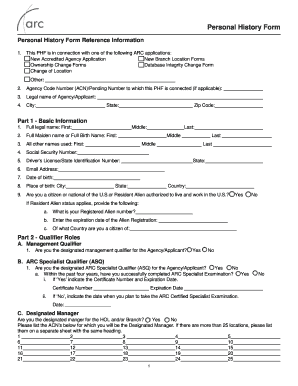
Get Personal History Form - Arc
How it works
-

Open form follow the instructions
-

Easily sign the form with your finger
-

Send filled & signed form or save
How to fill out the Personal History Form - Arc online
Completing the Personal History Form - Arc online is a crucial step for agency applicants seeking to provide accurate and relevant information. This guide will walk you through each section of the form, ensuring you understand what is required and how to complete it effectively.
Follow the steps to accurately complete the Personal History Form - Arc.
- Press the ‘Get Form’ button to retrieve the Personal History Form and open it in your preferred editor.
- Begin filling out the form, starting with the connection to an ARC application. Indicate whether it is a new accredited agency application, new branch location, or other applicable options.
- Provide the agency code number if relevant, along with the legal name of the agency or applicant, and the city, state, and zip code of the agency's location.
- In Part 1 - Basic Information, enter your full legal name, maiden name, and any other names you have used. Input your Social Security number, driver's license number, email address, date of birth, and place of birth.
- Answer the citizenship question. If you are a resident alien, provide your Registered Alien number, expiration date, and country of citizenship.
- Continue to Part 2 - Qualifier Roles. Indicate if you are the designated management qualifier, ARC specialist qualifier, or designated manager. Complete additional fields as required based on your qualifications.
- In Part 3 - Roles and Responsibilities, identify the access and authority you have with respect to the ARC documents and financial transactions, if applicable.
- Fill out Part 4 - Residence History, noting your residences for at least the past three years. Begin with your current address and provide details for any former residences.
- Complete Part 5 - Employment History by providing a detailed account of your employment, including your current job, previous jobs, and any periods of unemployment or self-employment for the last three years.
- In Part 6, answer questions regarding prior affiliations and potential legal issues, ensuring you indicate 'Yes' or 'No' where applicable. This section requires honesty and clarity.
- Review the checklist at the end of the form. Ensure you attach all necessary documents, including identification and proof of citizenship or residency. Include continuation pages if you require additional space.
- Finally, in Part 7 - Certification, affirm the truthfulness of the information you provided, sign, and date the form. If you are submitting electronically, verify the accuracy of the information.
- Save your changes, then download, print, or share the completed Personal History Form as required.
Begin completing the Personal History Form - Arc online today for a seamless application process.
Your personal history should encompass formative experiences, educational achievements, and career highlights. It can also include personal attributes that demonstrate your character and resilience. By effectively sharing these elements in your personal history form - Arc, you create a strong narrative that resonates with readers.