Loading
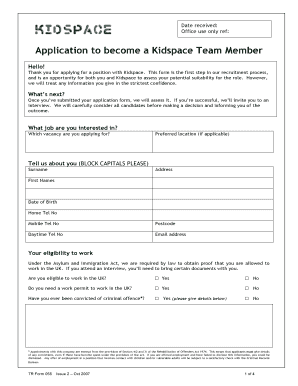
Get Kidspace Recruitment Team Email Form
How it works
-

Open form follow the instructions
-

Easily sign the form with your finger
-

Send filled & signed form or save
How to fill out the Kidspace Recruitment Team Email Form online
Filling out the Kidspace Recruitment Team Email Form is a crucial step in your application process. This guide will walk you through each section of the form to ensure you provide all necessary information accurately and confidently.
Follow the steps to complete your application effectively.
- Click the ‘Get Form’ button to access the Kidspace Recruitment Team Email Form and open it for editing.
- Begin with the section asking about the job you are interested in. Specify which vacancy you are applying for.
- Provide your preferred location if applicable by filling in the designated field.
- In the section labeled 'Tell us about you', fill in your last name and first names in block capitals, along with your address, date of birth, and contact numbers (home, mobile, and daytime).
- Confirm your eligibility to work in the UK by selecting 'Yes' or 'No' to the respective questions regarding your work permit and past convictions.
- In the 'Tell us more about you' section, describe your qualities that would make you a suitable Kidspace Team Member, along with any relevant experience or skills.
- Provide details of your working history, starting with your most recent position. Include information such as employer, type of business, address, position held, duties, reasons for leaving, salary, and notice period.
- In the 'Your learning and training' section, list the educational institutions you attended and any relevant qualifications.
- Indicate your skills by checking the areas you have experience in. These can include leisure, food and beverage, customer service, and more.
- Provide references by including names, titles, addresses, and contact details for two individuals who can provide a personal reference for you.
- In the diversity monitoring section, answer questions regarding your gender, ethnic origin, and disability status.
- Fill out your National Insurance number and ensure you have the necessary documentary evidence ready.
- Finally, read and sign the declaration confirming that the information you provided is true and accurate, then date your response.
- Once you have completed the form, ensure you save any changes made, and choose to download, print, or share the completed document as needed.
Complete your Kidspace Recruitment Team Email Form online today and take the first step towards joining our team.
Kids' space sessions usually last around two hours. This duration provides plenty of time for children to participate in enriching activities. For detailed schedules and planning, consider reaching out through the Kidspace Recruitment Team Email Form.
Industry-leading security and compliance
US Legal Forms protects your data by complying with industry-specific security standards.
-
In businnes since 199725+ years providing professional legal documents.
-
Accredited businessGuarantees that a business meets BBB accreditation standards in the US and Canada.
-
Secured by BraintreeValidated Level 1 PCI DSS compliant payment gateway that accepts most major credit and debit card brands from across the globe.