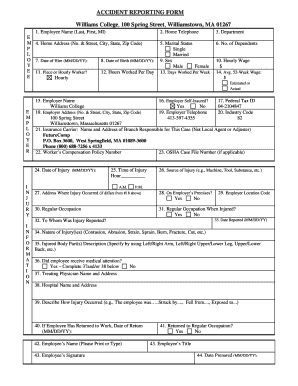
Get Williams College Employee Accident Reporting Form - Hr Williams
How it works
-

Open form follow the instructions
-

Easily sign the form with your finger
-

Send filled & signed form or save
How to fill out the Williams College Employee Accident Reporting Form - Hr Williams online
This guide provides clear and comprehensive instructions for completing the Williams College Employee Accident Reporting Form online. Whether you are familiar with online document management or new to the process, this step-by-step guide will help you navigate the form with ease.
Follow the steps to complete the form successfully.
- Press the ‘Get Form’ button to access the form and open it in your preferred document editor.
- In the first section, enter your full name (last name, first name, middle initial) in the designated field.
- Provide your home telephone number in the specified area.
- Fill in your department name accurately.
- For the home address section, include your complete address, including street number, city, state, and zip code.
- Indicate your marital status by selecting either 'Single' or 'Married' as applicable.
- Enter the number of dependents you have.
- Provide your date of hire in the MM/DD/YY format.
- Input your date of birth in the same MM/DD/YY format.
- Select your employment type, either 'Piece' or 'Hourly,' and input the hours you work per day.
- Enter your weekly working days.
- Fill out your hourly wage and average 52-week wage, noting whether the number is estimated or actual.
- For employer details, confirm the name (Williams College), self-insured status, federal tax ID, address, and telephone.
- Input the insurance carrier’s name and address, along with the worker’s compensation policy number.
- Complete date of injury, time of injury, and source of injury.
- If the injury occurred at a different address, enter that location. Confirm if it was on employer’s premises.
- Indicate your regular occupation and whether it was the same during the incident.
- Provide the date you reported the injury and the name of the person it was reported to.
- Describe the nature of the injury, detailing the body parts affected.
- Indicate whether medical attention was received, and if so, provide the names and addresses of the treating physician and hospital.
- Describe how the injury occurred in detail.
- If applicable, enter the date of return to work and confirm if you returned to your regular occupation.
- Finally, ensure to print or type your name, sign the document, specify your title, and enter the date prepared.
Complete your Williams College Employee Accident Reporting Form online to ensure accurate reporting of accidents.
All employees share the responsibility for reporting workplace injuries. It is vital for individuals to report any incidents they experience or witness to ensure a safe working environment. Completing the Williams College Employee Accident Reporting Form - Hr Williams facilitates this process and ensures that all details are documented accurately. Additionally, supervisors and HR personnel play a crucial role in ensuring that reports are filed and addressed promptly.
Industry-leading security and compliance
-
In businnes since 199725+ years providing professional legal documents.
-
Accredited businessGuarantees that a business meets BBB accreditation standards in the US and Canada.
-
Secured by BraintreeValidated Level 1 PCI DSS compliant payment gateway that accepts most major credit and debit card brands from across the globe.